Choosing inside one brand sounds simple until you open Razer’s catalogue and find overlapping wireless models that all promise immersive audio. The real decision is narrower than the range suggests: do you want a flagship desk headset built around physical immersion, with haptics and a control hub, or a quieter all-rounder that cancels noise, travels well and handles calls without a boom microphone in front of your face?


Those two briefs cover almost every Razer buyer, so this shortlist keeps exactly one headset for each. The Kraken V4 Pro serves players who game at a desk on PC or console and want every feature switched on, while the Barracuda Pro suits people who split time between games, music and movement. Both were picked from the connection types, drivers, microphones and battery figures printed on their Amazon product pages.
Quick Picks
As an Amazon Associate we earn from qualifying purchases.
| Product | Best for | Key spec |
|---|---|---|
| Razer Kraken V4 Pro | Desk gaming with maximum immersion | Sensa HD Haptics with OLED Control Hub |
| Razer Barracuda Pro | Travel, calls and quieter rooms | Hybrid ANC with up to 40 hours of battery life |
How to Choose
Decide whether immersion hardware matters to you
The biggest split between these two headsets is physical feedback. The Kraken V4 Pro carries Razer Sensa HD Haptics, which turns low-frequency audio into vibration you feel through the earcups, and it pairs that with an OLED Control Hub that sits on your desk as a separate component. The Barracuda Pro skips haptics entirely and spends its budget on Hybrid Active Noise Cancellation instead. Neither approach is better in the abstract. If your sessions are long, seated and single-player, felt immersion adds something speakers cannot. If your room is noisy or your gaming happens in shared spaces, silence around the audio usually wins.
Match the connection set to your devices
Count the machines you actually play on before choosing. The Kraken V4 Pro covers four routes: HyperSpeed 2.4GHz wireless, Bluetooth, USB and a 3.5mm wired connection, so it can move between a PC, a console and a phone without adapters. The Barracuda Pro uses SmartSwitch dual wireless, pairing a 2.4GHz HyperSpeed link with Bluetooth and swapping between two connected devices without manual re-pairing. A wired fallback matters more than it looks: the Kraken’s 3.5mm option keeps it working when batteries die or a platform restricts wireless audio, while the Barracuda Pro leans fully on its wireless links and battery.
Pick a microphone style you can live with
Voice chat exposes the sharpest difference here. The Kraken V4 Pro uses a retractable HyperClear Super Wideband microphone on a boom, which places the capsule near your mouth and pulls it away when you play alone. The Barracuda Pro has no boom at all; its beamforming noise-cancelling microphones are integrated into the earcups, so nothing sticks out and nothing needs adjusting. Boom placement generally gives teammates a closer, clearer voice, while integrated microphones keep the headset clean for calls, commuting and video meetings where a gaming boom looks out of place. Decide which conversations you have more often.
Weigh drivers, audio processing and battery honestly
Specifications only help when tied to a use. The Kraken V4 Pro runs TriForce Titanium 40mm drivers with THX Spatial Audio, aiming at positional cues in competitive and cinematic games. The Barracuda Pro fits larger TriForce Bio-Cellulose 50mm drivers and a THX Achromatic Audio Amplifier, a pairing aimed at clean, accurate playback for music as much as games. Battery is the Barracuda Pro’s clearest practical win at up to 40 hours per charge, which suits travel and workdays. The Kraken’s specification sheet leads with features rather than endurance, so frequent charging should be part of your expectation there.
The 2 Best Options
Razer Kraken V4 Pro
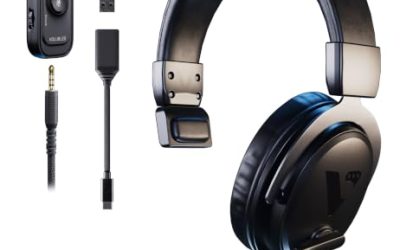
The Kraken V4 Pro is Razer’s flagship swing: a wireless headset that adds touch to sound. Sensa HD Haptics vibrate in response to in-game audio, the included OLED Control Hub gives you a physical dial and display on the desk, and THX Spatial Audio over TriForce Titanium 40mm drivers handles the soundscape itself. Four connection routes mean one headset can cover a gaming PC, a console and a phone, and the retractable wideband microphone keeps squad chat clear, then disappears into the earcup when you switch to a solo campaign. It suits desk-based players who want the full feature stack in a single purchase.
Specs
- Connection: Razer HyperSpeed 2.4GHz wireless, Bluetooth, USB and 3.5mm
- OLED Control Hub included
- Razer Sensa HD Haptics
- Drivers: TriForce Titanium 40mm
- THX Spatial Audio
- Retractable Razer HyperClear Super Wideband microphone
- Impedance: 32 ohm
- Model: RZ04-05160100-R3U1
Best for: Desk-based PC and console players who want haptic immersion and a hardware control hub.
Watch out for: The OLED Control Hub is a separate component that needs desk space and its own connection, so measure your setup and confirm the listing includes the hub before ordering.
ASIN: B0DG3L8WMM
Razer Barracuda Pro
The Barracuda Pro is built for people whose headset leaves the desk. Hybrid Active Noise Cancellation quiets aircraft cabins, offices and busy homes, while SmartSwitch dual wireless hops between a 2.4GHz HyperSpeed connection and Bluetooth without re-pairing, so a game session and a phone call can share one headset. TriForce Bio-Cellulose 50mm drivers with a THX Achromatic Audio Amplifier favour accurate, musical playback, and the beamforming microphones are built into the earcups, keeping the silhouette clean enough for video calls. Up to 40 hours of battery life means charging becomes a weekly habit rather than a nightly one.
Specs
- Connection: SmartSwitch dual wireless, 2.4GHz HyperSpeed and Bluetooth
- Hybrid Active Noise Cancellation (ANC)
- THX Achromatic Audio Amplifier (THX AAA)
- Drivers: TriForce Bio-Cellulose 50mm
- Integrated beamforming noise-cancelling microphones
- Battery life: up to 40 hours
- Model: RZ04-03780100-R3U1
Best for: Players who also travel, commute or take calls, and want noise cancellation without a boom mic.
Watch out for: There is no boom microphone at all, so if your priority is the clearest possible voice for competitive team chat, check the integrated beamforming microphones meet that need before ordering.
ASIN: B09Z1KLJ7L
Which One Fits Your Situation
You game at one desk and want everything switched on
Choose the Kraken V4 Pro. The haptics, the OLED Control Hub and THX Spatial Audio all serve a fixed setup where the headset stays plugged into one ecosystem of PC and console. Its four connection routes cover wired and wireless platforms alike, and the retractable boom handles voice chat properly before vanishing for solo play. Nothing else in Razer’s current line combines felt feedback with a desktop hub, so if that combination appeals, this is the only route to it.
You split your week between games, work and travel
Choose the Barracuda Pro. Hybrid ANC earns its keep in open-plan offices, shared flats and cabins, and SmartSwitch dual wireless means the headset follows you from a gaming PC to a phone without a pairing ritual. The microphones keep it presentable on work calls, and up to 40 hours of battery life covers a working week of mixed use. It trades the Kraken’s theatre for flexibility, which is the right exchange when one headset has to do every job.
Your room is loud and your teammates still need to hear you
Start with the Barracuda Pro if the noise is around you: its Hybrid Active Noise Cancellation cuts what reaches your ears, and its beamforming microphones are designed to reject background sound when you speak. Pick the Kraken V4 Pro instead if your room is already quiet but your voice matters most, because a boom microphone near your mouth remains the dependable route to clear callouts. The honest split is environmental noise versus voice priority, and your room decides it.
You play on several platforms and hate re-pairing
Both headsets were picked with multi-device homes in mind. The Kraken V4 Pro covers the widest ground with HyperSpeed wireless, Bluetooth, USB and a 3.5mm cable, so even a platform with restricted wireless support stays reachable. The Barracuda Pro answers with SmartSwitch, which holds two wireless connections and swaps between them quickly, suiting a PC-and-phone pairing. If a wired fallback is non-negotiable, take the Kraken; if your switching is wireless, the Barracuda Pro is smoother.
Common Mistakes
- Assuming every Razer wireless headset includes noise cancellation, when Hybrid ANC belongs to the Barracuda Pro and the Kraken V4 Pro instead spends its feature budget on haptics and its control hub.
- Expecting a detachable or retractable boom microphone on the Barracuda Pro, whose beamforming microphones are integrated into the earcups and cannot be repositioned closer to your mouth.
- Forgetting that the Kraken V4 Pro’s OLED Control Hub is separate desk hardware, then discovering there is no free surface or spare connection for it beside the keyboard.
- Buying on driver size alone, even though the 40mm titanium drivers in the Kraken and the 50mm bio-cellulose drivers in the Barracuda Pro are tuned for different priorities: spatial gaming versus accurate all-round playback.
- Ignoring the wired fallback question, and only noticing during a dead-battery session or on a platform with wireless restrictions that the Barracuda Pro relies on its wireless connections.
Frequently Asked Questions
Does the Razer Barracuda Pro have a microphone for voice chat?
Yes, but not the kind most gaming headsets use. The Barracuda Pro carries integrated beamforming noise-cancelling microphones inside its earcups, so there is no boom to position, detach or lose. That design keeps the headset tidy for calls and travel. Players who want a capsule sitting near the mouth should look at the Kraken V4 Pro’s retractable boom instead.
What does the OLED Control Hub do with the Kraken V4 Pro?
The hub is a separate desktop component included with the Kraken V4 Pro, giving you a physical control point with an OLED display rather than forcing every adjustment through software menus. It belongs on the desk next to your keyboard or monitor, which is why this headset suits a fixed setup. Confirm the hub is listed in the box contents before ordering, since the headset’s full feature set assumes it.
Can these headsets connect to more than one device?
Yes, in different ways. The Barracuda Pro’s SmartSwitch dual wireless holds a 2.4GHz HyperSpeed link and a Bluetooth link, swapping between two devices without re-pairing. The Kraken V4 Pro offers four separate routes: HyperSpeed wireless, Bluetooth, USB and a 3.5mm wired connection. The Barracuda is quicker for wireless switching; the Kraken covers more connection types overall, including a cable.
Which Razer headset is better for music as well as games?
The Barracuda Pro is the stronger all-rounder for listening. Its TriForce Bio-Cellulose 50mm drivers pair with a THX Achromatic Audio Amplifier, a combination aimed at accurate, low-distortion playback, and its Hybrid ANC removes the background noise that masks detail in shared spaces. The Kraken V4 Pro counters with THX Spatial Audio and haptics, which favour game immersion over plain stereo listening.
Related guides
More from Amazon
Programs that pair well with the guide above. Offers and eligibility are set by Amazon and may change.
Free shipping on eligible items, Prime Video and more. Eligible new members can start with a free trial.
Start a Prime free trialAd-free music streaming. Eligible new subscribers can start with a free trial.
Try Music Unlimited freeA Prime membership for ages 18-24 with a trial period. Eligibility is set by Amazon.
See Prime for Young AdultsAudiobooks and podcasts to listen to on the go. Eligible new members can start with a free trial.
Try Audible freeAs an Amazon Associate we earn from qualifying purchases.