Practice sessions are where fighting game skills are built, and the controller used shapes how fast that building happens. Long hours in training mode mean thousands of button presses, and an optical-button arcade controller suits that routine because its buttons actuate with light rather than a metal contact, giving a consistent press, a clean actuation point, and a quieter feel than many mechanical designs.


Optical switches also tend to last well under heavy use, since there is no contact to wear or bounce. The controllers below were selected from manufacturer listings and Amazon product pages, with button switch type checked against each listing, because the difference between an optical button and a mechanical button is the whole point of this guide. Leverless all-button layouts feature heavily here, since they suit practice well: directions and actions sit under the fingers, with no stick to wear out or misread.
At a Glance
| Product | Key feature | Best for |
|---|---|---|
| Razer Kitsune Black | Razer low-profile linear optical switches | Leverless practice on PS5 and PC |
| Razer Kitsune Chun-Li Edition | Same optical switches, Chun-Li artwork | A themed leverless controller with the same feel |
| Razer Kitsune Cammy Bundle | Same optical switches, Cammy vinyl skin | A themed bundle for players who want the skin included |
| Mad Catz N.E.K.O. | Optical directional pad, compact leverless layout | A compact mixed-design controller for travel and practice |
Razer Kitsune Black
Razer Kitsune All-Button Optical Arcade Controller for PS5 and PC – Black (ASIN: B0CCX2DMXV)
The Razer Kitsune is the reference leverless controller for optical buttons, and the black model is the plainest way into that design. Its buttons use Razer low-profile linear optical switches, which actuate when a light beam is interrupted, rather than when two metal contacts meet. That gives a short, consistent press with a clean actuation point, and it removes the contact bounce that can make a mechanical button feel uneven after months of heavy use. For practice sessions, that consistency helps a player trust that a missed input came from timing, not from the hardware.
The layout is all-button, with directions on the left and actions on the right, and the low-profile switches keep the hand flat and relaxed during long sessions. The controller works on PS5 and PC, connects by USB-C, and includes a detachable cable, a slim aluminium top plate, and a lock switch that prevents accidental presses of the options button during play.
Considerations
A leverless layout takes time to learn, especially for movement, and players used to a stick should expect a week or two of adjustment before the new layout feels natural. The Kitsune is a premium controller, and the low-profile buttons feel different from full-height arcade buttons. The controller is wired, so a USB-C cable and a free port are needed during play.
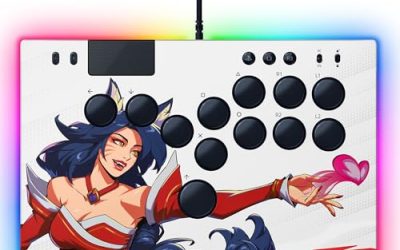
Razer Kitsune Chun-Li Edition
Razer Kitsune All-Button Optical Arcade Controller for PS5 and PC – Chun-Li Edition (ASIN: B0CCWPPKRM)
The Razer Kitsune Chun-Li Edition is the same leverless controller as the black model, with Chun-Li artwork on the top plate and a matching colour scheme. The buttons still use Razer low-profile linear optical switches, the layout is still all-button, and the controller still works on PS5 and PC over USB-C. The difference is presentation: the artwork, the colours, and the themed finish make the controller feel personal, which matters for a device that will sit on a desk for hundreds of practice hours.
For a Chun-Li player, or a Street Fighter fan who wants a controller that matches the character they main, the edition adds that identity without changing the hardware underneath. Practice routines feel the same as on the black model, because the switches, the spacing, and the layout are identical.
Considerations
The themed edition carries the same learning curve as any leverless controller, and the same wired connection. The artwork is a matter of taste, and players who prefer a plain finish may find the black model a better fit. The themed finish does not change the switch feel or the layout, so the choice between editions is about appearance rather than performance.
Razer Kitsune Cammy Bundle
Razer Kitsune All-Button Optical Arcade Controller for PS5 and PC – Cammy Bundle with Vinyl Skin (ASIN: B0D8RM2YH2)
The Razer Kitsune Cammy Bundle is the same leverless optical controller, sold with a Cammy vinyl skin included in the box. The buttons use Razer low-profile linear optical switches, the layout is all-button, and the controller works on PS5 and PC over USB-C, with the same slim aluminium top plate, detachable cable, and lock switch as the other Kitsune models. The bundle suits a Cammy player who wants the themed look without buying a skin separately.
The vinyl skin covers the top plate with Cammy artwork, and it can be applied, removed, or replaced without changing the controller underneath. For practice sessions, the hardware behaves exactly like the black and Chun-Li models, with short, consistent optical presses and a quiet feel that suits long hours in training mode.
Considerations
As with the other Kitsune models, the leverless layout takes time to learn, and the controller is wired. The vinyl skin is an accessory rather than a hardware change, so players who do not want the themed look may prefer the black model. The skin needs careful application to sit flat, and it can be removed later.
Mad Catz N.E.K.O.
Mad Catz N.E.K.O. All-Button Arcade Controller for Fighting Games (ASIN: B0F9T525ZX)
The Mad Catz N.E.K.O. is a compact leverless controller with a mixed button design, included here because its directional pad is optical. The directional buttons use an optical design with adjustable actuation from 1mm to 4mm, according to the manual, which lets a player tune how shallow or deep a direction press feels. The action buttons use Kailh Choc V2 low-profile mechanical switches, so the action side of the controller is mechanical rather than optical, and the listing is clear about that split.
The compact layout suits travel and small desks, and the leverless design removes the stick entirely, keeping the controller thin and light. For practice sessions, the adjustable optical directions are the interesting feature: a player can set a shallow actuation for fast movement drills, or a deeper actuation for a firmer feel during longer sessions.
Considerations
The mixed design is the main caveat: only the directional pad is optical, while the action buttons are mechanical, so this controller is not a fully optical unit. Players who want optical switches on every button should choose a Kitsune model instead. The compact layout also means smaller spacing between buttons, which can feel cramped for large hands.
How to Choose
Confirm the switch type on every button. Optical and mechanical switches look similar from above, but they actuate differently. Check the listing and the manual for the switch name on both the action buttons and the directions, because a mixed design can hide a mechanical set under an optical headline.
Choose leverless or stick first. A leverless layout puts directions under the fingers and suits precise movement and fast inputs, but it takes time to learn. A stick suits players who already play on one, and changing layouts mid-practice can slow progress for a while.
Match the platform. Confirm PS5, PC, or console support for the exact model, including whether a firmware update or a mode switch is needed. A controller that works on one system may need extra steps on another.
Consider button height and travel. Low-profile optical switches keep the hand flat and suit long sessions, while full-height buttons give more travel and a firmer feel. Try both if possible, or choose the height that matches the controller already in use.
Think about noise and feel. Optical switches are often quieter than mechanical ones, which matters in a shared room or during late-night practice, and a quieter switch can make long sessions more comfortable for everyone nearby.
Check the cable and the lock switch. A detachable cable is easier to replace and carry, and a lock switch prevents accidental presses of the options button during a match.
Plan for the learning curve. A new layout needs a week or two of regular practice before it feels natural. Keep the old controller nearby during the transition, and run the same drills on both layouts.
FAQ
What makes an optical button different from a mechanical button?
An optical button actuates when a light beam is interrupted, while a mechanical button actuates when two metal contacts meet. The optical design has no contact to wear or bounce, which gives a consistent press over time and a clean actuation point.
Is a leverless controller better for practice than a stick?
It depends on the player. A leverless layout gives precise directional inputs and removes stick wear from the equation, which suits players who drill movement and combos for hours. A stick suits players who already play on one. The best choice is the layout that feels natural after a week of practice.
Can an optical-button controller be used on PS5 and PC?
The Razer Kitsune models in this guide work on PS5 and PC, and the Mad Catz N.E.K.O. works on PC and compatible consoles as listed. Confirm the exact platform support for the model in use, because some controllers need a mode switch or a firmware update for a particular system.
How long does it take to learn a leverless layout?
Most players need a week or two of regular practice before a leverless layout feels natural. Movement is usually the hardest part to relearn, because directions move from a stick to four separate buttons. Running the same drills on the new layout every day helps the transition go faster.
Conclusion
An optical-button arcade controller gives practice sessions a consistent, quiet, and durable feel. The Razer Kitsune Black suits a plain leverless setup on PS5 and PC, the Chun-Li Edition and the Cammy Bundle suit players who want a themed finish with the same hardware, and the Mad Catz N.E.K.O. suits a compact controller with adjustable optical directions. Confirm the switch type on every button, and give a new layout a week or two to feel natural.
As an Amazon Associate, we earn from qualifying purchases.
Related guides
More from Amazon
Programs that pair well with the guide above. Offers and eligibility are set by Amazon and may change.
Free shipping on eligible items, Prime Video and more. Eligible new members can start with a free trial.
Start a Prime free trialAd-free music streaming. Eligible new subscribers can start with a free trial.
Try Music Unlimited freeA Prime membership for ages 18-24 with a trial period. Eligibility is set by Amazon.
See Prime for Young AdultsAudiobooks and podcasts to listen to on the go. Eligible new members can start with a free trial.
Try Audible freeAs an Amazon Associate we earn from qualifying purchases.