Our Short List of 3

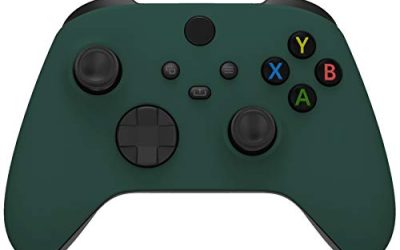
- Best for: Xbox players who want four back buttons, wireless play and the longest battery figure in this guide.
- Platform: Xbox Series X|S, Xbox One and Windows 10/11; officially licensed for Xbox
- Back buttons: 4 mappable Advanced Gaming Buttons, programmable on the fly
- Sticks: Quick-Twist thumbsticks with 3 height settings; Hall effect modules
- Triggers: Hall effect with 3-way trigger locks

- Best for: Xbox and PC players who switch profiles often and want settings visible and adjustable on the controller itself.
- Platform: PC and Xbox; Xbox-certified
- Back buttons: 4 rear buttons, programmable in Armoury Crate
- Display: Built-in OLED for profiles, status and custom images or text
- Triggers: Step and linear modes with short trigger lock

- Best for: PC and Android players who want two paddles, extra bumpers and a charging dock without moving to a premium console pad.
- Platform: Windows PC and Android
- Back buttons: 2 Pro back paddle buttons, plus extra R4/L4 bumpers
- Sticks: TMR joysticks with RGB Fire Ring
- Triggers: Switchable Hall effect and tactile trigger modes
All 3 Picks at a Glance
| Product | Specs | Action |
|---|---|---|
| PowerA FUSION Pro Wireless |
| Check price on Amazon |
| ASUS ROG Raikiri Pro |
| Check price on Amazon |
| 8BitDo Ultimate 2 Wireless |
| Check price on Amazon |
Back buttons let your middle and ring fingers handle jump, crouch, reload or dodge while both thumbs stay on the sticks, and that single change is why they have become the defining feature of competitive controllers. The five complete controllers below build those extra inputs in at the factory, with two or four remappable rear controls each, rather than bolting an attachment onto a standard pad.
The group covers every major platform: a licensed PlayStation option from Nacon, two Xbox-licensed pads from PowerA and ASUS, and two multi-platform models from 8BitDo and FLYDIGI for PC, Switch and Android. They differ most in paddle count, stick technology, trigger stops and how remapping is handled, so the guide sections after the picks explain which differences actually matter before you spend.
Top 3 picks at a glance
Quick Picks
As an Amazon Associate we earn from qualifying purchases.
| Product | Best for | Key spec from title |
|---|---|---|
| Nacon Revolution 5 Pro | PS5 players who want four paddles | Hall Effect sticks and triggers |
| PowerA FUSION Pro Wireless | Xbox players who want wireless freedom | Up to 30 hours of gameplay per charge |
| ASUS ROG Raikiri Pro | Xbox and PC players who tweak settings on the pad | Built-in OLED display |
| 8BitDo Ultimate 2 Wireless | PC and Android players who want a charging dock included | 1,000 Hz polling rate on 2.4G and wired |
| FLYDIGI Vader 5 Pro | PC and Switch players who want the most extra inputs | 8 extra buttons, including 4 rear buttons |
How to Choose
Count the back buttons, then check how they feel
Two back buttons cover the classic pairing of jump and crouch, and they are easier to learn because there is less to press by accident. Four rear controls add reload, dodge or weapon swap without moving a thumb, but the extra pair sits closer to your ring fingers and takes longer to build into muscle memory. Shape matters as much as count: paddles that lever outward feel different from flush buttons that click straight in, and micro-switch designs give a shorter, crisper press than membrane ones. If a listing does not state the rear button count in its title or bullets, treat that as a reason to read the full page before ordering.
Match the controller to your platform first
Platform licensing decides your shortlist before any feature does. PlayStation 5 games only accept the stock DualSense or officially licensed third-party pads, and Xbox has its own licensing program, so a controller bought for one console will not work on the other. PC is the flexible platform: every controller in this guide works on Windows, which makes a PC-first pad a sensible shared purchase. Switch and Android support varies by model and sometimes by connection mode, so confirm the exact platform list for the connection you plan to use, especially if you intend to play wirelessly on more than one device.
Decide how you want to remap
Every controller here can assign face-button actions to its rear controls, but the workflow differs. Some models remap on the controller itself with a button combination, which is fast between matches and needs no software. Others rely on a companion app, which usually unlocks more: multiple stored profiles, dead zone and sensitivity adjustments, trigger behaviour and sometimes macros. Profiles stored on the controller travel with it between devices, while app-only settings may not. Check whether remapping is per-profile or global, whether the rear buttons can duplicate triggers and bumpers as well as face buttons, and whether your games or tournaments restrict macro functions.
Weigh sticks, triggers and battery together
Stick technology affects how long accurate aim lasts. Hall effect and TMR sticks read position with magnets instead of physical contact, removing the wear point that causes drift on conventional sticks, and several picks below use them on the triggers as well. Trigger stops shorten trigger travel for faster shots in shooters, but racers and adventure games often want full analog travel, so switchable stops are more useful than fixed short triggers. Finally, compare battery figures honestly: wireless pads in this class range from around ten hours to around thirty, and features such as RGB lighting and vibration motors shorten real sessions.
The 5 Best Options
Nacon Revolution 5 Pro
The Revolution 5 Pro is Nacon’s officially licensed PlayStation controller for PS5, PS4 and PC, and it is the most customisation-heavy pad in this guide. Four Omron micro-switch back paddles sit on the underside and inside the grips, and they can be remapped on the controller or through the dedicated PC and Mac application. Hall effect sensors in both sticks and triggers remove the usual drift wear point, trigger blockers switch between long and short pulls, and the box includes interchangeable stick heads, stick sizes and three sets of weights, so the balance of the pad can be tuned as well as its inputs.
Specs
- Platform: PlayStation 5, PlayStation 4 and PC; officially licensed for PlayStation
- Back buttons: 4 remappable Omron micro-switch back paddles
- Sticks and triggers: Hall effect magnetic technology on both
- Triggers: Trigger blockers for long or short pull
- Profiles: 4 profiles saved per platform
- Connection: Wireless via USB-A adapter, wired via 3 m USB-C to USB-A cable, Bluetooth for audio
- Battery: Up to 10 hours of wireless gameplay
- Extras: Interchangeable weights, stick heads and stick sizes; storage case included
Best for: PS5 players who want four clicky paddles, drift-resistant sticks and deep profile customisation in one licensed pad.
Watch out for: As with other licensed third-party PS5 controllers, it does not reproduce the DualSense’s haptic feedback or adaptive triggers, and the roughly ten-hour battery is the shortest in this guide, so check both points against how you play.
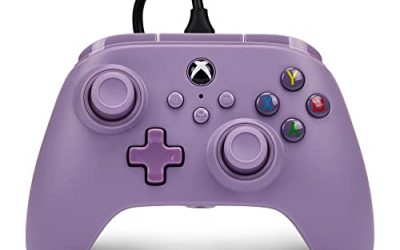
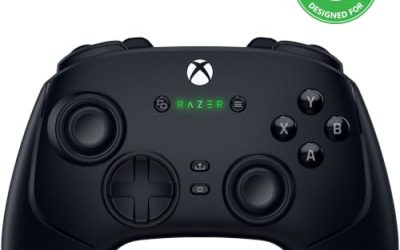
PowerA FUSION Pro Wireless
- Best for: Xbox players who want four back buttons, wireless play and the longest battery figure in this guide.
- Platform: Xbox Series X|S, Xbox One and Windows 10/11; officially licensed for Xbox
- Back buttons: 4 mappable Advanced Gaming Buttons, programmable on the fly
- Sticks: Quick-Twist thumbsticks with 3 height settings; Hall effect modules
- Triggers: Hall effect with 3-way trigger locks
Xbox players who want four back buttons, wireless play and the longest battery figure in this guide.
Wireless runs through the included USB adapter rather than the console’s built-in wireless, so confirm you have a free USB port on your console or PC before choosing it.
PowerA’s FUSION Pro Wireless is an officially licensed Xbox controller for Xbox Series X|S, Xbox One and Windows 10/11, and it takes a different route to customisation: instead of swapping stick parts, its Quick-Twist thumbsticks change height with a simple twist, across three settings per stick. Four mappable Advanced Gaming Buttons on the back can be programmed on the fly, mid-game, without opening system settings. Hall effect modules in the sticks and triggers handle precision and longevity, three-way trigger locks set trigger travel, and the Lumectra lighting reveals a hidden design through six modes across four zones when the RGB is switched on.
ASUS ROG Raikiri Pro
- Best for: Xbox and PC players who switch profiles often and want settings visible and adjustable on the controller itself.
- Platform: PC and Xbox; Xbox-certified
- Back buttons: 4 rear buttons, programmable in Armoury Crate
- Display: Built-in OLED for profiles, status and custom images or text
- Triggers: Step and linear modes with short trigger lock
Xbox and PC players who switch profiles often and want settings visible and adjustable on the controller itself.
The full customisation route runs through the Armoury Crate app on PC, and the rear buttons are fixed in place rather than removable, so check the layout suits your grip before ordering.
The Raikiri Pro is ASUS’s Xbox-certified controller for PC and Xbox, and its signature feature is a built-in OLED display above the sticks. The screen shows custom animations, text and status indicators, and two buttons beside it switch controller profiles mid-game or change what the display shows. Four rear buttons can be programmed as hotkeys for in-game commands or used as on-the-fly joystick sensitivity toggles, which is a use for back buttons none of the other picks here offer. Selectable step triggers switch between full range and a short lock mode, and the 3.5 mm jack runs through a built-in ESS DAC for wired headset audio.
8BitDo Ultimate 2 Wireless
- Best for: PC and Android players who want two paddles, extra bumpers and a charging dock without moving to a premium console pad.
- Platform: Windows PC and Android
- Back buttons: 2 Pro back paddle buttons, plus extra R4/L4 bumpers
- Sticks: TMR joysticks with RGB Fire Ring
- Triggers: Switchable Hall effect and tactile trigger modes
PC and Android players who want two paddles, extra bumpers and a charging dock without moving to a premium console pad.
This version does not support Nintendo Switch, and Bluetooth is for Android while Windows uses 2.4G or wired, so confirm the model variant matches your devices before ordering.
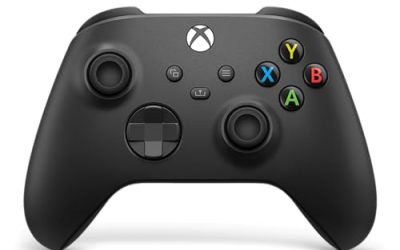
The Ultimate 2 Wireless is 8BitDo’s flagship for Windows PC and Android, built around TMR joysticks, which use magnetic sensing for higher sensitivity and durability than conventional sticks. It carries two Pro back paddle buttons rather than four, plus extra R4 and L4 bumpers, so the total number of additional inputs is higher than the paddle count suggests. A physical switch flips the triggers between linear Hall effect mode and non-linear tactile mode, the 2.4G and wired connections poll at 1,000 Hz, and the 8Speed wireless technology is rated by 8BitDo at under 1 ms latency. A multifunctional charging dock and USB-C adapter are included in the box.
FLYDIGI Vader 5 Pro
The Vader 5 Pro is FLYDIGI’s multi-platform controller for PC, Nintendo Switch, Android and TV, and it offers the largest set of extra inputs in this guide: eight additional buttons in total. Four of them sit on the rear — two detachable and two fixed — alongside two C and Z face buttons and two mini shoulder buttons, and all of them are customisable. The FORCEFLEX joysticks adjust their tension with a rotating ring, the FORCESWITCH triggers flip between a micro-switch mode for fast shooting and a Hall effect linear mode for pressure-sensitive control, and four motors deliver vibration in both the triggers and the grips.
Specs
- Platform: PC, Nintendo Switch, Android and TV (no Xbox or PlayStation support)
- Back buttons: 4 rear buttons — 2 detachable and 2 fixed — among 8 extra customisable buttons
- Sticks: FORCEFLEX force-adjustable lever joysticks
- Triggers: FORCESWITCH dual-mode, micro-switch or Hall effect linear
- Latency: 3 ms ultra-low latency as listed
- Battery: 1,000 mAh
- Vibration: 4-motor vibration in triggers and grips
- Extras: C and Z buttons and 2 mini shoulder buttons, all customisable
Best for: PC and Switch players who want the most remappable inputs and adjustable stick tension in a single pad.
Watch out for: It does not work with Xbox or PlayStation consoles at all, despite the Xbox-style layout, so it only suits lineups built around PC, Switch, Android or a TV box.
Which One Fits Your Situation
You play competitive shooters on PS5
Your licensed choices are narrow, because PS5 games reject unlicensed third-party pads. Look for four remappable rear inputs, trigger stops you can switch off for other genres, and sticks built on magnetic sensing so accuracy does not degrade with wear. On-controller remapping or stored profiles matter here, because you will want different bindings for different shooters without rebuilding them each time you switch games.
You split time between Xbox and PC
Choose an Xbox-licensed pad and both platforms are covered by one purchase, since every licensed Xbox controller here also works on Windows. Check how the wireless connection is made: a USB dongle keeps latency low but occupies a port on both machines, while Bluetooth pairing is tidier for a laptop. Stored profiles are worth prioritising, because your console and PC bindings rarely match.
You play on PC, Switch or Android and skip the big consoles
Multi-platform pads give you the most extra inputs for your money, including rear buttons, extra bumpers and sometimes additional face buttons. Confirm the platform list connection by connection, because Bluetooth, 2.4G and wired modes often support different devices on the same controller. A charging dock in the box is a genuine convenience if the pad moves between a desk, a couch and a handheld dock.
Your hands are small, or four paddles feel crowded
Start with two back buttons. They cover jump and crouch, the pair most players actually use, and they sit where your middle fingers already rest, so accidental presses are rare while you learn. Flush buttons are usually easier to live with than tall paddles if your grip is tight. If a four-button model is otherwise the right fit, check whether the extra pair can be removed or disabled.
Common Mistakes
- Buying a back button attachment instead of a complete controller, then discovering it only fits one specific stock pad and adds bulk without trigger stops or better sticks.
- Assuming a controller works on every console because the layout looks familiar; Xbox, PlayStation and Switch licensing are separate, and several pads here exclude whole platforms.
- Counting extra buttons without checking what they can be mapped to, since some rear buttons duplicate face buttons only and cannot take triggers, bumpers or macros.
- Leaving trigger stops locked short for every game, which removes the analog range that racing and driving games need from the triggers.
- Ignoring the remapping workflow and ending up with a pad whose profiles live in an app you never open, instead of stored on the controller itself.
Frequently Asked Questions
How many back buttons do I actually need?
Two is enough for most players, covering jump and crouch or slide while your thumbs stay on the sticks. Four adds reload, dodge or weapon swap, which helps in fast shooters and action games with dense controls. The trade-off is learning time: extra rear inputs are easy to press by accident at first, so pick the count that matches the games you play most.
Can back buttons be remapped to any input?
Usually they duplicate other controller inputs rather than creating new ones, so a rear button can act as a face button, bumper or stick click depending on the model. Some controllers also allow macros or keyboard-style hotkeys on PC. The exact limits differ by brand and are set in the maker’s app or on the controller, so check the remapping rules for the specific model before buying.
Are back buttons allowed in competitive play?
In most ranked ladders and tournaments, remapped back buttons are legal because they only duplicate standard inputs that are already on the controller. Macros that chain several actions into one press are the part that rulesets often restrict, and some controllers can disable those functions. Check the rules for your specific league or tournament, because policies differ between games and organisers.
Do back buttons help with stick drift or hand strain?
They address a different problem. Back buttons reduce how often your right thumb leaves the stick, which helps aim consistency, but they do nothing for drift, which is a stick sensor issue. If drift is your concern, look for Hall effect or TMR sticks like several picks in this guide use. For strain, moving actions to your middle fingers can ease thumb workload, but grip shape matters more.
Related guides
More from Amazon
Programs that pair well with the guide above. Offers and eligibility are set by Amazon and may change.
Free shipping on eligible items, Prime Video and more. Eligible new members can start with a free trial.
Start a Prime free trialAd-free music streaming. Eligible new subscribers can start with a free trial.
Try Music Unlimited freeA Prime membership for ages 18-24 with a trial period. Eligibility is set by Amazon.
See Prime for Young AdultsAudiobooks and podcasts to listen to on the go. Eligible new members can start with a free trial.
Try Audible freeAs an Amazon Associate we earn from qualifying purchases.