Our Short List of 3

- Best for: The main player at home who wants one proper gamepad for TV sessions.
- Brand: Nintendo
- Model number: HACAFSSKA
- Motion controls and HD rumble
- Built-in amiibo functionality
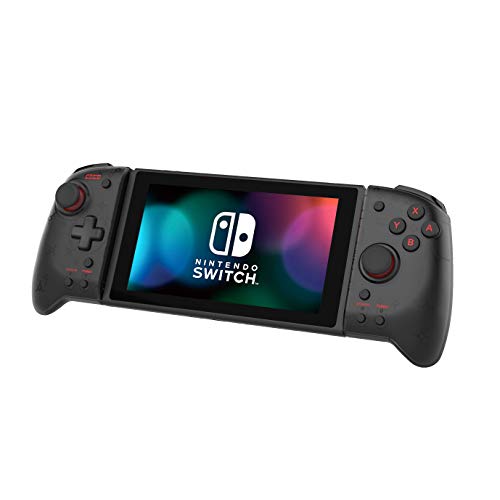
- Best for: Long handheld sessions in action games where standard Joy-Con feel too small.
- Brand: HORI
- Ergonomic controller designed for handheld mode
- Full-size analog sticks and precision D-pad
- Assignable rear buttons
- Best for: Players building a digital library who want storage that simply works.
- Brand: SanDisk
- Capacity: 128GB
- Model: SDSQXAO-128G-GNCZN
- microSDXC UHS-I card
All 5 Picks at a Glance
| Product | Specs | Action |
|---|---|---|
| Nintendo Switch Pro Controller |
| Check price on Amazon |
| HORI Split Pad Pro (Black) |
| Check price on Amazon |
| SanDisk 128GB microSDXC Card for Nintendo Switch |
| Check price on Amazon |
 PowerA Joy-Con Charging Dock |
| Check price on Amazon |
 amFilm OneTouch Screen Protector for Nintendo Switch |
| Check price on Amazon |
The Switch ships with almost everything needed to start playing, yet the accessories worth buying are the ones that fix a specific friction: cramped controls on the TV, a handheld mode that tires larger hands, storage that fills after a handful of downloads, Joy-Con left scattered and uncharged, or a screen one drop away from a scratch. Choosing well means matching each add-on to the way the console is actually used, not collecting every gadget in the category.
This roundup is for docked players who want a proper gamepad, handheld players who want a fuller grip, and families juggling several Joy-Con between sessions. Every pick below is a Nintendo Switch accessory sold on Amazon, selected from the product names and specification details printed on its listing, and each one solves a different problem so the five can be combined without overlap.
Our Top Picks
Top 3 picks at a glance
Quick Picks
As an Amazon Associate we earn from qualifying purchases
| Product | Best for | Key spec from title |
|---|---|---|
| Nintendo Switch Pro Controller | Docked play with a full-size gamepad | Motion controls, HD rumble, built-in amiibo functionality |
| HORI Split Pad Pro (Black) | Handheld sessions that need bigger grips | Ergonomic controller for handheld mode, officially licensed |
| SanDisk 128GB microSDXC Card for Nintendo Switch | Download libraries that outgrow internal storage | 128GB, licensed for Nintendo Switch, UHS-I |
| PowerA Joy-Con Charging Dock | Households with several Joy-Con to keep charged | Charges 4 Joy-Con, LED charge indicators, USB powered |
| amFilm OneTouch Screen Protector for Nintendo Switch | Protecting the 2017 model’s display from day one | Auto-alignment OneTouch tempered glass, 2 pack |
How to Choose
Start with the mode you play most
Accessories divide cleanly by play mode, and buying against the wrong mode wastes money. Docked and tabletop players gain the most from a separate full-size controller, because the Joy-Con grip included in the box is a compromise shape. Handheld players gain little from a TV controller and should look at grip-style controllers that replace the Joy-Con outright. Storage, charging, and screen protection apply to every mode, so those categories come after the mode-specific pick rather than before it.
Check the exact console model on the listing
The Switch family now covers the 2017 original, the Lite, and the OLED model, and accessory fit is not universal across them. Screen protectors are cut to one display size, so an OLED protector will not sit correctly on the original model’s smaller screen. Cases and grips also differ around the OLED’s slightly larger body. Before ordering, match the model named in the listing title against the console in hand, and treat a listing that only says “for Switch” with caution when the product touches the screen or shell.
Prefer licensed products where electronics are involved
Controllers, chargers, and docks interact with the console’s battery and wireless hardware, which is where licensing matters most. Officially licensed accessories are built to Nintendo’s electrical and communication specifications, so a licensed charging dock will not feed a Joy-Con the wrong voltage, and a licensed controller pairs without workarounds. Unlicensed electronics are the category most often behind charging faults and pairing dropouts. For passive items such as cases and glass, licensing matters less than material and fit, so judge those on their stated construction instead.
Buy storage by speed class, not just capacity
A microSD card only helps if the console can read it at full speed, so the rating printed on the listing matters as much as the gigabyte count. Look for UHS-I cards with a U3 or V30 speed class, which keep load times close to game-card performance. Nintendo-licensed cards state their compatibility with Switch, OLED, and Lite directly in the title, removing guesswork. Capacity-wise, 128GB suits a mixed physical and digital library, while mostly digital collectors should step up to a larger size in the same licensed range.
The 5 Best Options
Nintendo Switch Pro Controller
- Best for: The main player at home who wants one proper gamepad for TV sessions.
- Brand: Nintendo
- Model number: HACAFSSKA
- Motion controls and HD rumble
- Built-in amiibo functionality
The main player at home who wants one proper gamepad for TV sessions.
It has no headphone jack, so voice chat still needs a separate solution.
Anyone who plays docked for more than an hour at a time is the audience here. The Pro Controller replaces the Joy-Con grip with a conventional gamepad shape, a real D-pad for platformers and fighting games, and sticks positioned for adult hands. It keeps the features the Joy-Con introduced, including motion controls for aiming and HD rumble, and adds a built-in amiibo reader in the shell. Because it is Nintendo’s own controller, pairing is a single cable plug or a menu press, and it works with the console docked or undocked.
HORI Split Pad Pro (Black)
- Best for: Long handheld sessions in action games where standard Joy-Con feel too small.
- Brand: HORI
- Ergonomic controller designed for handheld mode
- Full-size analog sticks and precision D-pad
- Assignable rear buttons
Long handheld sessions in action games where standard Joy-Con feel too small.
It works only in handheld mode and has no motion controls, rumble, or amiibo reader.
Handheld players with larger hands, or anyone whose fingers cramp around standard Joy-Con, should look at this first. The Split Pad Pro slides onto the console rails in place of the Joy-Con and gives each side a full-size stick, a proper D-pad on the left, and grips shaped like a traditional controller. Rear buttons on each half can be assigned to other inputs, and a turbo function covers games that reward repeated presses. It is officially licensed by Nintendo, and because it draws power from the console, there is no separate battery to charge.
SanDisk 128GB microSDXC Card for Nintendo Switch
- Best for: Players building a digital library who want storage that simply works.
- Brand: SanDisk
- Capacity: 128GB
- Model: SDSQXAO-128G-GNCZN
- microSDXC UHS-I card
Players building a digital library who want storage that simply works.
The listing states compatibility with Nintendo Switch models, not Switch 2, so keep it for the original system.
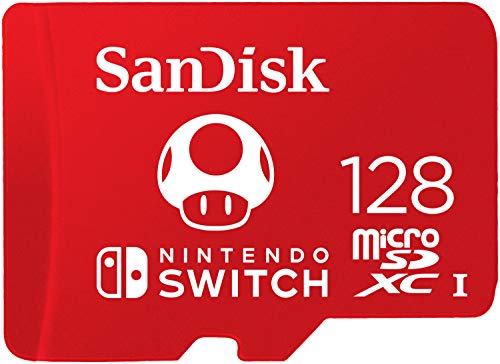
The console’s internal storage disappears quickly once a few large downloads land, and this licensed card is the straightforward fix. It is made for the Switch family, with the listing naming the original model, OLED, and Lite, so there is no compatibility research to do. UHS-I speeds of up to 100MB/s read and 90MB/s write keep game loading close to cartridge pace, and 128GB holds a realistic mix of big releases and smaller indie titles. The card carries Super Mushroom artwork, which also makes it easy to tell apart from generic cards in a drawer.
PowerA Joy-Con Charging Dock
- Best for: Families and multiplayer homes that rotate several Joy-Con between sessions.
- Brand: PowerA
- Model: 1501406-01
- Charges 4 Joy-Con simultaneously
- LED charge indicators
Families and multiplayer homes that rotate several Joy-Con between sessions.
It charges Joy-Con only, so a Pro Controller still needs its own cable.
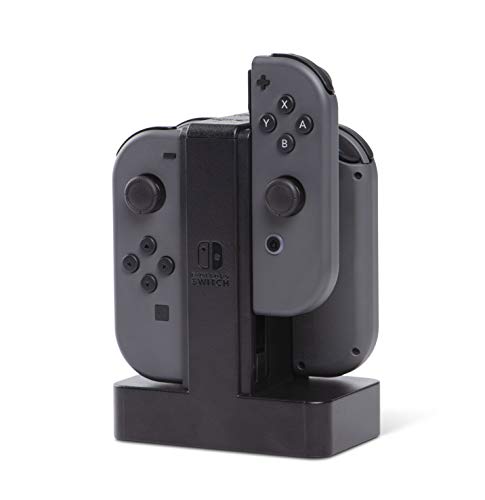
Households with two pairs of Joy-Con know the routine: one set is always flat when a multiplayer game starts. This dock charges four Joy-Con at once, sliding them onto rails in a compact stand that lives next to the TV. LED indicators above each slot show charging status at a glance, so a green light means a controller is ready before guests arrive. It is USB powered, drawing from the Switch dock or any USB port, and it is officially licensed by Nintendo, which matters for a product that feeds power into first-party controllers.
amFilm OneTouch Screen Protector for Nintendo Switch
- Best for: New owners who want a correctly aligned protector without installation stress.
- Brand: amFilm
- Tempered glass screen protector for Nintendo Switch (2017 model)
- Auto-alignment OneTouch installation kit
- 2 pack
New owners who want a correctly aligned protector without installation stress.
It fits the 2017 model’s screen only, so OLED owners need the OLED-specific version instead.
The Switch screen is plastic and picks up scratches from the dock itself, so glass protection belongs on the console early. This amFilm set is the OneTouch version for the original 2017 model, built around an auto-alignment installation frame that positions the tempered glass correctly on the first attempt, which removes the crooked-fit problem that ruins most protector installs. Two protectors come in the pack, leaving a spare if the first is ever cracked or misapplied. The glass keeps full touch sensitivity and clarity, and it is cut for the 2017 display rather than the larger OLED panel.
Which One Fits Your Situation
You play mostly on the TV
Start with the Pro Controller, because docked play is where the included Joy-Con grip feels most like a compromise. Its full-size shape, real D-pad, and amiibo reader cover long sessions and every control scheme the console supports. Add the PowerA charging dock beside the TV if a second pair of Joy-Con lives in the house, and the setup is complete for both solo and multiplayer nights.
You play mostly in handheld mode
The Split Pad Pro is the single upgrade that changes how the console feels, replacing the flat Joy-Con with full-size sticks and shaped grips. Pair it with the amFilm glass, since a handheld console travels in bags and gets set down on hard surfaces far more often than a docked one. Storage can wait until the download warnings actually appear.
The console is shared by kids
Prioritize the PowerA dock and the screen protector. Four Joy-Con charging in one visible place ends the flat-controller argument before game night, and the LEDs make the ready check something a child can do alone. Tempered glass absorbs the drops and dock scrapes that a shared console inevitably collects, and the two-pack means one accident does not end the protection.
Your storage filled up already
Go straight to the SanDisk 128GB card. It is licensed for all three Switch models, so it works whichever console is in the house, and its UHS-I speeds keep downloads loading quickly. If the library is mostly digital triple-A releases, choose a larger capacity from the same licensed SanDisk range rather than a slower budget card, because the speed class is what protects load times.
Common Mistakes
- Buying an OLED screen protector for the original Switch, or the reverse, when the two displays are different sizes.
- Choosing an unlicensed charging dock or cable that can feed the console or Joy-Con incorrect power.
- Picking a microSD card by capacity alone and ignoring the UHS-I speed class, which leads to slow load times.
- Assuming a handheld grip controller works wirelessly, when rail-attached models like the Split Pad Pro only function attached to the console.
- Buying a second full controller for multiplayer before checking whether a charging dock would solve the actual problem of flat Joy-Con.
Frequently Asked Questions
Do these accessories also work with the Switch OLED and Lite?
Some do and some do not, which is why each listing’s stated compatibility matters. The SanDisk card names all three models, and the Pro Controller and PowerA dock work across the family. The amFilm protector in this list is cut for the 2017 screen only, and the Split Pad Pro does not fit the Lite’s fixed-body design, so check the model named in each title before ordering.
Is a licensed microSD card necessary, or will any card work?
Any UHS-I microSD card with a suitable speed class works in the console, so licensing is not a technical requirement. The licensed SanDisk card earns its place by stating Switch, OLED, and Lite compatibility in the listing and by carrying the speed ratings the console can use, which removes the two mistakes buyers make most often: wrong format and slow class.
Why choose the Split Pad Pro over a second pair of Joy-Con?
They solve different problems. Extra Joy-Con add players; the Split Pad Pro changes comfort for one handheld player, with full-size sticks, a real D-pad, assignable rear buttons, and turbo. The trade-off is that it only works attached to the console and drops motion controls and rumble, so motion-heavy games still play better with the original Joy-Con attached.
Can the PowerA dock charge a Pro Controller as well?
No. This dock is built for Joy-Con only, seating up to four of them on its rails with an LED indicator per slot. The Pro Controller charges from its own USB-C cable, which is included in its box. Households with both controller types usually keep the dock by the TV for Joy-Con and a loose cable in the dock area for the Pro Controller.
Related guides
More from Amazon
Programs that pair well with the guide above. Offers and eligibility are set by Amazon and may change.
Free shipping on eligible items, Prime Video and more. Eligible new members can start with a free trial.
Start a Prime free trialAd-free music streaming. Eligible new subscribers can start with a free trial.
Try Music Unlimited freeA Prime membership for ages 18-24 with a trial period. Eligibility is set by Amazon.
See Prime for Young AdultsAudiobooks and podcasts to listen to on the go. Eligible new members can start with a free trial.
Try Audible freeAs an Amazon Associate we earn from qualifying purchases.