Designing an ideal home gaming setup requires as much focus on physical comfort as high-performance displays. When donning a virtual reality headset, glasses wearers quickly encounter an annoying set of problems: painful frame compression against temples, constant threat of glass-on-glass scratches, and persistent trapped heat that fogs up prescription lenses within minutes. Standard factory facial pads rarely offer the depth or passive airflow needed to accommodate eyewear comfortably during extended VR sessions.
Finding the best facial interface for quest glasses wearers transforms uncomfortable, high-pressure VR sessions into seamless, immersive experiences. Upgraded third-party interfaces replace dense, narrow foam with recessed side cutouts, multi-channel vents, adjustable depth posts, and cooling fabrics like Ice Silk and Lycra. In 2026, ergonomic facial interface designs cater directly to spectacle wearers across the Meta Quest 2, Quest 3, and Quest 3S lineups, keeping your lenses fog-free and your frames sitting naturally without digging into your skin.
As an Amazon Associate we earn from qualifying purchases at no extra cost to you.



Our Top Picks



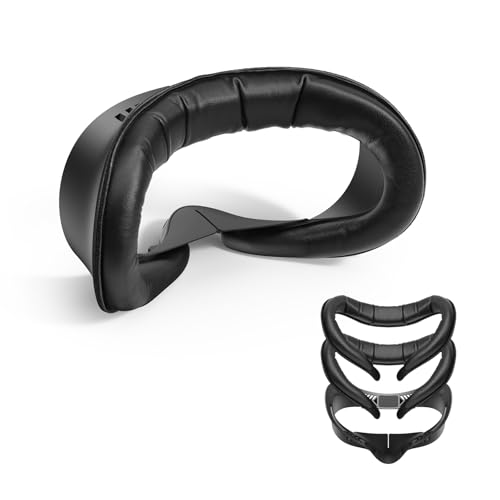
Top 3 picks at a glance
Quick Picks
| Product | Best For | Price |
|---|---|---|
| BOBOVR F3 Facial Interface | Best Overall for Quest 3 | Check on Amazon |
| AMVR Q3SFC1 Facial Interface Pad | Best Dual-Material for Quest 3S | Check on Amazon |
| Face Cover Pad for Meta/Oculus Quest 3S | Best Budget PU Leather | Check on Amazon |
| SUPERUS Facial Interface & Face Cover Pad | Best Spacer Compatibility for Quest 2 | Check on Amazon |
| APEXINNO Adjustable Facial Interface | Best Swappable Cushions | Check on Amazon |
| KIWI design V4 Facial Interface | Best Comfort Ergonomics for Quest 3S | Check on Amazon |
| VR Open Facial Interface | Best Maximum Airflow | Check on Amazon |
| VR Facial Interface and Foam Replacement Set | Best Complete Kit for Quest 2 | Check on Amazon |
How We Compared
To evaluate these facial interfaces for spectacle wearers, we analyzed five critical ergonomic factors: frame clearance depth, active and passive anti-fog ventilation, material hygiene, nose-bridge light blockage, and overall mounting stability. Glasses wearers require extra clearance (often 4mm to 8mm of added depth) to prevent frame arms from binding against temples or sliding backward into the VR optic lenses. We prioritized models featuring wide lateral channels, adjustable position steps, and breathable mesh or wipeable PU leather. Finally, we evaluated prices ranging from around $14 to around $29 across Meta Quest 2, 3, and 3S hardware options to ensure top value for every home gaming room budget.
The 8 Best Picks
1. BOBOVR F3 Facial Interface
The BOBOVR F3 Facial Interface is engineered specifically for Meta Quest 3 owners who wear glasses and require precise heat dissipation. Featuring a built-in 3-channel ventilation system, it continuously exhausts warm breath and facial heat before moisture condenses on your prescription lenses. The frame offers adjustable field-of-view (FOV) distance settings, allowing spectacle wearers to push the facial pad outward to create a safe buffer between glasses and optical lenses. A soft Lycra nose guard gently wraps around nose bridges to block ambient light bleeding into the headset visual field.
- Pros: 3-channel ventilation effectively stops glasses fogging; soft Lycra nose guard prevents light bleed without nose pressure.
- Cons: Highest price tag among single-bracket Quest 3 interfaces at around $29.
Skip if: Skip if you play on a Quest 2 or Quest 3S, as the clip geometry fits Quest 3 headsets exclusively.
2. AMVR Q3SFC1 Facial Interface Pad
Targeted directly at Meta Quest 3S users, the AMVR Q3SFC1 Facial Interface Pad introduces a dual-material setup combining supple PU leather with ice silk fabric. This hybrid build absorbs sweat efficiently while maintaining a cool skin contact surface during active room-scale VR gaming. Wide side channels are integrated into the plastic housing, allowing standard prescription spectacle frames to pass through without pinching the user’s temples or warping the frame arms.
- Pros: Hybrid PU and Ice Silk construction stays cool under heat; wide side relief channels eliminate frame pressure.
- Cons: Does not feature active fan mounting brackets.
Skip if: Skip if you own the standard Meta Quest 3, as the mounting clips are non-compatible with Quest 3 hardware.
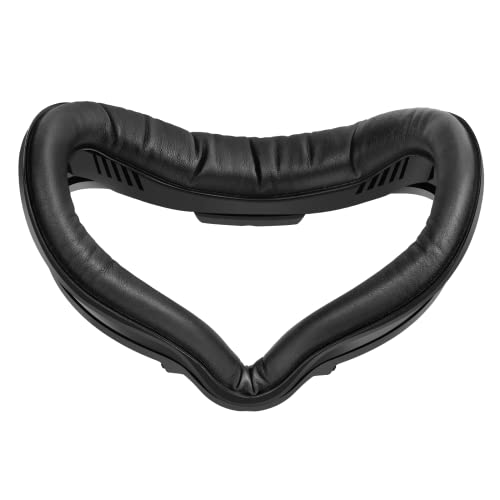
3. Face Cover Pad for Meta/Oculus Quest 3S
For budget-focused Quest 3S owners, this sweatproof PU leather face cover pad offers a straightforward, ergonomic replacement for stock facial foam. Priced at just around $14, it uses a soft, lightweight cushion pad wrapped in wipeable leather that resists oil and perspiration. The internal cavity provides generous lateral space, enabling small-to-medium glasses frames to sit comfortably without pressing tightly against the user’s cheeks or eye sockets.
- Pros: Highly affordable price point; wipeable PU leather surface simplifies cleanups between users.
- Cons: Lacks active cooling channels, causing moderate heat retention during intense cardio games.
Skip if: Skip if you suffer from severe lens fogging and require mesh or vented open-air designs.
4. SUPERUS Facial Interface & Face Cover Pad
Designed for Meta Quest 2 players, the SUPERUS Facial Interface features a sweat-proof PU foam cushion specifically structured to work in tandem with the original Oculus Quest 2 glasses spacer. By mounting seamlessly over the OEM spacer bracket, it maintains critical eye-relief depth so prescription lenses remain safely separated from the internal VR displays. The soft foam distributes headset weight across the brow bone, lessening cheek tension during long play sessions.
- Pros: Direct compatibility with the original Quest 2 glasses spacer; plush sweat-proof PU foam cushion.
- Cons: Foam padding feels slightly rigid until broken in after a few hours of use.
Skip if: Skip if you have upgraded your VR setup to a Meta Quest 3 or Quest 3S system.
5. APEXINNO Adjustable Facial Interface
The APEXINNO Adjustable Facial Interface provides Meta Quest 3 wearers with multi-step depth adjustments and two distinct cushion choices: high-density PU leather and breathable Ice Silk fabric. Spectacle wearers can adjust the mounting depth across distinct positional clicks to prevent thick frame edges from touching the VR optics. A light-blocking nose pad prevents room illumination from leaking upward, keeping game visuals vibrant while maintaining plenty of room for eyewear.
- Pros: Includes both Ice Silk and PU cushions; multi-step depth adjustment tailored for thick glasses.
- Cons: Frame adjustment tabs require firm mechanical force to snap into locked positions.
Skip if: Skip if you operate a Quest 3S, as the clip positions do not match Quest 3S faceplates.
6. KIWI design V4 Facial Interface
Built exclusively for the Quest 3S, the KIWI design V4 Facial Interface comes supplied with two plush face pads engineered to alleviate facial stress points. Designed with an expanded inner facial curvature, it easily accommodates eyeglasses frames up to 145mm wide without causing uncomfortable temple pinching. The ergonomic interface frame features passive top and bottom vents that keep air moving across the face, helping clear steam and perspiration from prescription lenses.
- Pros: Includes two full-sized replacement face pads; generous interior width handles wider glasses frames cleanly.
- Cons: Matte finish frame shows finger oils easily.
Skip if: Skip if you require an interface designed for the original Quest 2 or standard Quest 3 models.
7. VR Open Facial Interface
Designed for Quest 3S players who experience heavy lens fogging, the VR Open Facial Interface utilizes an open-air concept. By stripping away perimeter foam side barriers, this interface relies on continuous passive airflow to neutralize internal moisture and balance temperatures. Glasses wearers gain virtually unlimited lateral arm space since the sides remain open, completely removing temple compression and nose bridge friction.
- Pros: Maximum airflow prevents lens fogging entirely; complete elimination of lateral frame pressure.
- Cons: Allows peripheral ambient room light to seep into visual field.
Skip if: Skip if you play in bright living rooms where peripheral light leakage ruins immersion.
8. VR Facial Interface and Foam Replacement Set
This comprehensive set for Oculus Meta Quest 2 includes a removable facial interface frame, replacement foam covers, an anti-leakage silicone nose pad, and a protective optical lens cover for around $17. The replacement frame features expanded internal side cutouts engineered to sit comfortably over prescription glasses frames, while the wipeable synthetic leather padding prevents sweat from soaking deep into the internal foam structure.
- Pros: Complete value kit including a bonus optical lens cover; flexible replacement cushions reduce facial pressure.
- Cons: Synthetic leather surface can feel slippery during heavy sweat sessions.
Skip if: Skip if you are searching for a facial interface for Quest 3 or Quest 3S hardware.
Buying Guide
Frame Depth Clearance & Eyewear Spacers
The primary concern for glasses wearers in VR is preventing prescription lenses from touching the headset’s optical display lenses. Contact between glass and optical resin causes severe, permanent scratches on both surfaces. When selecting an interface, search for models that offer built-in depth adjustment clicks or total compatibility with OEM glasses spacers. A clearance buffer of at least 4mm to 8mm ensures that even thick frames sit safely without pushing back into your skin when tightening head straps.
Ventilation Systems & Fog Prevention
Prescription lenses create a dual-glass air chamber inside a VR headset, trapping body heat and breath moisture. Without proper ventilation, steam rapidly coats both your glasses and the headset display. Choose facial interfaces equipped with passive multi-channel micro-vents, 3-channel exhaust grooves, or open-air frame designs. Moving air away from the upper cheeks keeps lens temperatures balanced and fog-free without blowing dry air directly into your eyes.
Material Selection: PU Leather vs. Ice Silk & Lycra
Material selection drastically impacts long-term comfort and maintenance routine. PU leather cushions are sweatproof and easily wiped down with alcohol-free wipes, making them perfect for high-intensity fitness gaming or multi-user households. However, PU leather traps more heat against the cheeks. Ice Silk, Lycra, and fabric mesh cushions offer superior breathability and thermal relief for long seated sessions, though they absorb sweat and require occasional hand washing.
Our Verdict
For Meta Quest 3 users, the BOBOVR F3 Facial Interface stands out as the ultimate pick thanks to its 3-channel anti-fog ventilation, FOV adjustment, and soft Lycra nose guard. Quest 3S owners seeking optimal comfort and frame space should look to the AMVR Q3SFC1 Facial Interface Pad for its balanced Ice Silk and PU build, or the ultra-breathable VR Open Facial Interface to end lens fogging forever. Quest 2 gamers can rely on the SUPERUS Facial Interface & Face Cover Pad for its seamless compatibility with original glasses spacers.
FAQ
How do I prevent my prescription glasses from scratching Quest optical lenses?
Ensure your facial interface incorporates dedicated lateral glasses cutouts or adjustable depth settings that keep prescription frames at least 4mm away from the headset optics. You can also use silicone lens protector rings mounted directly around the Quest display lenses for extra insurance.
Will a Quest 3 facial interface fit on a Quest 3S headset?
No. While the Meta Quest 3 and Quest 3S share similar processing internals, their outer faceplates feature different clip locations and shell dimensions. Always check that the facial interface explicitly lists compatibility for your exact headset model before buying.
How do I clean PU leather vs. Ice Silk facial interface pads?
PU leather cushions can be wiped clean instantly using non-alcoholic, skin-safe disinfectant wipes. Ice Silk and Lycra fabric pads should be gently detached from the plastic frame, hand-washed with mild soap and warm water, and left to air dry completely before reattaching.
What frame dimensions fit inside glasses-friendly VR facial interfaces?
Most standard glasses-friendly facial interfaces accommodate frames up to 145mm wide and 50mm tall. If your eyewear exceeds these dimensions, consider opting for an open-sided interface frame or ordering custom prescription VR lens inserts that snap directly over the display optics.
Related guides
- Best Free MMOs on Steam: Subscription Limits, Pay-to-Win and Time Cost (2026)
- Best Free Horror Games on Steam: How to Pick One That Fits Your PC and Your Nerves (2026)
- Black Frame Insertion vs VRR: Which Smoothness Feature Should You Use?
- Best Webcams for Streaming: 11 Listings Compared by Resolution, Focus and Light (2026)