As an Amazon Associate, we earn from qualifying purchases.

The Galaxy S26 Ultra is a large, expensive flagship, and the best accessories for Samsung Galaxy S26 Ultra owners are the ones that solve the phone’s real quirks rather than just dressing it up. This phone has no built-in magnets, so magnetic charging and snap-on accessories only work through a magnetic case. Its 6.9-inch display carries an anti-reflective coating and a built-in Privacy Display, so a screen or lens protector has to preserve both. And with the S Pen tucked into the bottom edge, any case that blocks the stylus is a non-starter. This guide covers the four accessory types that matter most: a protective magnetic case, a slimmer everyday case, a camera lens protector, and a fast wall charger. Every pick below is made specifically for the Galaxy S26 Ultra, is verified as selling on Amazon US, and earns its place on fit, function, and value rather than brand name alone. Use the quick picks to shortlist, then read the detailed sections to match each accessory to how you actually use the phone.
Our Top Picks
Top 3 picks at a glance
Quick Picks
Our Short List of 3
- Best for: Owners who want one case that handles protection, magnets, and hands-free viewing together.
- Best for: Everyday carry where slim, dependable protection matters more than a stand.

- Best for: Owners who set the phone down on tables, counters, and rough surfaces and want the lenses to stay flawless.
All 3 Picks at a Glance
| Product | Specs | Action |
|---|---|---|
| 1. Spigen Tough Armor MagFit |
| Check price on Amazon |
| 2. OtterBox Commuter Series |
| Check price on Amazon |
| 3. Spigen Glas.tR EZ Fit Optik Pro Camera Lens Protector |
| Check price on Amazon |
How We Chose
We started from the S26 Ultra itself. First, magnetic compatibility: because the phone has no built-in magnets, a case earns a top spot only if it adds a properly aligned magnetic ring, so Qi2 chargers, wallets, and car mounts actually snap on and stay on. Second, S Pen access: every case here leaves the stylus slot fully usable, because a case that fights the phone’s signature feature is a bad case. Third, display and camera honesty: protectors must be made for the 6.9-inch S26 Ultra specifically, not the S25 Ultra or the smaller S26 models, and must not block the ultrasonic fingerprint reader or degrade the camera. Fourth, charging reality: the phone supports up to 45W wired charging through Super Fast Charging 2.0, which needs a USB-C PD charger with PPS, so the charger pick had to support that protocol rather than just advertise a wattage number. Fifth, real-world availability: we verified each product as a current Amazon US listing for the S26 Ultra, checked that the model name and compatibility line matched, and favoured products with strong buyer feedback over obscure listings. Finally, we balanced the list across the accessory types a new owner actually needs first, instead of filling it with four near-identical cases.
The Best Accessories for Samsung Galaxy S26 Ultra
1. Spigen Tough Armor MagFit
- Best for: Owners who want one case that handles protection, magnets, and hands-free viewing together.
Owners who want one case that handles protection, magnets, and hands-free viewing together.
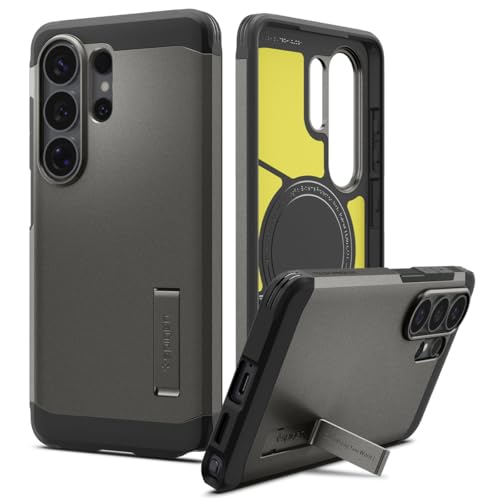
The Spigen Tough Armor MagFit is the single most useful accessory in this guide because it fixes the S26 Ultra’s biggest design gap while also protecting it. Samsung left magnets out of the phone, and this case puts them back: its built-in MagFit ring aligns with magnetic chargers, wallets, and car mounts, and the case is Qi2 certified so magnetic wireless charging runs at full speed. Around that ring sits a serious protective build. A hard polycarbonate shell, a flexible TPU frame, impact-absorbing foam, and Air Cushion corners work together to absorb drops, and Spigen rates the design to military-grade drop standards with testing at 1.2 metres. A built-in kickstand folds flush into the back and props the big screen up for video at up to 70 degrees, which is genuinely handy on a phone this size. Raised edges guard the screen and the large camera bump, and the S Pen slot stays fully accessible. The trade-off is bulk: this is a two-layer case with a stand, so it will never feel as slim as a bare shell, and the industrial styling is not for everyone. But for most owners it is the one accessory that changes how the phone is used every day.
Key specs:
– Hybrid PC, TPU, and impact foam construction with Air Cushion corners
– Built-in MagFit magnetic ring; Qi2 certified for up to 25W magnetic wireless charging
– Built-in kickstand with viewing angles up to 70 degrees
– Military-grade drop protection; drop tested at 1.2 metres for 26 drops
– Raised edges for the screen and camera; S Pen slot fully accessible
Pros:
– Adds the magnetic ring the phone itself lacks, unlocking Qi2 charging and mounts
– Strong three-layer protection with a kickstand included at a modest tier
– Very high buyer feedback volume, with tens of thousands of ratings across versions
Cons:
– Noticeably thicker and heavier than a slim case
– Industrial look will not suit buyers who want a minimal finish
2. OtterBox Commuter Series
- Best for: Everyday carry where slim, dependable protection matters more than a stand.
Everyday carry where slim, dependable protection matters more than a stand.
The OtterBox Commuter Series is the pick for owners who want trusted protection without the bulk of a rugged case. It uses OtterBox’s familiar two-layer approach: a rigid outer shell takes scrapes and impacts while a soft inner layer absorbs the shock, and the whole case is tested to three times the military drop standard. Built-in magnets align the phone for fast wireless charging, which matters on a phone with no magnets of its own. Port covers keep dust and lint out of the USB-C port, raised edges protect the screen and camera lenses, and grippy sides make the large, smooth phone easier to hold one-handed. At roughly pocket-friendly dimensions it slides in and out of a pocket without catching, and the S Pen remains easy to reach. The Commuter sits a tier above the Spigen on price, and it has no kickstand, so video watching means leaning the phone against something. It also comes in a wide range of colours, which is a small thing until you are the person who has to find a black slab on a dark car seat. For everyday carry, this is the dependable middle ground between a featherweight shell and a full rugged case.
Key specs:
– Dual-layer construction: rigid outer shell plus soft inner slip layer
– Built-in magnets for fast wireless charging alignment
– Port covers and raised edges around the screen and cameras
– Tested to 3X the military drop standard
– Model number 77-99838; pocket-friendly slim profile
Pros:
– Proven two-layer protection from a long-established case maker
– Port covers and grippy sides solve real everyday annoyances
– Slim enough for comfortable pocket carry despite the dual layers
Cons:
– No built-in kickstand for hands-free viewing
– Higher tier than the Spigen while offering less versatility
3. Spigen Glas.tR EZ Fit Optik Pro Camera Lens Protector
- Best for: Owners who set the phone down on tables, counters, and rough surfaces and want the lenses to stay flawless.
Owners who set the phone down on tables, counters, and rough surfaces and want the lenses to stay flawless.
The camera system is the most exposed part of the S26 Ultra, with large lenses sitting proud of the back panel, and this Spigen lens protector is the cheapest insurance for it. Each pack contains two tempered-glass lens protectors rated 9H or higher, with an oleophobic coating that resists fingerprints and smudges. The EZ Fit auto-align tray is the real selling point: it positions the glass exactly over the lenses in one motion, so installation takes seconds and does not depend on a steady hand. Spigen designs the protectors to be case-friendly, so they work with the brand’s own S26 Ultra cases and most others, and the glass is optically tuned to preserve photo quality rather than adding haze or flare. The obvious limitation is that a lens protector guards only the lenses, not the screen or the body, so it is a complement to a case rather than a substitute. It also adds a barely visible ring around the camera module, which some owners will notice in photos of the phone even though it does not affect the photos the phone takes. For a small outlay, it removes the worry of setting the phone down on a rough surface.
Key specs:
– 9H+ tempered glass lens protectors, 2-pack
– EZ Fit auto-align tray for one-motion installation
– Oleophobic coating resists fingerprints and smudges
– Case-friendly fit; model number AGL11071
– Optically tuned glass preserves photo quality
Pros:
– Alignment tray makes a fiddly job almost foolproof
– Two protectors in the box, so a spare is ready if the first install goes wrong
– Protects the most exposed glass on the phone for a low tier
Cons:
– Guards the lenses only, not the screen or body
– Adds a visible ring around the camera module
4. Anker Nano 45W Smart Display Charger
Samsung stopped including a charger in the box, and the S26 Ultra needs a proper one to reach its fastest wired speeds. The Anker Nano 45W Smart Display Charger delivers up to 45W through a single USB-C port using USB Power Delivery 3.0 with PPS, which is the protocol Samsung’s Super Fast Charging 2.0 depends on. Its signature feature is the small smart display, which shows real-time charging status so you can see at a glance that the phone is actually fast charging instead of guessing. Gallium nitride construction keeps the brick compact and cool, the plug folds flat at 180 degrees for travel, and Anker’s ActiveShield 3.0 system monitors temperature during charging. A single port means no power splitting and no second device charging at the same time, and no cable is included, so you will need a USB-C to USB-C cable rated for the full wattage. The smart display’s device-recognition features are tuned for recent iPhones, so Android owners get the wattage readout rather than the full recognition suite. Even so, this is a compact, honest 45W charger that does the one job it exists for without fuss.
Key specs:
– Up to 45W output via USB-C PD 3.0, PPS, and PowerIQ
– Smart display shows real-time charging status
– GaN construction with 180-degree foldable plug
– Single USB-C port; ActiveShield 3.0 temperature monitoring
– Model number A121D; charging cable not included
Pros:
– True 45W PPS output unlocks the S26 Ultra’s fastest wired charging
– Display confirms fast charging is actually happening
– Compact GaN design with a folding plug travels well
Cons:
– Only one port, so it charges one device at a time
– No cable in the box, and the smart display’s recognition features favour iPhones
Best for: Owners who want a compact travel charger that proves it is fast charging.
Buying Guide
Start with the case, because everything else depends on it. The S26 Ultra has no built-in magnets, so if you want magnetic wireless charging, a magnetic car mount, or a snap-on wallet, the case has to supply the ring. Check the listing for a magnetic ring and Qi2 certification rather than assuming any case will do, and confirm the case leaves the S Pen slot open. Protection level is a personal trade-off: a rugged case with a kickstand is the best all-rounder, while a slim dual-layer case is better if the phone lives in a tight pocket. Either way, verify the listing says Galaxy S26 Ultra and not S25 Ultra, S26, or S26 Plus, because the dimensions differ and a wrong-size case will not fit.
Next, protect the glass. The screen already has Gorilla Armor 2 with an anti-reflective coating and a built-in Privacy Display, so a screen protector is optional, but the camera lenses have no such protection and sit exposed. A tempered-glass lens protector with an alignment tray is the easiest win, and if you do add a screen protector, choose one that states ultrasonic fingerprint compatibility so the in-display reader keeps working.
For charging, match the charger to the phone’s actual charging system. The S26 Ultra draws up to 45W wired, but only from a charger that supports USB-C PD with PPS, and only through a cable rated for that output. A 45W label alone is not enough. For wireless charging, the phone supports up to 25W over Qi2, but only with a magnetic case in place, and the wireless charger and its power adapter both have to support the relevant profile. Buy the case first, then the charger, and check the current price and stock at checkout, since accessory pricing moves quickly around sales events.
Frequently Asked Questions
Does the Galaxy S26 Ultra have built-in magnets for accessories?
No. The S26 Ultra has no built-in magnets, so magnetic chargers, wallets, and mounts cannot attach to the bare phone. A magnetic case such as the Spigen Tough Armor MagFit or the OtterBox Commuter adds the ring, and once the case is on, Qi2 magnetic chargers and MagSafe-style accessories snap on and align correctly.
Will a case block the S Pen?
A case made for the S26 Ultra should not block the S Pen, because the stylus slot is part of the phone’s design and case makers cut around it. Both cases in this guide leave the slot fully accessible. The risk comes from cases made for a different model, so always confirm the listing states Galaxy S26 Ultra before buying.
Do I need a screen protector if the phone has Gorilla Armor 2?
Not necessarily. Gorilla Armor 2 with its anti-reflective coating is already tough and glare-resistant, and a cheap protector can dull both qualities. A lens protector is the more useful purchase, since the camera lenses are exposed. If you do fit a screen protector, pick one that states ultrasonic fingerprint compatibility.
What charger do I need for the fastest wired charging?
You need a USB-C charger that supports PD with PPS at 45W, plus a USB-C to USB-C cable rated for that output. The Anker Nano 45W Smart Display Charger in this guide meets that requirement. Without PPS support, the phone falls back to slower charging even if the charger advertises 45W.
Can the S26 Ultra charge wirelessly at 25W with any Qi charger?
No. Full-speed 25W wireless charging needs a Qi2 charger and a magnetic case, because the phone has no magnets of its own. A standard Qi pad will still charge the phone, but at a lower speed. Pair a Qi2 magnetic charger with one of the magnetic cases in this guide for the fastest wireless top-ups.
Conclusion
The best accessories for Samsung Galaxy S26 Ultra owners start with the Spigen Tough Armor MagFit, which adds the magnetic ring the phone lacks, protects it properly, and includes a kickstand for a modest tier. The OtterBox Commuter Series is the runner-up for anyone who prefers a slimmer everyday case with port covers and a proven two-layer build. Add the Spigen Optik Pro lens protector to guard the exposed camera glass, and the Anker Nano 45W Smart Display Charger to unlock the phone’s fastest wired charging with a display that confirms it is working. Buy the magnetic case first, then match the charger to it, and check fit and stock at checkout before ordering.
Related guides
More from Amazon
Programs that pair well with the guide above. Offers and eligibility are set by Amazon and may change.
Free shipping on eligible items, Prime Video and more. Eligible new members can start with a free trial.
Start a Prime free trialAd-free music streaming. Eligible new subscribers can start with a free trial.
Try Music Unlimited freeA Prime membership for ages 18-24 with a trial period. Eligibility is set by Amazon.
See Prime for Young AdultsAudiobooks and podcasts to listen to on the go. Eligible new members can start with a free trial.
Try Audible freeAs an Amazon Associate we earn from qualifying purchases.