Our Short List of 3
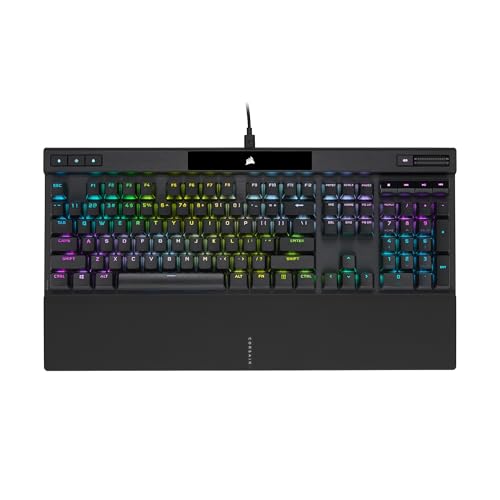
- Best for: PC gamers who want a fast wired mechanical board with tournament features.
- Layout: Full-size wired gaming keyboard
- Switches: Cherry MX Red mechanical, linear
- Polling: AXON 8,000Hz hyper-polling
- Keycaps: PBT double-shot

- Best for: Writers, analysts and anyone who types all day across more than one computer.
- Model: 920-011558, Graphite
- Layout: Full-size with numeric keypad
- Connectivity: Bluetooth Low Energy and Logi Bolt USB receiver
- Pairing: Easy-Switch keys for up to three devices

- Best for: Hobbyists and power users who want to remap keys and swap switches.
- Layout: Full-size, 108 keys, with programmable knob
- Switches: Keychron K Pro Brown, hot-swappable, pre-lubed
- Firmware: QMK/VIA programmable macros and remapping
- Keycaps: Double-shot PBT, OSA profile
All 4 Picks at a Glance
| Product | Specs | Action |
|---|---|---|
| Corsair K70 RGB PRO |
| Check price on Amazon |
| Logitech MX Keys S |
| Check price on Amazon |
| Keychron V6 (Knob Version) |
| Check price on Amazon |
 Logitech K120 |
| Check price on Amazon |
Choosing a PC keyboard looks simple until you sit in front of the options: mechanical or membrane, wired or wireless, full-size or compact, and switch names that read like a parts catalog. The right pick depends on what your desk actually does all day. A board that shines in fast shooters can feel tiring across a long document, and a quiet office keyboard may give up the fast polling and rollover that competitive games reward. This guide narrows the field to five keyboards that cover the main ways people really use a PC.
Gamers who want tournament hardware get the Corsair K70 RGB PRO and the low-profile Logitech G915 X Lightspeed. People who type for a living get the Logitech MX Keys S, customizers get the hot-swappable Keychron V6, and anyone who wants a dependable spare gets the Logitech K120. Every pick below is a keyboard for PC use, drawn from the names and specifications on its Amazon product page.
Our Top Picks
Top 3 picks at a glance
Quick Picks
As an Amazon Associate we earn from qualifying purchases.
| Product | Best for | Key spec from title |
|---|---|---|
| Corsair K70 RGB PRO | Fast wired gaming | Cherry MX Red switches with 8,000Hz hyper-polling |
| Logitech G915 X Lightspeed | Wireless gaming | Low-profile GL Linear switches, Lightspeed wireless |
| Logitech MX Keys S | All-day office work | Backlit low-profile keys, pairs with three devices |
| Keychron V6 (Knob Version) | Customizing and macros | QMK/VIA support with hot-swappable switches |
| Logitech K120 | A simple starter or spare board | Full-size wired USB with a spill-resistant design |
How to Choose
Switch Type and Typing Feel
The switch decides how every keystroke feels and sounds. Linear mechanical switches such as Cherry MX Red move straight down with no bump, which suits rapid repeated presses in games. Tactile switches add a small bump you can feel, a middle ground many typists prefer. Low-profile mechanical switches shorten the travel for a faster, flatter feel, while membrane boards like the K120 stay quiet and simple. Product pages name the exact switch fitted, so match that name to your preference before anything else, because the same keyboard model often ships in several switch variants.
Layout and Desk Space
Full-size keyboards keep the number pad, which matters for spreadsheets, data entry and games that bind extra keys. They also take the most desk room, pushing your mouse hand further out. Tenkeyless and compact layouts free space for wide mouse movements but drop the pad entirely. Every pick in this guide is full-size, because a general PC roundup has to cover number-pad work, but the trade-off is real: measure your desk, think about where your mouse travels, and decide whether the pad earns its space before you commit to a layout.
Wired, Wireless and Multi-Device Connections
A wired board never needs charging and gives a fixed connection, which is why tournament-style models stay wired. Wireless boards clear the cable off the desk and can move between a PC, a laptop and a tablet. Look at how the board connects: a dedicated 2.4GHz receiver gives the most stable gaming link, Bluetooth suits office devices, and some boards offer both plus a cable. Multi-device pairing matters if your desk holds more than one computer, because switching with a key press beats unplugging cables several times a day.
Keycaps, Backlighting and Software
Double-shot PBT keycaps resist shine and keep legends readable far longer than basic ABS caps, which matters on a board you plan to keep for years. Backlighting ranges from plain white light for night typing to per-key RGB that games tie into on-screen events. Software is the other half of the decision: suites such as Corsair iCUE and Logitech G HUB record macros and store profiles, while QMK and VIA boards let you remap every key without an account. Check which system a keyboard uses before buying, because your settings live there.
The 5 Best Options
Corsair K70 RGB PRO
- Best for: PC gamers who want a fast wired mechanical board with tournament features.
- Layout: Full-size wired gaming keyboard
- Switches: Cherry MX Red mechanical, linear
- Polling: AXON 8,000Hz hyper-polling
- Keycaps: PBT double-shot
PC gamers who want a fast wired mechanical board with tournament features.
The cable is detachable but this model has no wireless mode at all.
The K70 RGB PRO is the wired gaming anchor of this roundup. Its Cherry MX Red switches are linear, so each press travels straight down with no tactile bump, and Corsair’s AXON processing reports keystrokes at up to 8,000Hz hyper-polling. The double-shot PBT keycaps will not wear smooth the way basic caps do, per-key RGB lighting ties into Corsair iCUE, and a tournament switch locks down distractions during ranked play. A detachable USB Type-C cable makes the board easier to pack for events than older fixed-cable designs.
Logitech G915 X Lightspeed
The G915 X Lightspeed answers the same gaming brief without the cable. It is a full-size board in a slim aluminum-finish body, using low-profile GL Linear switches and double-shot PBT keycaps. Lightspeed wireless handles the gaming connection, Bluetooth covers a second device, and a USB-C cable is there when you want to charge or play wired. Programmable G-keys sit along the left edge, media controls and a volume roller sit at the top, and LIGHTSYNC RGB lighting can react to supported games. It is the premium route to a clean, cable-free gaming desk.
Specs
- Layout: Full-size, low profile
- Switches: GL Linear low-profile mechanical
- Keycaps: Double-shot PBT
- Connectivity: Lightspeed wireless, Bluetooth and USB-C wired
- Lighting: LIGHTSYNC RGB backlighting
- Case: Aluminum finish
- Controls: Programmable G-keys, media keys and volume roller
Best for: Gamers who want a full-size wireless board that still feels fast and mechanical.
Watch out for: The GL switches are a proprietary low-profile design, so standard tall keycaps and switches do not swap in.
ASIN: B0DB1WY5L9
Logitech MX Keys S
- Best for: Writers, analysts and anyone who types all day across more than one computer.
- Model: 920-011558, Graphite
- Layout: Full-size with numeric keypad
- Connectivity: Bluetooth Low Energy and Logi Bolt USB receiver
- Pairing: Easy-Switch keys for up to three devices
Writers, analysts and anyone who types all day across more than one computer.
The keys are low-profile scissor switches, not mechanical, so there is nothing to hot-swap or customize.
The MX Keys S is built for the hours when the PC is a work machine. Its low-profile keys are spherically dished to match fingertip shape, the backlighting wakes as your hands approach, and the full-size layout keeps a number pad for spreadsheet work. It pairs with up to three devices over Bluetooth or the included Logi Bolt receiver and switches between them with a key press, which suits a desk shared by a PC and a laptop. Smart Actions in the Logi Options+ app automate repeated shortcuts, and the board charges over USB-C.
Keychron V6 (Knob Version)
- Best for: Hobbyists and power users who want to remap keys and swap switches.
- Layout: Full-size, 108 keys, with programmable knob
- Switches: Keychron K Pro Brown, hot-swappable, pre-lubed
- Firmware: QMK/VIA programmable macros and remapping
- Keycaps: Double-shot PBT, OSA profile
Hobbyists and power users who want to remap keys and swap switches.
This version is wired only, and the deep customization takes time to learn.
The Keychron V6 is the roundup’s tinkering board. This knob version is a full-size 108-key wired mechanical keyboard with QMK and VIA support, so every key and macro can be remapped in open software. The fitted Keychron K Pro Brown switches are pre-lubed and tactile, and the sockets are hot-swappable for both 3-pin and 5-pin MX-style switches, so changing the feel later needs no soldering. Double-shot PBT keycaps in the OSA profile, south-facing RGB lighting and a system toggle with extra keycaps for Windows and macOS round out a board aimed at people who like to tune.
Logitech K120
- Best for: New setups, family PCs and anyone keeping a reliable spare keyboard.
- Model: 920-002478
- Layout: Full-size with numeric keypad
- Connection: USB wired, plug and play
- Design: Spill-resistant with a curved space bar
New setups, family PCs and anyone keeping a reliable spare keyboard.
Membrane keys feel softer than mechanical switches and there is no backlighting for dark rooms.
The K120 is the keyboard that asks nothing of you. It is a full-size wired board that plugs into a USB port and works, with a number pad, low-profile membrane keys and a curved space bar. The spill-resistant design gives everyday accidents a path away from the electronics, and the casing uses tilt legs to set a typing angle. There is no software, no lighting and no battery to manage, which is exactly the point: as a first keyboard for a new PC, a family computer board or a spare kept in a drawer, it covers the basics at the lowest complexity.
Which One Fits Your Situation
You Play Competitive Games at Your Desk
Start with the Corsair K70 RGB PRO. The linear Cherry MX Red switches, 8,000Hz hyper-polling and full-key rollover are all aimed at fast, repeated inputs, and the tournament switch exists for matches that matter. If your desk cannot stand another cable, the G915 X Lightspeed keeps a full-size layout and mechanical switches while moving the connection to Lightspeed wireless, at a noticeably higher tier of the market.
Your Desk Doubles as an Office
The MX Keys S fits a desk that earns its keep from nine to five. Quiet low-profile keys, smart backlighting and three-device switching make it easy to move between a work laptop and a home PC, and the number pad stays for spreadsheet sessions. The Keychron V6 is the alternative if your work involves heavy shortcuts, since its QMK and VIA macros can fold a repeated sequence into a single key.
You Like Tuning Every Key
Choose the Keychron V6. Hot-swappable sockets let you change switch feel without soldering, QMK and VIA remap every key, and the knob can be assigned to volume, zoom or brush sizes depending on the app. The K70 RGB PRO offers a lighter version of the same habit through iCUE macros and profiles, but its switches are soldered in place, so the tuning stops at software.
You Just Need a Keyboard That Works
Take the Logitech K120 and move on with your day. It plugs in over USB, needs no software or charging, and its spill-resistant full-size layout handles family computers, homework stations and spare-desk duty without complaint. Buyers who later get curious about mechanical switches or wireless freedom can step up to the Keychron V6 or G915 X knowing exactly which feature they are paying to add.
Common Mistakes
- Buying a switch type by name alone: linear, tactile and clicky versions of the same board feel completely different, so confirm the exact variant on the listing before ordering.
- Forgetting the number pad: compact boards free desk space, but spreadsheet and data-entry work slows down without a pad, and a separate pad costs extra later.
- Mixing up wireless modes: Bluetooth adds latency compared with a 2.4GHz gaming receiver, so check which connections a wireless board actually offers.
- Ignoring keycap material: basic ABS caps shine and fade with use, while double-shot PBT holds its texture and legends far longer.
- Assuming every board works everywhere: layouts, system toggles and included keycaps differ between Windows and macOS, so check the stated compatibility first.
Frequently Asked Questions
Is a mechanical keyboard better for PC gaming?
Mechanical boards give you a choice of switch feel, strong rollover and, on gaming models, very high polling rates, all of which suit fast play. Membrane boards stay quieter and simpler. The honest answer is that switch preference decides it: players who like a crisp, defined press usually prefer mechanical, while shared or quiet rooms often favor a membrane board like the K120.
Can one keyboard work with two computers?
Yes, if it offers multi-device pairing. The MX Keys S connects to three devices over Bluetooth or its Logi Bolt receiver and swaps between them with its Easy-Switch keys. The G915 X Lightspeed covers two wireless paths, Lightspeed and Bluetooth, plus a wired mode. Single-connection wired boards such as the K120 and Keychron V6 serve one machine at a time unless you add a separate switch box.
Do wireless keyboards lag in games?
A gaming-grade 2.4GHz connection such as Logitech Lightspeed is designed for play and reports fast enough that most players never notice a difference from a cable. Bluetooth is the slower path and is better kept for office work and casual games. If you play competitively and want zero doubt, a wired board like the K70 RGB PRO removes the question entirely and never needs charging.
What does hot-swappable mean on a keyboard?
It means the switches sit in sockets instead of being soldered, so you can pull a switch out and press a different one in to change the feel of a key or the whole board. The Keychron V6 supports both 3-pin and 5-pin MX-style switches. Boards without hot-swap sockets, including the K70 RGB PRO and G915 X, keep the switches they shipped with for life.
Related guides
More from Amazon
Programs that pair well with the guide above. Offers and eligibility are set by Amazon and may change.
Free shipping on eligible items, Prime Video and more. Eligible new members can start with a free trial.
Start a Prime free trialAd-free music streaming. Eligible new subscribers can start with a free trial.
Try Music Unlimited freeA Prime membership for ages 18-24 with a trial period. Eligibility is set by Amazon.
See Prime for Young AdultsAudiobooks and podcasts to listen to on the go. Eligible new members can start with a free trial.
Try Audible freeAs an Amazon Associate we earn from qualifying purchases.