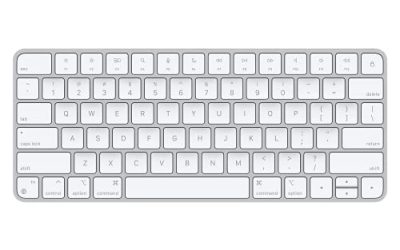
Our Short List of 3

- Best for: Buyers who want deep remapping and a wired board they can retune switch by switch.
- Layout: 75 percent, 82 keys
- Switches: Keychron K Pro Brown (tactile), hot-swappable
- Socket support: 3-pin and 5-pin MX switches
- Connectivity: Wired USB-C

- Best for: Typists and gamers who want a soft, padded typing sound from a complete wireless board.
- Layout: 75 percent, 81 keys
- Switches: LEOBOG Reaper (linear), pre-lubed, hot-swappable
- Mount: Leaf-spring gasket mount, five-layer padding
- Connectivity: Bluetooth 5.0, 2.4 GHz wireless, USB-C wired
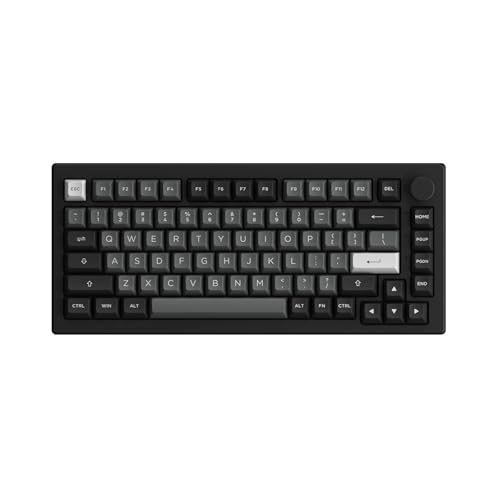
- Best for: Wireless desks that want a knob, tall ASA keycaps and switch swapping in one package.
- Layout: 75 percent
- Switches: Akko V3 Creamy Yellow Pro (linear), hot-swappable
- Keycaps: PBT double-shot, ASA profile
- Connectivity: 2.4 GHz wireless, Bluetooth 5.0, USB-C wired
All 5 Picks at a Glance
| Product | Specs | Action |
|---|---|---|
| Keychron V1 |
| Check price on Amazon |
| EPOMAKER x Aula F75 |
| Check price on Amazon |
| Akko 5075B Plus |
| Check price on Amazon |
 RK Royal Kludge RK84 |
| Check price on Amazon |
 Glorious GMMK 2 Compact Barebones |
| Check price on Amazon |
Choosing a custom keyboard starts with one decision: how much of the board do you want to change yourself? A ready-built hot-swappable model lets you pull switches and keycaps with no tools beyond a puller, while a barebones kit starts as an empty frame and leaves every part to you. Between those poles sit gasket-mounted boards tuned for a softer sound, wireless models with knobs, and firmware that remaps every key.
This guide compares five custom keyboards sold on Amazon, each verified against its listing: the Keychron V1 for wired QMK/VIA control, the EPOMAKER x Aula F75 for its padded gasket build, the Akko 5075B Plus for tri-mode wireless with a knob, the RK Royal Kludge RK84 for triple-mode value in an 84-key frame, and the Glorious GMMK 2 barebones kit for builders who want to choose every switch and keycap themselves.
Our Top Picks
Top 3 picks at a glance
Quick Picks
As an Amazon Associate we earn from qualifying purchases.
The five boards below cover the main custom routes: firmware-first, sound-first, wireless, value and full DIY.
| Product | Best for | Key spec from title |
|---|---|---|
| Keychron V1 | Deep QMK/VIA remapping | 75 percent layout, hot-swappable K Pro Brown switches |
| EPOMAKER x Aula F75 | Soft, quiet gasket typing feel | Leaf-spring gasket mount, five-layer padding |
| Akko 5075B Plus | Tri-mode wireless with a knob | V3 Creamy Yellow Pro switches, ASA PBT keycaps |
| RK Royal Kludge RK84 | Triple-mode value in a bigger frame | Bluetooth 5.0, 2.4 GHz and USB-C, 84 keys |
| Glorious GMMK 2 Compact Barebones | Building from an empty frame | Aluminium 65 percent frame, 5-pin hot-swap sockets |
How to Choose
Decide How Much You Want to Build
Custom keyboards sit on a spectrum. At one end, a complete board arrives with switches and keycaps fitted, and customization means swapping parts later. At the other end, a barebones kit is a frame, plate and PCB with empty sockets, so switches and keycaps are a separate purchase before the board can type at all. Ready-built boards cost less time and carry fewer surprises; kits give full control over feel and sound. First-time buyers usually start with a complete hot-swappable board, then move to a kit once they know which switch weight and keycap profile they actually prefer.
Match the Socket and Switch Type
Every board in this guide uses hot-swap sockets, but the details matter. Sockets that accept both 3-pin and 5-pin switches widen your replacement options, while 5-pin-only sockets suit the many enthusiast switches sold with five pins. Stock switch choice shapes the board from day one: linear switches press smoothly, tactile switches add a bump, and clicky switches add noise some households will not forgive. Pre-lubed switches reduce scratchiness out of the box. Check whether replacement switches you like are sold in the pin format the board takes before you commit to a platform.
Pick a Layout That Fits Your Desk and Games
Layout decides which keys survive. A 65 percent board keeps arrow keys but folds the function row into a layer, which suits small desks and mouse-heavy games. A 75 percent board restores the function row in a tight frame and often adds a rotary knob for volume. Gamers who rely on dedicated F-row keys for abilities or recording shortcuts usually prefer 75 percent, while players who mostly need WASD, arrows and a compact footprint can go smaller. Also check the keycap profile in the listing, because tall sculpted caps and low flat caps feel very different.
Check Firmware and Connection Options
Firmware controls how deep customization goes. QMK and VIA boards remap keys, build layers and record macros through open tools, and VIA changes apply in real time from a browser-style interface. Vendor software on other boards covers the basics but varies in polish. Connections matter just as much: wired USB-C gives the simplest, lowest-latency link, while tri-mode boards add Bluetooth for a tablet or laptop and a 2.4 GHz dongle for wireless play at the desk. If you switch between a gaming PC and a work machine, multi-device Bluetooth pairing is worth prioritizing.
The 5 Best Options
Keychron V1
- Best for: Buyers who want deep remapping and a wired board they can retune switch by switch.
- Layout: 75 percent, 82 keys
- Switches: Keychron K Pro Brown (tactile), hot-swappable
- Socket support: 3-pin and 5-pin MX switches
- Connectivity: Wired USB-C
Buyers who want deep remapping and a wired board they can retune switch by switch.
Wired only, so cable-free desks should look at the tri-mode boards below.
The Keychron V1 is the firmware-first pick: a wired 75 percent board built around QMK and VIA, so every key, layer and macro can be rearranged without proprietary software. Its hot-swappable PCB takes 3-pin and 5-pin MX switches, and the listed Carbon Black version ships with tactile Keychron K Pro Brown switches and OSA PBT double-shot keycaps. Screw-in PCB stabilizers, a silicone acoustic pad and south-facing RGB round out a board aimed at people who expect to keep tuning it long after setup.
EPOMAKER x Aula F75
- Best for: Typists and gamers who want a soft, padded typing sound from a complete wireless board.
- Layout: 75 percent, 81 keys
- Switches: LEOBOG Reaper (linear), pre-lubed, hot-swappable
- Mount: Leaf-spring gasket mount, five-layer padding
- Connectivity: Bluetooth 5.0, 2.4 GHz wireless, USB-C wired
Typists and gamers who want a soft, padded typing sound from a complete wireless board.
No QMK/VIA support; remapping relies on the vendor software instead.
The EPOMAKER x Aula F75 is built around sound and feel. Its leaf-spring gasket mount suspends the plate inside the case, and five layers of internal padding absorb the hollow echo many plastic boards produce. The listed Black Gradient version arrives with pre-lubed LEOBOG Reaper linear switches in hot-swap sockets that accept 3-pin and 5-pin switches, plus PBT keycaps and an aluminium knob. Tri-mode connectivity and a 4000 mAh battery make it as comfortable away from the desk as on it.
Akko 5075B Plus
- Best for: Wireless desks that want a knob, tall ASA keycaps and switch swapping in one package.
- Layout: 75 percent
- Switches: Akko V3 Creamy Yellow Pro (linear), hot-swappable
- Keycaps: PBT double-shot, ASA profile
- Connectivity: 2.4 GHz wireless, Bluetooth 5.0, USB-C wired
Wireless desks that want a knob, tall ASA keycaps and switch swapping in one package.
The themed colorway and tall keycap profile are a taste choice; check the listing photos first.
The Akko 5075B Plus pairs the custom checklist with a themed finish. The listed Black & Silver version is a 75 percent gasket-era board with a rotary knob, tri-mode connectivity and hot-swappable sockets, fitted with Akko V3 Creamy Yellow Pro linear switches and PBT double-shot ASA profile keycaps. ASA caps sit taller and rounder than standard OEM profile, which gives the board a distinct feel before any modding starts. It suits buyers who want wireless freedom and a knob without giving up switch swapping later.
RK Royal Kludge RK84
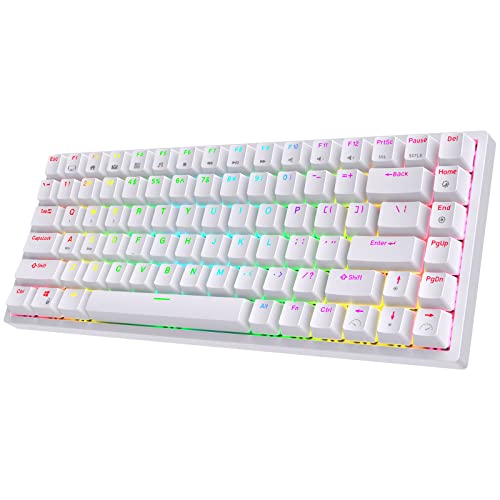
- Best for: First-time custom buyers who want triple-mode wireless and a full function row.
- Layout: 75 percent, 84 keys
- Switches: RK Brown (tactile), hot-swappable
- Connectivity: Bluetooth 5.0, 2.4 GHz wireless, USB-C wired
- Backlight: RGB
First-time custom buyers who want triple-mode wireless and a full function row.
The frame is plastic and the stock stabilizers are basic next to the gasket boards above.
The RK84 is the value route into custom boards: an 84-key, 75 percent frame with triple-mode connectivity at a spec sheet that undercuts most rivals. The listed version carries tactile RK Brown switches in hot-swappable sockets, RGB backlighting and a high-capacity battery for its Bluetooth and 2.4 GHz modes. The extra keys versus a 65 percent board keep the function row and arrows in reach, which helps players who split time between games and everyday typing. It is the simplest recommendation for a first hot-swappable board.
Glorious GMMK 2 Compact Barebones
- Best for: Builders who want to select every switch and keycap themselves from an empty frame.
- Layout: 65 percent barebones frame (switches and keycaps not included)
- Case: Aluminium top shell
- Sockets: Hot-swap, designed for 5-pin switches
- Backlight: Per-key RGB
Builders who want to select every switch and keycap themselves from an empty frame.
It cannot type as delivered; budget for switches and a keycap set on top.
The GMMK 2 Compact Barebones is the true kit in this guide: a 65 percent aluminium frame with hot-swap sockets, per-key RGB and nothing else in the box that touches your fingers. Switches and keycaps are bought separately, so the finished board’s feel, sound and look are entirely your choices. The sockets are designed for 5-pin switches, and Glorious includes a braided USB-C cable plus switch and keycap pullers to start the build. It is the pick for anyone who already owns switches or wants to choose them deliberately.
Which One Fits Your Situation
You Want to Learn Modding Without Soldering
Start with a complete hot-swappable board such as the Keychron V1 or the RK84. Both arrive ready to type, and both let you pull switches with the included-style puller the moment curiosity strikes. You can change one switch, a whole row or the full set, then move to keycaps and stabilizer tuning later. That staged approach teaches the hobby in safe steps, with a working keyboard at every stage instead of a half-built project.
You Play and Type at the Same Desk
Pick a 75 percent tri-mode board. The EPOMAKER x Aula F75 and the Akko 5075B Plus keep a function row for work shortcuts, connect by 2.4 GHz dongle for play, and fall back to Bluetooth for a laptop or tablet. A knob handles volume without leaving the game, and hot-swap sockets mean the typing feel can change when the desk role does. Boards like these cover the mixed-use desk better than a wired-only or 65 percent model.
You Are Building a Board From Scratch
The Glorious GMMK 2 Compact Barebones is your starting point. Its aluminium frame, plate and PCB are fixed, but every switch and keycap is your decision, which is exactly the appeal for builders chasing a specific sound or a themed set. Order switches and keycaps at the same time, confirm the switches are 5-pin, and keep the included pullers nearby. The result is slower to assemble than any complete board here, and far more personal.
You Want a Quieter Board for Shared Spaces
Look at the gasket-mounted options first. The F75 combines a leaf-spring gasket mount, five padding layers and pre-lubed linear switches, a stack designed to soften bottom-out noise in a shared room or late-night setup. The Akko 5075B Plus is the alternative if you also want a knob and taller keycaps. Avoid clicky switch variants entirely, and remember that keycaps and desk mats change the sound further after the board itself is chosen.
Common Mistakes
- Buying a barebones kit and forgetting that switches and keycaps are a separate purchase, so the board cannot type on delivery day.
- Ignoring pin counts: ordering 3-pin switches for a board whose sockets and plate suit 5-pin switches, or the reverse, and bending pins during a forced fit.
- Choosing a 65 percent layout and then missing the dedicated function row in games or work apps that lean on F-keys.
- Assuming every custom board supports QMK/VIA, when many wireless models rely on vendor software with fewer layers and macro options.
- Pulling switches out by hand or with pliers instead of a switch puller, which scratches the plate and bends switch pins.
Frequently Asked Questions
What makes a keyboard a custom keyboard?
A custom keyboard is built for owner changes rather than fixed parts. The defining feature is hot-swappable switch sockets, which let switches be replaced without soldering. Most also add remappable firmware, swappable keycaps and construction choices such as gasket mounting. Barebones kits push the idea furthest by selling the frame alone, while complete custom boards ship assembled with the same freedom to change parts later.
Can I put any mechanical switch into a hot-swappable board?
Almost, with two checks. The switch must be an MX-style switch, and its pin count must match the board: some sockets and plates accept both 3-pin and 5-pin switches, while others, like the GMMK 2 barebones frame, are designed around 5-pin switches. Five-pin switches can usually have their two extra plastic legs clipped to fit 3-pin boards. Switches with optical or magnetic sensing are not interchangeable with standard mechanical sockets.
Does a barebones kit work out of the box?
No. A barebones kit contains the case, plate, PCB and stabilizers only, with empty switch sockets. It cannot register a keystroke until you install switches and fit keycaps, both sold separately. That is the point of the format: the builder chooses the exact switch feel and keycap set. First-time buyers who want to type on day one should choose a complete board and treat a kit as a second project.
Is QMK/VIA support worth it for gaming?
Yes, if you remap keys, build layers for different games or use macros. QMK stores those changes on the board, and VIA applies edits in real time, so the layout travels between computers without reinstalling software. Players who never change a key can skip it and choose on layout, switches and connection instead. The Keychron V1 is built around QMK/VIA; many wireless rivals use vendor tools.
Related guides
More from Amazon
Programs that pair well with the guide above. Offers and eligibility are set by Amazon and may change.
Free shipping on eligible items, Prime Video and more. Eligible new members can start with a free trial.
Start a Prime free trialAd-free music streaming. Eligible new subscribers can start with a free trial.
Try Music Unlimited freeA Prime membership for ages 18-24 with a trial period. Eligibility is set by Amazon.
See Prime for Young AdultsAudiobooks and podcasts to listen to on the go. Eligible new members can start with a free trial.
Try Audible freeAs an Amazon Associate we earn from qualifying purchases.