Our Short List of 3

- Best for: Ryzen 7 and Ryzen 9 gaming builds that use wired Ethernet.
- Socket AM4 with AMD B550 chipset
- ATX form factor
- 4 DDR4 DIMM slots, up to 128GB dual-channel memory
- 2 M.2 slots, primary slot PCIe 4.0 with M.2 Shield Frozr heatsink

- Best for: gaming builds that rely on Wi-Fi but still want fast wired networking as a backup.
- Socket AM4 with AMD B550 chipset
- ATX form factor
- 4 DDR4 DIMM slots, up to 128GB memory
- 12+2 teamed power stages
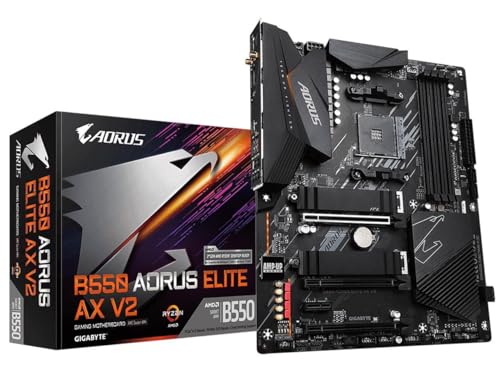
- Best for: all-round ATX builds that want front USB-C and both networking options.
- Socket AM4 with AMD B550 chipset, supports Ryzen 5000, 4000 and 3000 series
- ATX form factor
- 12+2 power phase design
- 4 DDR4 DIMM slots, up to 128GB memory
All 4 Picks at a Glance
| Product | Specs | Action |
|---|---|---|
| MSI MAG B550 Tomahawk |
| Check price on Amazon |
| ASUS ROG Strix B550-F Gaming WiFi II |
| Check price on Amazon |
| GIGABYTE B550 AORUS Elite AX V2 |
| Check price on Amazon |
 MSI B550M PRO-VDH WiFi |
| Check price on Amazon |
Choosing a B550 motherboard is rarely about the chipset itself, because every board here shares the same AM4 socket, DDR4 memory and PCIe 4.0 headline features. The real decision is how much power delivery your Ryzen chip needs, which form factor your case accepts, and whether the board’s networking and storage layout match the parts you already own. A Ryzen 5 5600 and a Ryzen 9 5950X both drop into the same socket, yet they ask very different things of the board underneath them.
This guide is for builders upgrading from Ryzen 3000, anyone putting together a value AM4 gaming PC around a Ryzen 5000 processor, and small form factor fans who want B550 in a mini-ITX footprint. Every pick below was chosen from its Amazon listing, with the specifications taken from that listing rather than from roundups.
Our Top Picks
Top 3 picks at a glance
Quick Picks
As an Amazon Associate we earn from qualifying purchases
| Product | Best for | Key spec from title |
|---|---|---|
| MSI MAG B550 Tomahawk | High-core gaming rigs on wired networking | PCIe 4.0 with 2.5Gbps LAN |
| ASUS ROG Strix B550-F Gaming WiFi II | Wireless gaming builds | WiFi 6E and 2.5Gb LAN |
| GIGABYTE B550 AORUS Elite AX V2 | All-round ATX builds | 12+2 power phase with front USB-C |
| MSI B550M PRO-VDH WiFi | Compact budget builds | Micro-ATX with Wi-Fi and Bluetooth |
| GIGABYTE B550I AORUS PRO AX | Small form factor builds | Mini-ITX with dual M.2 |
How to Choose
Match the power delivery to your CPU
A six-core Ryzen 5 runs happily on almost any B550 board, but twelve and sixteen-core chips draw far more current under sustained loads. Boards built for those processors use more power stages, larger VRM heatsinks and an 8-pin EPS connector arrangement that stays cool during long renders or shader-compiling sessions. If you plan to drop in a Ryzen 9 later, buy the stronger power design now instead of replacing the whole board when you upgrade the processor.
Pick the form factor before anything else
ATX boards give you the most expansion slots and usually four memory slots, micro-ATX trims the slot count to fit smaller cases, and mini-ITX cuts you down to one graphics slot and two memory slots. Measure your case before ordering, and think about what else needs a slot: a capture card, a sound card or a second network adapter all disappear as options once you shrink the board. Form factor is the one choice you cannot work around later.
Understand the PCIe 4.0 lane layout
On B550, the fast lanes come from the processor itself: the main graphics slot and one M.2 slot run at PCIe 4.0 with a Ryzen 3000 or 5000 chip installed. Everything fed by the chipset, including the second M.2 slot on most boards, runs at PCIe 3.0 speeds. That is still plenty for a game library drive, but it means your fastest NVMe SSD belongs in the primary slot, ideally under the heatsink several of these boards include.
Check networking and the BIOS update path
Decide whether your desk gets wired Ethernet, Wi-Fi 6 or Wi-Fi 6E before you shortlist boards, because adding wireless later costs a slot. Just as important, confirm how the board updates its BIOS. Most current stock ships ready for Ryzen 5000, yet older inventory may need an update first, and boards with a USB BIOS flash feature let you do that update without a supported processor installed. The same logic applies to front-panel headers: a case USB-C port needs a matching header on the board, or it stays decorative.
The 5 Best Options
MSI MAG B550 Tomahawk
- Best for: Ryzen 7 and Ryzen 9 gaming builds that use wired Ethernet.
- Socket AM4 with AMD B550 chipset
- ATX form factor
- 4 DDR4 DIMM slots, up to 128GB dual-channel memory
- 2 M.2 slots, primary slot PCIe 4.0 with M.2 Shield Frozr heatsink
Ryzen 7 and Ryzen 9 gaming builds that use wired Ethernet.
there is no onboard Wi-Fi, and you should confirm the installed BIOS supports your exact processor if the box turns out to be early stock.
The Tomahawk is the board to shortlist when a high-core Ryzen chip and a wired connection are both non-negotiable. Its dual LAN arrangement pairs a 2.5 gigabit port with a standard gigabit port, which suits desks that move large files around a home network, and the extended heatsink design plus an M.2 heatsink over the primary slot keep temperatures in check during long sessions. There is no wireless hardware at all, so it fits builders whose PC lives next to the router and who would rather spend on power delivery and cooling than on radios they will never switch on.
ASUS ROG Strix B550-F Gaming WiFi II
- Best for: gaming builds that rely on Wi-Fi but still want fast wired networking as a backup.
- Socket AM4 with AMD B550 chipset
- ATX form factor
- 4 DDR4 DIMM slots, up to 128GB memory
- 12+2 teamed power stages
gaming builds that rely on Wi-Fi but still want fast wired networking as a backup.
the older ROG Strix B550-F Gaming (Wi-Fi) is a separate listing with slower wireless, so check the model name ends in WiFi II before ordering.
This is the wireless counterpart to the Tomahawk’s wired focus, and it gives up very little elsewhere. WiFi 6E covers the 6 GHz band for homes with a matching router, the Intel 2.5 gigabit Ethernet port is there when you do run a cable, and BIOS FlashBack lets you update firmware from a USB stick with no processor fitted. Two M.2 slots and six SATA ports cover most storage plans, while the addressable RGB headers and Aura Sync support suit windowed cases. It suits gamers who cannot run Ethernet to their desk but still want a board that handles an eight or twelve-core upgrade later.
GIGABYTE B550 AORUS Elite AX V2
- Best for: all-round ATX builds that want front USB-C and both networking options.
- Socket AM4 with AMD B550 chipset, supports Ryzen 5000, 4000 and 3000 series
- ATX form factor
- 12+2 power phase design
- 4 DDR4 DIMM slots, up to 128GB memory
all-round ATX builds that want front USB-C and both networking options.
several hardware revisions share this model name, so verify the revision on the listing if a specific header or feature matters to your build.
Gigabyte’s entry is the balanced all-rounder of this group, with a 12+2 phase power design that is comfortable under Ryzen 7 processors, dual M.2 slots and a front-panel USB-C header that many B550 boards skip. That header matters if your case has a USB-C port on the front that would otherwise sit dead. WiFi 6 and a 2.5 gigabit Ethernet port cover networking without forcing a choice between them, and Q-Flash Plus provides the same no-CPU BIOS update safety net as its rivals. It is a sensible default for a first AM4 build that mixes gaming with everyday work.
MSI B550M PRO-VDH WiFi
- Best for: compact budget Ryzen builds, including APU systems that skip a graphics card.
- Socket AM4 with AMD B550 chipset
- Micro-ATX form factor
- 4 DDR4 DIMM slots, up to 128GB, speeds rated to 4400 MHz overclocked
- M.2 slot with heatsink, SATA 6Gb/s ports
compact budget Ryzen builds, including APU systems that skip a graphics card.
the micro-ATX layout has fewer expansion slots than the ATX boards here, so count your add-in cards before choosing it.
Not every B550 build needs a flagship board, and this micro-ATX ProSeries model covers the essentials for far more modest builds. It keeps four memory slots, which many compact boards drop, adds Wi-Fi and Bluetooth for desks without Ethernet, and provides three display outputs, which makes it a natural partner for Ryzen G-series processors with integrated graphics. The primary M.2 slot gets a heatsink, and the layout leaves room for a mid-range graphics card. Choose it for a Ryzen 5 5600 or 5600G system in a small case where the budget belongs in the processor and graphics card instead.
GIGABYTE B550I AORUS PRO AX
Mini-ITX B550 boards are scarce, and this one is unusually complete for the size. A direct 8-phase power design feeds high-core processors in cases with limited airflow, two M.2 slots give a small build real storage headroom, and the rear panel carries DisplayPort plus two HDMI outputs for APU-based systems. WiFi 6 and 2.5 gigabit Ethernet match boards twice its size, and the ALC1220-VB audio codec is a step above typical compact-board sound. It is the pick for a living-room or LAN-party PC built around a Ryzen 5000 chip where every centimetre of the case is spoken for.
Specs
- Socket AM4 with AMD B550 chipset
- Mini-ITX form factor
- Direct 8-phase digital VRM design
- 2 DDR4 DIMM slots
- 2 M.2 slots (PCIe 4.0 x4 and PCIe 3.0 x4) plus 4 SATA 6Gb/s ports
- WiFi 6 wireless and 2.5 GbE LAN
- Realtek ALC1220-VB HD audio
- DisplayPort 1.4 and 2 HDMI 2.0b outputs
Best for: small form factor gaming PCs that still want dual NVMe storage and strong networking.
Watch out for: production revisions changed the wireless module under this same model name, so confirm whether the listing offers WiFi 6 or WiFi 6E if the 6 GHz band matters to you.
ASIN: B089FWWN62
Which One Fits Your Situation
You are upgrading from a Ryzen 3000 chip
Keep your DDR4 and case, and choose between the MSI MAG B550 Tomahawk for wired setups or the ASUS ROG Strix B550-F Gaming WiFi II for wireless ones. Both have the power delivery headroom for a Ryzen 7 or Ryzen 9 upgrade, and both update their BIOS easily if the installed firmware predates your new processor.
You are building a budget Ryzen 5 system
The MSI B550M PRO-VDH WiFi leaves more of your budget for the processor, graphics card and storage while still including Wi-Fi, Bluetooth and four memory slots. In a micro-ATX case it makes a tidy, quiet everyday gaming PC, and it handles a Ryzen 5 5600 or an APU-based 5600G build equally well.
You want the smallest gaming PC possible
Pick the GIGABYTE B550I AORUS PRO AX and a mini-ITX case with good airflow. It keeps dual M.2 storage, 2.5 gigabit networking and a power design that tolerates high-core chips, so the only real compromises are the single expansion slot and two memory slots that every board this size shares.
Your desk has no Ethernet cable
Either Wi-Fi board works, but they differ by band: the ASUS ROG Strix B550-F Gaming WiFi II adds WiFi 6E for homes with a 6 GHz router, while the GIGABYTE B550 AORUS Elite AX V2 sticks to WiFi 6 and adds a front USB-C header. Match the board to the router you actually own.
Common Mistakes
- Buying DDR5 memory for a B550 build, when every board on this platform uses DDR4 only.
- Assuming the installed BIOS already supports Ryzen 5000, then having no older processor available to perform the update.
- Installing the fastest NVMe drive in the second M.2 slot, which runs at PCIe 3.0 speeds on most B550 boards.
- Ordering an ATX motherboard for a case that only accepts micro-ATX or mini-ITX boards.
- Mixing up near-identical model names, such as the B550-F Gaming WiFi and WiFi II, or the Tomahawk and the Tomahawk MAX WiFi.
Frequently Asked Questions
Do B550 motherboards support Ryzen 5000 processors out of the box?
Most boards shipping today do, because B550 launched alongside firmware that covers the Ryzen 5000 series. Early production stock may still need an update, which is why a USB BIOS flash feature matters: boards with BIOS FlashBack or Q-Flash Plus can update with no processor installed at all.
Should I choose B550 or move to a newer platform?
Choose B550 when you already own DDR4 memory or an AM4 processor, or when a Ryzen 5000 chip covers your needs at a lower total build cost. A newer AM5 platform makes more sense for a completely fresh build with no parts to reuse, since it requires DDR5 memory and a new processor.
Can a B550 board run a PCIe 4.0 graphics card and NVMe drive at full speed?
Yes, as long as a Ryzen 3000 or 5000 processor is installed. The graphics slot and the primary M.2 slot both connect to the processor and run at PCIe 4.0, while slots and ports fed by the B550 chipset itself run at PCIe 3.0, which is still fine for extra storage.
How much memory can these B550 boards hold?
The ATX and micro-ATX picks here have four DDR4 slots and support up to 128GB in total. The mini-ITX GIGABYTE B550I AORUS PRO AX has two slots, so plan on a two-stick kit from the start if you build small, because there are no spare slots to fill later.
Related guides
More from Amazon
Programs that pair well with the guide above. Offers and eligibility are set by Amazon and may change.
Free shipping on eligible items, Prime Video and more. Eligible new members can start with a free trial.
Start a Prime free trialAd-free music streaming. Eligible new subscribers can start with a free trial.
Try Music Unlimited freeA Prime membership for ages 18-24 with a trial period. Eligibility is set by Amazon.
See Prime for Young AdultsAudiobooks and podcasts to listen to on the go. Eligible new members can start with a free trial.
Try Audible freeAs an Amazon Associate we earn from qualifying purchases.