Our Short List of 3

- Best for: Casual gamers who want a fast 24-inch screen with room for two connected devices.
- 24-inch Full HD display, 1920 x 1080 resolution
- 165Hz refresh rate with 1ms response time and blur reduction
- 2 x HDMI and 2 x DisplayPort inputs
- Built-in speakers

- Best for: Home workers and students who want a larger screen for documents, video and light gaming.
- 27-inch Full HD display, 1920 x 1080 resolution
- 100Hz refresh rate with 1ms response time
- AMD FreeSync support
- DisplayPort and 2 x HDMI inputs
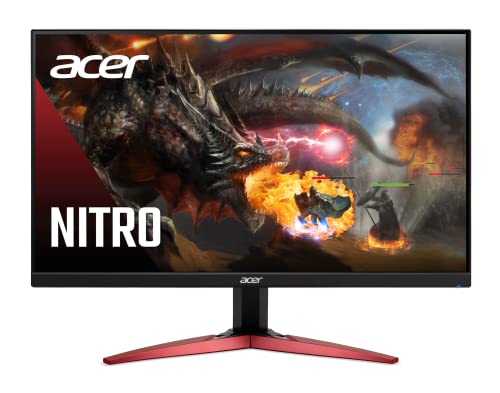
- Best for: Casual and competitive gamers who want fast motion and strong dark tones on a compact screen.
- 23.8-inch Full HD VA display, 1920 x 1080 resolution
- 165Hz refresh rate with 1ms VRB response time
- AMD FreeSync Premium technology
- 1 x DisplayPort 1.2 and 2 x HDMI 2.0
All 3 Picks at a Glance
| Product | Specs | Action |
|---|---|---|
| Sceptre E248B-FW165T |
| Check price on Amazon |
| Sceptre E275W-FW100T |
| Check price on Amazon |
| Acer Nitro KG241Y Sbiip |
| Check price on Amazon |
A monitor is the part of a desk setup you stare at for hours, so the real decision is not which screen looks best in a product photo. It is which trade-off you can live with every day: a smaller screen with a faster refresh rate, a larger screen with a slower panel, or a plain office display that never tries to be a gaming screen. Each choice changes how text reads, how motion feels, and how much desk space disappears.
This guide is for people setting up a first desk, students and home workers who need a second screen, and casual gamers who want smoother motion without a flagship display. Every monitor below was chosen from the facts in its Amazon listing: screen size, panel type, resolution, refresh rate, response time and ports. Nothing here was picked for a brand name alone.
Our Top Picks
- New! Sceptre 24-inch Prime Gaming Monitor DisplayPort x224 inches6.7 x 21.3 x 15.6 inchesCheck on Amazon
- Sceptre 27-inch Prime Gaming Monitor 100Hz 1ms DisplayPort277.66 x 24.13 x 17.21 inches7.21 poundsCheck on Amazon
- Acer Nitro 23.8in FHD 1920x1080 180Hz Gaming Monitor23.8-inch21.27 x 7.44 x 16.3 inches8.4 poundsCheck on Amazon
Top 3 picks at a glance
Quick Picks
As an Amazon Associate we earn from qualifying purchases.
| Product | Best for | Key spec from title |
|---|---|---|
| Sceptre E248B-FW165T | Fast-paced casual gaming on a 24-inch screen | 24-inch, 165Hz, Full HD, DisplayPort and HDMI |
| Sceptre E275W-FW100T | A larger 27-inch screen for work and play | 27-inch, 100Hz, 1ms, Full HD, FreeSync |
| ASUS VA24EHF | Eye comfort during long work and study sessions | 24-inch IPS, Full HD, 100Hz, Adaptive-Sync, 1ms MPRT |
| Acer Nitro KG241Y Sbiip | Smooth gaming with FreeSync Premium on a 23.8-inch panel | 23.8-inch Full HD VA, 165Hz, 1ms VRB, FreeSync Premium |
How to Choose
Start with screen size and desk space
A 24-inch monitor fits a narrow desk, a dorm room and a shared table without crowding a keyboard and a notebook. A 27-inch screen shows more of a spreadsheet, a document and a game scene at once, but it needs a deeper desk so the panel does not sit too close to your eyes. Measure your desk width and the distance from your chair before you choose, because an oversized screen forces you to turn your head all day. Size also changes how sharp Full HD looks: the same 1920 x 1080 resolution spreads across more inches on a 27-inch panel, so text looks slightly softer than on a 24-inch one.
Pick the panel type for your main use
IPS panels keep colours steady when you view the screen from an angle, which matters when the monitor sits off to one side of a desk. VA panels usually show deeper dark tones, which suits films and games with night scenes, but their colours can shift more at wide angles. The listings in this guide name the panel type in the title, so check that line before anything else. If your day is mostly documents, browsing and video calls, an IPS panel is the safer all-round choice. If your evenings are mostly games and films in a dim room, a VA panel has a real advantage.
Match refresh rate and response time to motion
A 60Hz or 75Hz screen is fine for reading, writing and watching video, because the image changes slowly. A 100Hz screen feels noticeably smoother when you scroll a long page or move a window, and a 165Hz screen makes fast games feel more responsive. Response time matters alongside refresh rate: the listings here quote 1ms figures, but note the method behind each number, since MPRT and VRB are different ways of measuring motion blur. Do not chase the highest refresh rate if your computer cannot feed it, because a 165Hz monitor shows its advantage only when the graphics hardware keeps up. For mixed work and casual play, 100Hz is a sensible middle ground.
Check ports, speakers and the stand before you order
A monitor with two HDMI ports and a DisplayPort connects a laptop, a console and a desktop without swapping cables, and that flexibility matters more than it first appears. Built-in speakers save desk space and suit video calls and casual viewing, but they are small by nature, so plan for headphones or separate speakers if sound quality matters to you. Check whether the stand tilts and whether the monitor supports a VESA wall mount, because a fixed stand at the wrong height causes neck strain over a long day. Also confirm the cable in the box matches your computer: a monitor with DisplayPort is only useful if your device has that output or you already own an adapter.
The 4 Best Options
Sceptre E248B-FW165T
- Best for: Casual gamers who want a fast 24-inch screen with room for two connected devices.
- 24-inch Full HD display, 1920 x 1080 resolution
- 165Hz refresh rate with 1ms response time and blur reduction
- 2 x HDMI and 2 x DisplayPort inputs
- Built-in speakers
Casual gamers who want a fast 24-inch screen with room for two connected devices.
The listing gives conflicting refresh-rate figures in different places, so confirm the 165Hz figure and check which cable ships in the box.
The Sceptre E248B-FW165T is a 24-inch Full HD monitor built around a fast refresh rate, and it suits casual gamers who want smoother motion in competitive games without moving to a larger screen. Its listing pairs a 165Hz refresh rate with a 1ms response time and blur reduction, plus two HDMI ports and two DisplayPort inputs for a desktop and a second device. Built-in speakers and blue-light shift technology round out a screen that works for evening games and daytime browsing. One caution: the listing shows both 165Hz and 180Hz in different places, so treat 165Hz as the safe figure when you compare it with other monitors.
Watch out for: The listing gives conflicting refresh-rate figures in different places, so confirm the 165Hz figure and check which cable ships in the box.
Sceptre E275W-FW100T
- Best for: Home workers and students who want a larger screen for documents, video and light gaming.
- 27-inch Full HD display, 1920 x 1080 resolution
- 100Hz refresh rate with 1ms response time
- AMD FreeSync support
- DisplayPort and 2 x HDMI inputs
Home workers and students who want a larger screen for documents, video and light gaming.
Text looks softer on a 27-inch Full HD panel than on a smaller screen, so check your viewing distance before you choose this size.
The Sceptre E275W-FW100T gives you a 27-inch Full HD screen with a 100Hz refresh rate, and it suits anyone who wants a bigger picture for work documents, video and light gaming. Its listing pairs the larger panel with a 1ms response time, AMD FreeSync, built-in speakers and an eye-care frameless design, plus a DisplayPort and two HDMI ports for a laptop and a console. The 100Hz refresh rate makes scrolling feel smoother than a standard office screen, while the larger size keeps text comfortable during long sessions. Remember that Full HD stretches further across 27 inches, so sit farther back than you would with a 24-inch screen.
Watch out for: Text looks softer on a 27-inch Full HD panel than on a smaller screen, so check your viewing distance before you choose this size.
ASUS VA24EHF
The ASUS VA24EHF is a 24-inch IPS monitor aimed at long sessions, and it suits office work, study and browsing more than fast competitive play. Its listing highlights a 23.8-inch viewable IPS panel with Full HD resolution, a 100Hz refresh rate, Adaptive-Sync, a 1ms MPRT response time and a frameless design, plus low blue light and flicker-free operation for eye comfort. The IPS panel keeps colours consistent from wider viewing angles, which helps when the screen is shared or angled on a desk. HDMI is the listed video input, so confirm your device has an HDMI output or a suitable adapter before ordering.
Specs
- 24-inch display, 23.8-inch viewable IPS panel
- Full HD resolution, 1920 x 1080
- 100Hz refresh rate with 1ms MPRT response time
- Adaptive-Sync support
- HDMI input
- Low Blue Light and Flicker Free
- Wall mountable
Best for: Office work, study and long reading sessions where eye comfort and steady colours matter most.
Watch out for: The listing names HDMI as the video input, so check your computer’s outputs and whether a DisplayPort connection matters to you.
Acer Nitro KG241Y Sbiip
- Best for: Casual and competitive gamers who want fast motion and strong dark tones on a compact screen.
- 23.8-inch Full HD VA display, 1920 x 1080 resolution
- 165Hz refresh rate with 1ms VRB response time
- AMD FreeSync Premium technology
- 1 x DisplayPort 1.2 and 2 x HDMI 2.0
Casual and competitive gamers who want fast motion and strong dark tones on a compact screen.
Colours can shift when viewed from a wide angle, so place the monitor straight ahead and check the stand adjustment range.
The Acer Nitro KG241Y Sbiip is a 23.8-inch Full HD VA gaming monitor, and it suits players who want fast motion and deep dark tones from a compact screen. Its listing pairs a 165Hz refresh rate with a 1ms VRB response time and AMD FreeSync Premium, plus a ZeroFrame design that keeps the bezel slim. One DisplayPort 1.2 and two HDMI 2.0 ports cover a desktop and a console, and the VA panel suits games and films with darker scenes. VA panels can shift colour more at wide angles than IPS panels, so sit directly in front of the screen for the best image.
Watch out for: Colours can shift when viewed from a wide angle, so place the monitor straight ahead and check the stand adjustment range.
Which One Fits Your Situation
You game most evenings and want the fastest screen
Choose the Sceptre E248B-FW165T or the Acer Nitro KG241Y Sbiip, because both list a 165Hz refresh rate and a 1ms response time for smoother motion. Pick the Sceptre if you want two DisplayPort inputs and two HDMI ports for several devices, and pick the Acer if FreeSync Premium and the slim ZeroFrame design matter more. Either one beats a standard office screen in fast games.
You work from home and read documents all day
Choose the ASUS VA24EHF, because its IPS panel holds colours steady at wider angles and its low blue light and flicker-free features suit long reading sessions. The 100Hz refresh rate also makes scrolling through long documents feel smoother than a basic office display. If your desk is deep enough, the larger Sceptre E275W-FW100T is the alternative when screen size matters more than panel type.
You want one bigger screen for everything
Choose the Sceptre E275W-FW100T, because its 27-inch panel shows more of a document, a video and a game scene at once, and its 100Hz refresh rate keeps everyday motion smooth. Its DisplayPort and two HDMI ports connect a laptop and a console without cable swapping. Sit a little farther back than you would with a 24-inch screen so Full HD text stays comfortable.
You need a second screen beside a laptop
Choose the ASUS VA24EHF or the Sceptre E248B-FW165T, because both are 24-inch screens that fit beside a laptop without taking over the desk. The ASUS suits reading and office work with its IPS panel and eye-comfort features, while the Sceptre suits a mix of work and gaming after hours. Check that your laptop has a matching HDMI or DisplayPort output before you order.
Safety Notes
Monitors run on mains power, so place the screen on a stable surface away from liquids and keep the ventilation slots clear of books, cloth and dust. Use the power adapter and cable supplied with the monitor, and plug it into a socket you can reach easily so you can switch it off. If the screen, cable or plug looks damaged, smells of burning or feels hot, unplug it and stop using it. Keep the monitor out of reach of small children pulling on cables, and mount it on a wall only with a bracket rated for its size and weight.
Common Mistakes
- Buying a 27-inch Full HD screen for close-up reading without checking how soft text looks at that size and distance.
- Choosing a 165Hz monitor when the computer cannot output that refresh rate, so the extra speed never appears.
- Ignoring the ports and ordering a monitor whose inputs do not match the computer, console or laptop it must connect to.
- Assuming built-in speakers replace proper audio gear for films, music or competitive games.
- Skipping the stand and mounting check, then discovering the screen sits too low or cannot tilt to a comfortable height.
Frequently Asked Questions
Is a 100Hz monitor enough for casual gaming?
Yes, a 100Hz monitor is enough for casual gaming, because it shows smoother motion than a standard 60Hz or 75Hz screen in most games. You will notice the difference most when scrolling, moving the camera or playing fast action titles. Competitive players who chase every frame may prefer a 165Hz screen, but for relaxed evening play a 100Hz panel gives a clear step up without demanding more from your computer.
Does panel type matter more than refresh rate?
It depends on what you do most. Panel type decides how colours and dark tones look: an IPS panel suits shared viewing and office work, while a VA panel suits films and games with dark scenes. Refresh rate decides how smooth motion feels, which matters more in fast games. If you split time between work and play, look for a monitor that balances both, such as a 100Hz IPS screen.
Can I connect a monitor to a laptop and a console at the same time?
Yes, if the monitor has enough inputs. The Sceptre models in this guide list two HDMI ports plus DisplayPort, so a laptop and a console can stay plugged in and you switch inputs from the monitor menu. Check your devices first: a laptop needs a matching HDMI or DisplayPort output, and a console needs an HDMI port. A monitor with only one input forces you to swap cables every time.
What should I check before buying a budget monitor?
Check screen size against your desk depth, panel type against your main use, and refresh rate against what your computer can output. Confirm the ports match your devices, look at the stand adjustment and VESA mounting options, and read the listing for what ships in the box, especially cables. Finally, note any conflicting figures in the listing, such as refresh rate, and use the lower number when you compare monitors.
Related guides
More from Amazon
Programs that pair well with the guide above. Offers and eligibility are set by Amazon and may change.
Free shipping on eligible items, Prime Video and more. Eligible new members can start with a free trial.
Start a Prime free trialAd-free music streaming. Eligible new subscribers can start with a free trial.
Try Music Unlimited freeA Prime membership for ages 18-24 with a trial period. Eligibility is set by Amazon.
See Prime for Young AdultsAudiobooks and podcasts to listen to on the go. Eligible new members can start with a free trial.
Try Audible freeAs an Amazon Associate we earn from qualifying purchases.