Our Short List of 3

- Best for: players who want wireless freedom and long battery life
- Sensor: HERO optical sensor, 200 to 12,000 DPI
- Tracking speed: over 400 IPS
- Connection: LIGHTSPEED wireless via USB receiver, 1 ms report rate
- Buttons: 6 programmable buttons
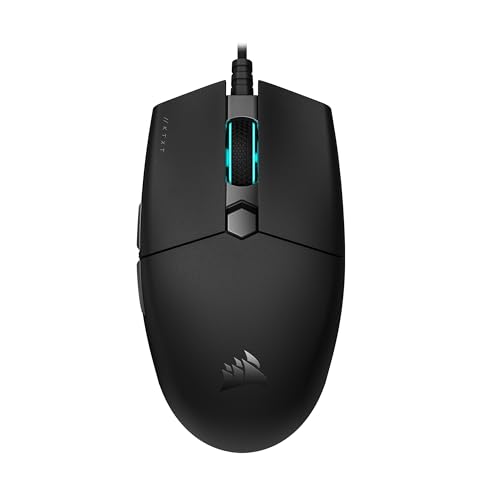
- Best for: fingertip and claw players who want the lightest wired option here
- Sensor: PixArt optical sensor, up to 18,000 DPI, adjustable in 1 DPI steps
- Tracking speed: 400 IPS, 50G acceleration
- Connection: wired USB with lightweight paracord cable
- Buttons: 6 programmable buttons with QUICKSTRIKE primary clicks

- Best for: medium and large right hands that palm grip for long sessions
- Sensor: optical sensor, up to 6,400 DPI
- Tracking speed: 220 IPS, 30G acceleration
- Polling rate: 1,000 Hz Ultrapolling
- Buttons: 5 independently programmable Hyperesponse buttons
All 4 Picks at a Glance
| Product | Specs | Action |
|---|---|---|
| Logitech G305 LIGHTSPEED |
| Check price on Amazon |
| Corsair KATAR PRO XT |
| Check price on Amazon |
| Razer DeathAdder Essential |
| Check price on Amazon |
 HyperX Pulsefire Core |
| Check price on Amazon |
Spending less on a mouse used to mean accepting a sensor that spun out during fast flicks, mushy side buttons, and a cable that fought every movement. That trade-off has mostly disappeared at this level, so the real decision is now about fit: the shape that suits your grip, the weight your wrist can move for hours, and whether a wire still makes sense on your desk.
This guide is for PC players who want a proper gaming mouse without stepping into flagship territory, whether that means a first upgrade from a bundled office mouse or a spare for a second setup. The five picks below were chosen from their Amazon listing titles and specifications, covering wireless freedom, ultralight wired speed, a large ergonomic shape, and two safe symmetrical designs.
Top 3 picks at a glance
Quick Picks
As an Amazon Associate we earn from qualifying purchases
| Product | Best for | Key spec from title |
|---|---|---|
| Logitech G305 LIGHTSPEED | Wireless on a budget | HERO sensor, 12,000 DPI |
| Corsair KATAR PRO XT | Ultralight wired FPS play | 18,000 DPI optical sensor |
| SteelSeries Rival 3 | Light wired claw grip | 8,500 CPI TrueMove Core sensor |
| Razer DeathAdder Essential | Large hands, palm grip | 6,400 DPI optical sensor |
| HyperX Pulsefire Core | Symmetrical shape, extra buttons | Pixart 3327 sensor, 6,200 DPI |
How to Choose
Match the Shape to Your Grip and Hand Size
Shape decides comfort more than any sensor figure, because a mouse that fights your hand will tire you long before its tracking becomes the limit. Palm grip players, who rest the whole hand on the shell, usually prefer a taller ergonomic body such as the DeathAdder Essential at 127 mm long. Claw and fingertip players, who steer with curled fingers, tend to suit shorter symmetrical shells such as the Rival 3 or KATAR PRO XT. Measure your hand from fingertip to wrist crease, then compare it with the length in each listing before ordering.
Read the Sensor Figures That Actually Matter
DPI and CPI headline numbers are easy to inflate, yet most players settle somewhere between 400 and 3,200 for shooters, well inside every range listed here. Tracking speed, shown as IPS, and acceleration tolerance matter more during panic flicks, because they describe how fast you can move before the sensor loses the surface. The G305 tracks beyond 400 IPS, the KATAR PRO XT reaches 400 IPS, and the Rival 3 manages 300 IPS, all comfortably past normal arm movement. Polling rate is simpler: every pick here reports at 1,000 Hz, so cursor updates arrive every millisecond.
Decide Between Wireless Freedom and Wired Simplicity
A wireless mouse removes cable drag entirely and keeps a desk or living-room setup tidy, which is why the G305 remains popular despite using a replaceable AA battery. The compromise is weight, since that battery pushes it to 99 grams, plus the small risk of forgetting a spare cell before a long session. Wired models such as the Pulsefire Core and KATAR PRO XT never need power and start working the moment they are plugged in. Their cables still differ, though: a flexible paracord-style cord pulls far less than a stiff rubber one.
Weigh the Mouse Against Your Games and Desk
Weight changes how a mouse feels in different genres. Lighter models around 73 to 77 grams suit low-sensitivity shooter players who sweep across a large pad, because less mass means less effort to start and stop each flick. Heavier mice near 96 to 99 grams can feel steadier for high-sensitivity aiming, strategy games, and everyday desktop work, where tiny movements dominate. Neither direction is automatically better. Problems start when the weight fights your style, for example a heavy ergonomic mouse paired with a small pad and constant lifting.
The 5 Best Options
Logitech G305 LIGHTSPEED
- Best for: players who want wireless freedom and long battery life
- Sensor: HERO optical sensor, 200 to 12,000 DPI
- Tracking speed: over 400 IPS
- Connection: LIGHTSPEED wireless via USB receiver, 1 ms report rate
- Buttons: 6 programmable buttons
players who want wireless freedom and long battery life
the symmetrical shell can feel small for large palm-grip hands
The G305 is the pick for players who want to cut the cable without leaving this budget tier behind. Its compact symmetrical shell suits small to medium hands using claw or fingertip grips, while the HERO sensor delivers precise tracking with none of the smoothing that makes older budget wireless mice feel vague. A single AA battery keeps it running for months of regular play rather than days, and the receiver stores inside the body, which makes it an easy travel mouse for a laptop bag as well as a tidy desk at home.
Corsair KATAR PRO XT
- Best for: fingertip and claw players who want the lightest wired option here
- Sensor: PixArt optical sensor, up to 18,000 DPI, adjustable in 1 DPI steps
- Tracking speed: 400 IPS, 50G acceleration
- Connection: wired USB with lightweight paracord cable
- Buttons: 6 programmable buttons with QUICKSTRIKE primary clicks
fingertip and claw players who want the lightest wired option here
the small shell is a poor match for large hands and palm grip
The KATAR PRO XT targets competitive shooter players who count grams. At 73 grams it is the lightest mouse in this guide, and its compact symmetrical shape is built for claw and fingertip grips rather than a relaxed palm rest. The PixArt optical sensor offers an unusually wide adjustment range in single steps, so dialing in an exact sensitivity takes seconds instead of compromise. Corsair’s QUICKSTRIKE buttons use a spring-loaded design intended to close the gap before each click registers, and the lightweight paracord cable reduces the drag that usually gives wired ultralight mice away.
SteelSeries Rival 3
The Rival 3 is a straightforward wired mouse for players who want a light, safe shape and nothing they have to learn. Its TrueMove Core sensor was developed with PixArt and delivers true one-to-one tracking, while the split-trigger primary buttons and mechanical switches rated for 60 million clicks give it a durability story that many mice at this level skip. At 77 grams it stays easy to flick, the symmetrical body works for claw and fingertip grips, and the three-zone Prism RGB lighting can be matched to the rest of a setup through SteelSeries software.
Specs
- Sensor: TrueMove Core optical sensor, 100 to 8,500 CPI in 100 CPI steps
- Tracking speed: 300 IPS, 35G acceleration
- Polling rate: 1,000 Hz, 1 ms
- Buttons: 6 programmable buttons, split-trigger design
- Switches: mechanical switches rated for 60 million clicks
- Weight: 77 grams
- Lighting: Brilliant Prism RGB
Best for: claw and fingertip players who want a light wired all-rounder
Watch out for: the cable is a plain rubber design rather than a flexible paracord type
ASIN: B08176SM7C
Razer DeathAdder Essential
- Best for: medium and large right hands that palm grip for long sessions
- Sensor: optical sensor, up to 6,400 DPI
- Tracking speed: 220 IPS, 30G acceleration
- Polling rate: 1,000 Hz Ultrapolling
- Buttons: 5 independently programmable Hyperesponse buttons
medium and large right hands that palm grip for long sessions
right-handed only, and the 6,400 DPI ceiling suits this tier rather than spec chasers
The DeathAdder Essential exists for one clear reason: its right-handed ergonomic shape is one of the most proven in gaming, and this version brings that shape to the lowest end of the budget. The long, gently sloped body fills a medium or large palm, the rubber side grips help during lifts, and the sensor ceiling of 6,400 DPI is still far above the settings most shooter players actually use. You give up the extras found on pricier DeathAdder models, including advanced lighting and higher switch ratings, but the fundamentals of comfort and tracking remain intact here.
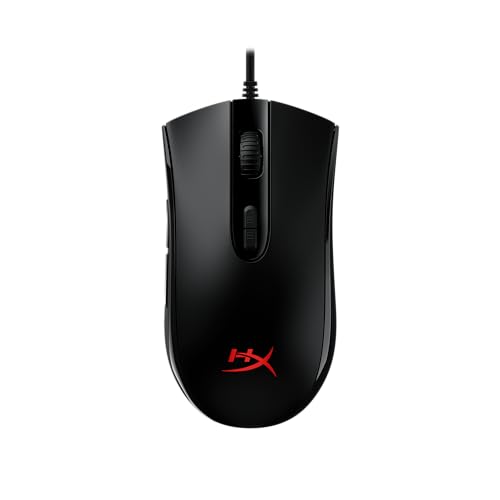
HyperX Pulsefire Core
- Best for: first-time buyers who want extra buttons and a forgiving symmetrical shape
- Sensor: Pixart 3327 optical sensor, native DPI up to 6,200
- Connection: wired USB with braided cable
- Buttons: 7 programmable buttons
- Switches: gaming-grade switches rated for 20 million clicks
first-time buyers who want extra buttons and a forgiving symmetrical shape
the braided cable is stiffer than the paracord cable on the KATAR PRO XT
The Pulsefire Core is the quiet value pick of the group: a symmetrical wired mouse with seven programmable buttons, which is one more than most rivals here offer, and a shape HyperX describes as fitting both palm and claw grips. Its Pixart 3327 sensor tracks without hardware acceleration, the large skates are meant to keep glide smooth and controlled, and the switches are rated for 20 million clicks. Single-zone RGB lighting and NGenuity software round out a package aimed at players setting up their first proper gaming desk, especially anyone who binds abilities or voice chat to side buttons.
Which One Fits Your Situation
You Play Shooters at Low Sensitivity on a Big Pad
Choose the Corsair KATAR PRO XT. Wide arm sweeps reward the lowest weight in this guide, and its 73 gram shell asks the least effort each time you start or stop a flick. The Rival 3 is the fallback if you prefer a slightly larger body, since it stays light while adding a roomier shape for claw grip and longer sessions without the cable ever becoming the deciding factor.
You Hate Cables and Play From the Sofa or a Laptop
Choose the Logitech G305 LIGHTSPEED. It is the only wireless mouse in this guide, its receiver hides inside the shell for travel, and a single AA battery lasts up to 250 hours, so charging routines never enter the picture. The trade is a heavier body than the wired ultralight picks, which matters less for mixed gaming, strategy titles, and everyday use than it does for competitive low-sensitivity aiming.
Your Hands Are Large and Your Palm Does the Steering
Choose the Razer DeathAdder Essential. Its 127 mm ergonomic body is the only shape here designed specifically to support a full palm, and the sloped right-handed form keeps the wrist in a neutral position during long sessions. Smaller symmetrical mice can leave large hands cramping around the sides, while this one lets your fingers rest where the buttons already sit, with rubber grips helping each lift.
You Are Building a First Gaming Setup and Bind Extra Keys
Choose the HyperX Pulsefire Core. Seven programmable buttons give you room for a push-to-talk key, a melee bind, and a DPI shift without reaching for the keyboard, and the symmetrical shape is forgiving while you work out which grip you actually prefer. Its braided cable and large skates also tolerate a basic desk surface better than lighter mice that assume a large cloth pad from day one.
Common Mistakes
- Choosing by the highest DPI number, even though every sensor here already exceeds the settings most players use, while shape and weight go untested.
- Buying a small ultralight mouse for a large palm-grip hand, then blaming wrist pain on long sessions instead of on the poor fit.
- Ignoring cable type on wired models, because a stiff cable on a small desk can drag more than a slightly heavier mouse ever will.
- Forgetting that the G305 runs on a replaceable AA battery, so keeping one spare nearby is part of owning it happily.
- Setting sensitivity once and never revisiting it after changing mice, although a different weight and skate setup will shift your aim feel.
Frequently Asked Questions
Is a wireless mouse fast enough for competitive shooters at this level?
Yes, provided it uses a proper gaming connection rather than a basic office link. The G305 reports at 1 ms over its LIGHTSPEED receiver, matching the wired picks in this guide on that figure. Its sensor also tracks beyond 400 IPS, so fast flicks stay registered. The practical differences are battery management and weight, not a delay you can feel during normal play.
How much DPI do I actually need for shooters and MOBA games?
Far less than the headline figures suggest. Most shooter players use effective settings built from 400 to 1,600 DPI combined with in-game sensitivity, and MOBA players rarely go far beyond that range either. Every mouse here reaches at least 6,200 DPI, which leaves generous headroom. Smooth, acceleration-free tracking at your chosen setting matters much more than a five-figure maximum you will never select.
Should I pick the lightest mouse I can find?
Only if your grip and games reward it. Fingertip and claw players making wide, fast movements usually feel the benefit of a 73 gram mouse immediately. Palm grip players, and anyone whose aim relies on small steady corrections, often prefer the planted feel of something closer to 90 grams. If your current mouse feels tiring to stop mid-flick, go lighter; if it feels twitchy, added weight may help.
Can these mice work for everyday office use as well as gaming?
Comfortably, yes. All five offer programmable buttons that can carry copy, paste, or media shortcuts, and their sensors track accurately on ordinary desks and pads. The DeathAdder Essential and Pulsefire Core feel most natural for full workdays thanks to their supportive shapes, while the G305 doubles as a travel mouse. Just silence or dim any lighting if your workplace prefers a quieter-looking setup during meetings and shared hours.
Related guides
More from Amazon
Programs that pair well with the guide above. Offers and eligibility are set by Amazon and may change.
Free shipping on eligible items, Prime Video and more. Eligible new members can start with a free trial.
Start a Prime free trialAd-free music streaming. Eligible new subscribers can start with a free trial.
Try Music Unlimited freeA Prime membership for ages 18-24 with a trial period. Eligibility is set by Amazon.
See Prime for Young AdultsAudiobooks and podcasts to listen to on the go. Eligible new members can start with a free trial.
Try Audible freeAs an Amazon Associate we earn from qualifying purchases.