A home office monitor does a different job than a gaming display. You look at spreadsheets, documents, and video calls for hours, so text sharpness, stand adjustability, and the ports on the back matter more than a 1ms response claim. At the same time, many remote workers use the same screen for evening games or streaming, which is why a modest refresh rate and adaptive sync still earn a place on the spec list.
This guide targets people setting up a desk at home who want a dependable screen without overspending, whether that means a small 22-inch panel for a tight corner or a 27-inch display for side-by-side windows. Seven monitors are compared, all based on what the product titles state, so confirm exact dimensions, stand range, and included cables on each listing. Several unrelated items appeared in the original shortlist, such as a desk lamp, a desk, and a baby monitor, and were left out because they are not computer displays. The 2026 market for 1080p office monitors is crowded, so the details below help separate them.
Our Top Picks
 Philips 24 Inch Computer Monitor FHD 100Hz VA24 inch 100Hz8.7 x 21.3 x 16.4 inches6.4 poundsCheck on Amazon
 MNNM 24 Inch Computer Monitor FHD 1080p 100Hz24"/FHD/100Hz1.62 x 21.27 x 16.14 inchesCheck on Amazon
 SANSUI Monitor 24 inch 100Hz 120Hz PC Computer23.8221.18 x 7.36 x 16.3 inches7.7 poundsCheck on Amazon


Top 3 picks at a glance
Quick Picks
As an Amazon Associate we earn from qualifying purchases at no extra cost to you.


| Product | Best for | Key spec from the title |
|---|---|---|
| Philips 241V8LB 24-inch | Everyday desk work | FHD 100Hz VA, flicker-free, tilt adjust |
| MNNM 24-inch | Adjustable ergonomics | Height, tilt, pivot, swivel, dual speakers |
| Philips 271V8LB 27-inch | More screen space | 27-inch FHD 100Hz VA, HDMI 1.4 and VGA |
| SANSUI 24-inch | Budget desk setup | 100Hz to 120Hz, HDMI and VGA, VESA mount |
| SANSUI 22-inch | Small or shared desk | 120Hz, dual HDMI, 100% sRGB |
| acer SB272 27-inch | IPS color and thin bezels | FHD IPS, ZeroFrame, FreeSync, 100Hz |
| ViewSonic VG2439SMH 24-inch | Adjustable stand and multiple inputs | 1080p, HDMI, DisplayPort, VGA |
How to Choose
Size and resolution for the distance you sit
At a typical desk distance of 24 to 30 inches, a 24-inch screen at 1920×1080 looks sharp enough for documents, while a 27-inch panel at the same resolution has larger pixels and a softer look to text. If you want side-by-side windows, 27 inches provides more room, but 1440p would be sharper. Each model here is 1080p, so match the size to how close you sit and how much window space you need.
Panel type: IPS versus VA
IPS panels tend to offer wider viewing angles and consistent color, which helps if you share the screen with a colleague or tilt it. VA panels usually have higher contrast, which makes dark scenes look deeper, but angle shifts can be more noticeable. For spreadsheet and document work, either works, so choose IPS if color and angles matter and VA if you watch more video than you edit.
Stand, mounting, and ports
A fixed stand that only tilts can force you to prop the screen on books, so look for height adjustment, pivot, or a VESA mount that lets you use an arm. Count the inputs: HDMI and DisplayPort handle modern laptops, while VGA is mainly a legacy input for older machines. Also check whether the monitor includes speakers, since built-in audio is convenient for calls but rarely impressive.
Eye-care labels and where budget models cut corners
Terms like flicker-free and low blue light describe display features, not guarantees of comfort, and individual experience varies. Take regular screen breaks regardless of the label. Budget monitors usually cut corners with plain stands, limited ports, and average color accuracy. Check the brightness and color coverage if you do photo work, and confirm what cables are in the box.
The 7 Best Options
Philips 241V8LB 24-Inch Monitor
The Philips 241V8LB is a 24-inch 1920×1080 VA monitor at 100Hz with a 4ms GtG response, Adaptive Sync, and a flicker-free design with a low blue light mode. It is a plain, dependable choice for spreadsheets, email, and calls.
- Strength: 100Hz refresh and Adaptive Sync listed in the title.
- Strength: VESA-compatible with tilt adjustment and flicker-free technology.
- Trade-off: only tilt adjustment is named, and HDMI 1.4 limits the highest refresh rates on that port.
Skip it if you need height adjustment or want to rotate the screen to portrait. It suits a first home office where the monitor sits on a desk at a comfortable height already, and where you want a recognizable brand without extra features. Check the listing for cables and a mount option if you plan to use an arm. It also fits a spare bedroom that doubles as an office, since a simple 24-inch panel is easy to move and takes little space beside a laptop dock.
MNNM 24-Inch Computer Monitor
The MNNM monitor lists FHD 1080p at 100Hz on a VA panel, dual speakers, a stand that adjusts for height, tilt, pivot, and swivel, a VESA mount, TUV Eye Care, and 100 percent sRGB. That full ergonomic stand is unusual at this size.
- Strength: height, tilt, pivot, and swivel adjustment in the title.
- Strength: dual speakers and 100 percent sRGB coverage.
- Trade-off: the brand is less established than major names, so check warranty terms on the listing.
Skip it if you prefer a well-known brand with a long support history. It works for remote workers who share a desk with a laptop and want to raise the screen to eye level or switch to portrait for documents without buying an arm. Treat the speakers as a convenience feature, not a replacement for a headset on important calls. It is also worth confirming the stand’s height range and the weight of the panel on the listing before you decide.
Philips 271V8LB 27-Inch Monitor
The 271V8LB stretches the same idea to 27 inches, with a 1920×1080 VA panel at 100Hz, a 4ms GtG response, Adaptive Sync, flicker-free technology, HDMI 1.4, VGA, and low blue light mode. It is a larger canvas for side-by-side windows.
- Strength: 27-inch size gives room for two documents next to each other.
- Strength: HDMI and VGA inputs cover older and newer machines.
- Trade-off: 1080p on 27 inches means larger pixels and softer text than a sharper panel.
Skip it if you sit very close or want crisp small text. It is a better fit for someone who sits a little farther back, such as at a deeper desk, and wants a bigger view for video calls plus a reference document. Confirm the stand’s range of adjustment on the listing before buying. The VGA input is a plus for connecting an older desktop or a shared workstation, while HDMI covers a modern laptop, which makes this model a flexible one-screen solution.
SANSUI 24-Inch 100Hz Monitor
SANSUI’s 24-inch monitor is listed at 100Hz to 120Hz with FHD resolution, HDMI and VGA ports, an ergonomic tilt stand, a VESA mount, an ultra-slim body, and eye care features. It targets budget home offices.
- Strength: VESA mount and slim design in a low-cost class.
- Strength: HDMI and VGA ports for broad compatibility.
- Trade-off: the refresh range reads “100Hz 120Hz,” so confirm the exact maximum over the connection you plan to use.
Skip it if you need a strong warranty history or advanced ergonomics. It suits a spare-room desk, a student corner, or a secondary monitor beside a laptop, where basic function matters more than premium features. Because the title lists both 100Hz and 120Hz, confirm which refresh rate applies over HDMI versus VGA, and check the stand and mounting hardware included before ordering. Pair it with an inexpensive monitor arm if you want to raise the screen to eye level, since the stand named in the title only tilts.
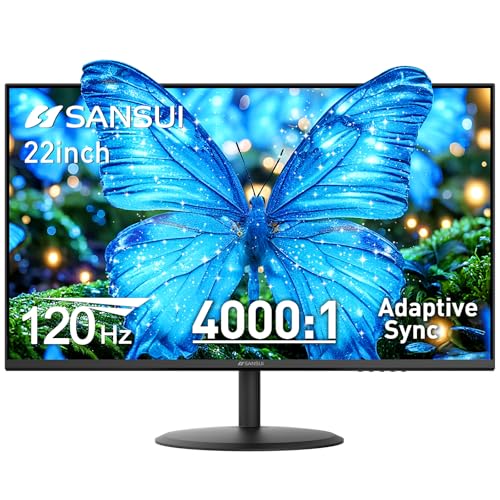
SANSUI 22-Inch 120Hz Monitor
The 22-inch SANSUI offers FHD at 120Hz, a 4000:1 contrast ratio, Adaptive Sync, HDR, 100 percent sRGB, and dual HDMI ports with VESA mount support. The small size and two HDMI inputs make it handy for shared setups.
- Strength: dual HDMI ports let you switch between a laptop and another device.
- Strength: 120Hz and Adaptive Sync listed for smoother motion.
- Trade-off: 22 inches is compact, with less workspace than 24 or 27.
Skip it if you want a large display for multitasking. It fits tight desks, kitchen-counter setups, and secondary screens where footprint matters. Treat the HDR label cautiously and read the listing for brightness details, since HDR on an entry-level panel usually has a modest effect. It is a sensible second monitor beside a laptop for chat windows, a calendar, or a reference document, or a small main screen for a corner desk where a 24-inch panel would crowd the space.
acer SB272 27-Inch IPS Monitor
Acer’s SB272 is a 27-inch FHD IPS ZeroFrame monitor with AMD FreeSync, an ultra-thin design, a 100Hz refresh, and a tilt stand. The IPS panel and thin borders suit a cleaner multi-window layout.
- Strength: IPS panel for wider viewing angles.
- Strength: ZeroFrame design and FreeSync listed in the title.
- Trade-off: the stand adjusts for tilt only according to the title.
Skip it if you need height or pivot adjustment. It is a natural choice for someone who wants a larger IPS screen for general work and the occasional game, and who plans to add an arm if the stand does not fit. The thin bezels also make it a good pick for a dual-monitor row, where the gap between screens stays small. Check the listing for the VESA pattern and the box contents before ordering, and consider a higher resolution panel if you spend long hours reading small text.
ViewSonic VG2439SMH 24-Inch Ergonomic Monitor
The ViewSonic VG2439SMH is a 24-inch 1080p monitor with an ergonomic stand and HDMI, DisplayPort, and VGA inputs, aimed at home and office use. The input selection is its standout.
- Strength: three input types handle a laptop, a desktop, and older gear.
- Strength: ergonomic stand named in the title.
- Trade-off: the title does not list the refresh rate or panel type, so check both.
Skip it if you want a high refresh rate for gaming. It suits professionals who juggle more than one computer and want a screen that switches cleanly between them, such as a work laptop on HDMI and a personal desktop on DisplayPort. Because the title does not state the refresh rate, panel type, or stand range, read those details on the listing, and confirm the warranty terms before purchase.
Which One Fits Your Situation
Hours of documents and calls
The MNNM 24-inch gives height, pivot, and swivel adjustment, so you can set it at eye level without extra gear.
Two apps side by side
The Philips 271V8LB offers 27 inches of room for a document next to a video call, while the acer SB272 adds an IPS panel.
Small desk or shared space
The SANSUI 22-inch occupies little space and has two HDMI inputs for two devices.
Several computers on one monitor
The ViewSonic VG2439SMH accepts HDMI, DisplayPort, and VGA inputs.
Common Mistakes
- Choosing a 27-inch 1080p screen and expecting sharp small text.
- Ignoring stand adjustment and ending up with the screen too low.
- Assuming an eye-care label guarantees comfort and skipping breaks.
- Forgetting to check that the cable type matches your laptop’s ports.
- Buying a monitor without confirming VESA mount size if you want an arm.
Related guides
- How To Check Motherboard Vrm Temperature In Hwinfo
- How To Clean Quest 3 Lenses And Facial Interface
- Prebuilt Gaming Desktops Under 1000 Dollars
Frequently Asked Questions
Is 1080p enough for a home office monitor?
For 24 inches, yes. On 27 inches the pixels get larger and text looks softer, so consider a higher resolution if you sit close.
Does a 100Hz refresh rate matter for office work?
It makes scrolling and cursor movement look smoother, but it is a bonus rather than a necessity. It helps if you also play games.
Are built-in speakers worth having?
They are convenient for calls and casual audio, but a headset is clearer for meetings.
What should be checked before buying a monitor arm?
Confirm the monitor’s VESA pattern and weight limits on the listing.
Related guides
More from Amazon
Programs that pair well with the guide above. Offers and eligibility are set by Amazon and may change.
Free shipping on eligible items, Prime Video and more. Eligible new members can start with a free trial.
Start a Prime free trialAd-free music streaming. Eligible new subscribers can start with a free trial.
Try Music Unlimited freeA Prime membership for ages 18-24 with a trial period. Eligibility is set by Amazon.
See Prime for Young AdultsAudiobooks and podcasts to listen to on the go. Eligible new members can start with a free trial.
Try Audible freeAs an Amazon Associate we earn from qualifying purchases.