If you ship twenty parcels a week from a spare bedroom, the printer on your desk is probably the most used tool in the business. A standard inkjet drinks cartridges and needs sticker sheets that waste half the page, while a thermal printer prints one clean 4×6 label at a time and needs no ink at all. For a small business, the question is less about whether thermal is better and more about which model connects smoothly to your phone, laptop, and selling platform without constant fiddling.
This guide is aimed at online sellers, craft shops, resellers, and home-office owners who print shipping labels, barcodes, and packing slips. Every comment below comes from the facts in the product titles, which share a lot of features, so the differences are subtle. Treat this as a shortlist for 2026 and read the compatibility lines on the product page before you choose.
Because the listed features overlap so heavily, price tier often becomes the deciding factor. Budget models give you the basics of Bluetooth and 4×6 printing, mid-range models add things like bundled labels and clearer setup, and the premium tier is rare in this group. In other words, you are mostly choosing between near-identical hardware with different software and supply bundles.
Our Top Picks
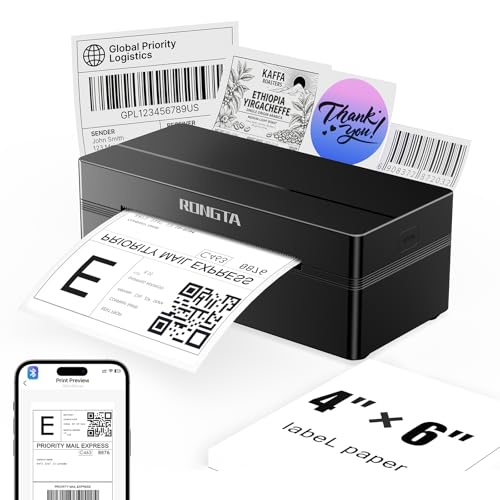
 Thermal Shipping Label Printer 4x6 Bluetooth Label Makerthermal printer labels1.17 poundsCheck on Amazon


Top 3 picks at a glance
Quick Picks
As an Amazon Associate we earn from qualifying purchases at no extra cost to you.



| Product | Best for | Key spec from the title |
|---|---|---|
| Rongta Bluetooth Label Printer | Phone-first shipping | Wireless 4×6, supports phones, Windows and macOS |
| Phomemo 241BT | Ready to print with labels included | Bluetooth 4×6, 20 labels included |
| MUNBYN Bluetooth Printer | Mixed home and office use | Wireless 4×6 for packages, office or home |
| Gloryang Shipping Printer | Inkless, multi-device printing | 4X6 inkless, iOS, Android, laptop |
| Nelko Bluetooth Printer | Fast, easy setup | 4×6, quick setup, fast speed, iPhone and Android |
| Labeer Bluetooth Printer | Online sellers and warehouses | Wireless 4×6 for home, office, warehouse |
How to Choose
Label size and roll compatibility
The 4×6 inch format is the standard for shipping labels from major carriers, and every printer in this guide lists it. The real compatibility question is which label rolls or fanfold stacks the printer accepts. Some models work only with a particular roll width, while others take a range of sizes from small barcodes to full 4×6 labels. Look for a printer that handles the label stock you can easily buy, rather than one that ties you to a single supplier.
Shelf space matters too. Fanfold stacks sit behind or beneath some printers, while roll-based designs hold the supply on a spindle. Choose the format that fits your packing table, and keep spare labels in a dry spot so the adhesive does not curl before you use them.
Connection: Bluetooth, USB, and software
All six products list Bluetooth, which makes phone printing simple. Still, check whether the printer also offers USB for a laptop connection. USB is more reliable for high volumes because Bluetooth can disconnect or lag during a long batch. Operating system support matters: Windows and macOS are named for some models, while others mention only iPhone, Android, and laptops in general terms. What to ignore is generic wording such as “crisp print quality,” which every manufacturer claims.
Pairing behavior deserves attention before you commit. Some Bluetooth printers connect to only one device at a time, which is awkward if a partner or employee also prints from a different phone. If more than one person ships orders, ask whether the printer remembers multiple devices or has to be re-paired each time.
Print speed and daily volume
Speed in labels per minute or inches per second determines how long a batch takes. A seller printing ten labels a day will never notice the difference, while one printing two hundred will. The titles here mention “fast speed” without numbers, so read the product page for the actual figure before buying if volume is high. Budget models can cut corners on motors and print heads, which shows up as slower output or faint edges after months of use.
One more point: your selling platform may print labels in a standard PDF that fits a 4×6 page without scaling. If the app you use forces odd margins, you may end up cropping text. A quick test print on the first day will reveal alignment issues before you ship real orders.
Supplies, setup, and support
Thermal printers need no ink, but they do need labels. Check whether the printer includes a first pack, since the Phomemo lists 20 labels in its title. Look at how setup works: a quick app pairing is easier than driver installs for beginners. Finally, think about warranty and replacement parts, since a small business cannot afford a printer that fails during the holiday rush.
Finally, consider noise and footprint. Thermal printers are quiet compared with inkjets, but some motors whine on long batches, which matters in a shared apartment. A compact body lets you tuck the printer beside a laptop, and a carry handle or slim profile helps if you take the station to craft fairs.
The 6 Best Options
Rongta Bluetooth Shipping Label Printer
Rongta lists a wireless 4×6 thermal label printer that supports phones and works with Windows, macOS, and Android devices.
- Strength: broad device support covers phones and both major computer systems.
- Strength: a 4×6 format matches standard shipping labels.
- Trade-off: the title gives no speed figure or included supplies.
It fits a seller who switches between a phone and a laptop. Skip it if you want a bundle with labels included or need documented print speed. Sellers who value flexibility over bundled extras will likely feel comfortable with its approach, and the mention of Windows and macOS makes desktop printing straightforward.
Phomemo 241BT
The 241BT is a Bluetooth thermal label printer sold with 20 labels. It is described as a 4×6 wireless shipping printer for small businesses and packages.
- Strength: included labels let you print right away.
- Strength: the wireless 4×6 design suits compact desk setups.
- Trade-off: only 20 labels are included, so you will need to restock soon.
It is a sensible choice for a first-time seller trying out a new shop. Skip it if you already have a large supply of labels and want specific brand support details. Because it ships with bundled labels, it also makes the lowest-effort first purchase when you want to confirm your workflow before buying rolls in bulk.
MUNBYN Bluetooth Thermal Label Printer
MUNBYN markets a wireless 4×6 printer for shipping packages in small business, office, or home settings.
- Strength: the mixed home and office framing suits flexible work areas.
- Strength: Bluetooth wireless printing keeps cables off the desk.
- Trade-off: the title gives few specifics beyond the size and connection.
Home sellers who also print office paperwork will find the positioning fitting. Skip it if you need detailed speed or compatibility numbers up front. It is a middle-of-the-road option that makes more sense when you read its product page for supply details.
Gloryang Bluetooth Thermal Shipping Label Printer
Gloryang lists a 4X6 inkless printer for iOS, Android, and laptops, aimed at small businesses.
- Strength: inkless printing removes cartridge costs.
- Strength: the explicit mention of iOS, Android, and laptops covers most setups.
- Trade-off: no included label count or speed figure is given.
It suits sellers who mix phone printing with occasional laptop use. Skip it if you want a bundle of labels or a detailed speed rating. The inkless label is a useful reminder that your ongoing cost is only the labels themselves.
Nelko Bluetooth Thermal Shipping Label Printer
Nelko emphasizes quick setup, fast speed, and crisp print quality for 4×6 labels, with iPhone and Android support.
- Strength: quick setup helps newcomers get going without installing complex drivers.
- Strength: fast speed is highlighted for busy shipping days.
- Trade-off: the listing offers no figures to back up the speed claim.
It fits a beginner who values easy pairing. Skip it if you need verified labels per minute for high-volume work. A low-effort pairing process is more valuable than it sounds when you are juggling packing, messages, and returns in the same hour.
Labeer Bluetooth Thermal Shipping Label Printer
Labeer lists a wireless 4×6 printer for small business, home, office, online sellers, and warehouse and shipping.
- Strength: the broad use-case list covers home offices up to small warehouses.
- Strength: wireless design keeps the packing station neat.
- Trade-off: the generic wording leaves speed and supply details unclear.
It suits growing sellers who want a printer that can move with them. Skip it if you need a clearly documented specification sheet. Its wide use-case list suggests flexibility, but you should still confirm supply compatibility.
Because these six printers overlap so much on paper, the practical tiebreakers are the supply bundle, the clarity of the compatibility list, and how comfortable the companion app feels. If two models seem equal, pick the one whose label stock is easiest for you to reorder, since running out mid-week costs more than any difference in hardware.
Which One Fits Your Situation
You are launching an online shop this month
The Phomemo 241BT comes with 20 labels, so you can print your first orders without hunting for supplies.
Order a second roll of labels with the printer so you never stall your first week of sales.
You print from both a phone and a laptop
The Rongta and Gloryang printers name multiple device types, which makes switching between them easy.
Keep a laptop cable nearby as a backup if Bluetooth drops during a big batch.
You care most about simple pairing
The Nelko Bluetooth printer highlights quick setup, which suits people who dislike installing drivers.
Test-print a sample label on the first day to confirm alignment.
You pack orders in a garage or small warehouse
The Labeer printer is the only one whose listing calls out warehouse use, so it fits that busier environment.
Common Mistakes
- Buying labels in the wrong width and discovering the printer cannot use them.
- Relying on Bluetooth for large batches when USB would be steadier.
- Choosing by marketing phrases like crisp quality instead of specs.
- Forgetting to check Windows or macOS support for your computer.
- Ignoring ongoing label costs when comparing models.
Related guides
- How To Check Motherboard Vrm Temperature In Hwinfo
- How To Clean Quest 3 Lenses And Facial Interface
- Micro Sd Cards For Samsung Galaxy Phones
Frequently Asked Questions
Do thermal printers need ink?
No. They apply heat to special paper, so you only buy labels. This removes cartridge costs and clogged nozzles, and it also means there is no wet ink to smear on a packing table.
Can I print from my phone?
Yes, all models here list Bluetooth and mention phone compatibility, though the software and apps differ by brand. Verify support for your phone’s operating system, and look at whether the app can print shipping PDFs directly from your selling platform or email.
Are thermal labels long lasting?
They are fine for shipping, since a label only needs to survive a trip. For long-term storage, heat and sunlight can fade thermal print over time.
What size should I buy?
For shipping, 4×6 is the standard. If you also want small product tags, check that the printer accepts narrower rolls. Remember that the label width you buy must match the printer’s supported range, or the print will shift off the label.
Related guides
More from Amazon
Programs that pair well with the guide above. Offers and eligibility are set by Amazon and may change.
Free shipping on eligible items, Prime Video and more. Eligible new members can start with a free trial.
Start a Prime free trialAd-free music streaming. Eligible new subscribers can start with a free trial.
Try Music Unlimited freeA Prime membership for ages 18-24 with a trial period. Eligibility is set by Amazon.
See Prime for Young AdultsAudiobooks and podcasts to listen to on the go. Eligible new members can start with a free trial.
Try Audible freeAs an Amazon Associate we earn from qualifying purchases.