Working from a spare room or a kitchen table means your headset does three jobs at once: it keeps your voice clear on video meetings, it shields you from household noise, and it stays comfortable through a long stretch of calls. The remote-work angle of this keyword points to wireless freedom, a microphone that is the real selling point, and enough battery to finish a full workday without hunting for a charger. A pair built for music is a poor stand-in.
This guide is for people who spend hours on calls and want a headset that connects to a laptop through a USB dongle or Bluetooth. The six options below are all wireless on-ear designs sold with a microphone for work, many with a charging base or a mute button. Based on the listed specs, they differ mainly in battery claims, Bluetooth version, and dongle type, which is what to compare as you shop in 2026.
Our Top Picks


Top 3 picks at a glance
Quick Picks
As an Amazon Associate we earn from qualifying purchases at no extra cost to you.




| Product | Best for | Key spec from the title |
|---|---|---|
| LEVN 65H Bluetooth Headset | Long call days between charges | AI noise cancelling, mute button, 65 hours working time |
| Bluetooth 6.0 Charging-Base Headset | Desk setups that dock overnight | Bluetooth 6.0, USB dongle, charging base |
| JIAMQISHI Wireless Headset | Laptop users who want a dongle | Bluetooth V5.2, USB dongle, clear calls, mic mute |
| PrancyBt Wireless Headset | Quick mute and a stable link | Noise cancelling mic, mute, USB dongle |
| Mopchnic Bluetooth Headset | Plain office work and calls | AI noise-canceling mic, on-ear, USB dongle |
| LEVN CallCenter 5.2 | Thin laptops and phone-heavy work | Bluetooth 5.2, USB-C adapter, 65H worktime |
How to Choose
Focus on the microphone, not the speakers
For remote work, what your colleagues hear matters more than what you hear. Look for a boom microphone with noise cancelling and a physical mute button you can hit without opening a window or hunting through a menu. Be skeptical of vague AI claims: the spec sheet rarely explains the processing, so treat the wording as a hint and judge the mic design, boom length, and pickup position instead. A mic placed close to your mouth always beats a clever algorithm working on a distant signal.
Check the connection type and your computer ports
A USB dongle gives the most reliable link for a laptop or desktop and avoids Bluetooth pairing quirks. If your laptop has only USB-C ports, you need a dongle with a USB-C adapter or a small hub. Bluetooth 5.x is common, while 6.0 is newer and may offer better range or stability on compatible devices. Multipoint pairing, when listed, lets you stay connected to a computer and a phone at the same time, which suits a desk job with a mobile line.
Read battery claims carefully
Figures such as 60 or 65 hours usually describe standby or a mixed-use best case, not nonstop talk time. A full workday of calls is typically six to eight hours, so a headset that lasts 20 hours of real talk time is already comfortable. A charging base helps by turning charging into a drop-in habit at the end of the day, which matters more than the highest number on a listing.
Weigh comfort for all-day wear
On-ear headsets press on the ears, which some people find tiring after two hours. Look for padded ear cups, an adjustable headband, and a light weight if the listing states one. Budget models tend to cut corners on cushion quality and boom flexibility, so read the description for adjustability and replaceable pads. If you wear glasses, a lighter clamp and softer pads make a noticeable difference by mid-afternoon.
The 6 Best Options
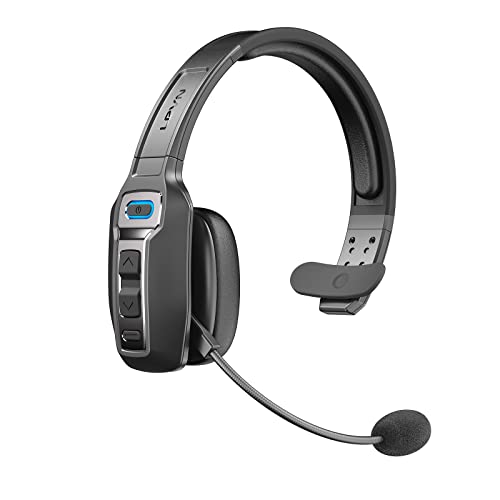
LEVN 65H Bluetooth Headset
Built for long shifts, this on-ear wireless headset lists AI noise cancelling, a mute button, and 65 hours of working time. The title also describes a trucker-oriented design, which suggests a focus on call clarity in noisy settings.
- A claimed 65 hours of working time points to weekly rather than daily charging.
- A mute button gives instant control during meetings.
- Trade-off: the listing is oriented toward drivers, so look closely at the dongle and laptop compatibility.
Skip it if you want a charging base and a dongle-first office setup. Remote workers who need a docked desk headset will find the long battery claim less relevant than a drop-in cradle. The driver-oriented wording also suggests the design priorities lean toward all-day phone calls rather than screen-share meetings, so check that it behaves well with your video software.
Bluetooth 6.0 Charging-Base Headset
This unbranded listing combines Bluetooth 6.0, a USB dongle, a charging base, and a mute button, with a claim of 65 hours of playtime. It makes for a clean desk setup for someone who docks the headset at the end of the day.
- A charging base keeps the headset ready each morning.
- Bluetooth 6.0 is the newest standard in this group.
- Trade-off: no brand in the listing means fewer clues about support and warranty.
Skip it if you prefer a named brand with a service track record. Buyers who value predictable after-sales help may choose a more familiar label, even at the cost of some features. If you buy it anyway, keep the order details and check the return window early, because unbranded accessories can vary in fit and finish from one batch to the next.
JIAMQISHI Wireless Headset
A simple dongle headset using Bluetooth V5.2, with a noise cancelling microphone, clear calls, and mic mute. The title names laptop use, which fits a remote-work desk and a typical video-meeting routine.
- A USB dongle skips Bluetooth pairing steps on a laptop.
- Mic mute is within reach for quick control.
- Trade-off: no charging base is listed, so you charge by cable.
Skip it if you want a docking station. People who regularly forget to plug in a cable overnight will enjoy a cradle model more. It is a good fit for someone who spends a few hours on calls each day and wants a no-frills dongle connection that works the moment the laptop wakes up.
PrancyBt Wireless Headset
This wireless headset emphasizes a noise cancelling microphone, mute, and a USB dongle for work from home. It sits in the middle of the group with a straightforward feature list that covers the basics.
- A noise cancelling mic is the priority feature for calls.
- The USB dongle gives a stable laptop connection.
- Trade-off: the visible part of the title does not mention battery hours, so check the full listing.
Skip it if you want documented battery life up front. Shoppers who plan their week around charge cycles will want clearer numbers before buying. Still, a dongle plus mute combination covers the two features most remote meetings actually depend on, so it works well as a straightforward everyday headset.
Mopchnic Bluetooth Headset
An on-ear wireless headset with an AI noise-canceling microphone and a USB dongle, positioned for office work and calls. Its title is short on extras, which appeals to buyers who want a plain tool rather than a feature list.
- The on-ear design is light enough for long meetings.
- The USB dongle works with desktops and laptops.
- Trade-off: no charging base or hour count appears in the title.
Skip it if you need a mute button spelled out or a dock. It suits someone with a simple setup who is willing to check the specifics on the product page. Because the title is spare, spend a minute confirming the mute control, the cable for charging, and whether the microphone boom can be flipped up out of the way between calls.
LEVN CallCenter 5.2
This upgraded version includes a USB-C adapter, which solves the common problem of laptops with no USB-A port. It uses Bluetooth 5.2 with noise cancelling and a mute button, and lists 65 hours of worktime.
- The USB-C adapter suits modern thin laptops without a hub.
- A call-center focus means the mic and mute are the priority.
- Trade-off: it is closely related to the other LEVN model, so there is limited variety between the two.
Skip it if your computer has USB-A ports and you want a charging base. Anyone happy with a basic dongle can save effort by choosing whichever LEVN listing matches their ports. Support-line staff or freelancers who take many short calls a day will appreciate the mute button and the idea that the headset was designed around that workflow.
Which One Fits Your Situation
You work from a kitchen table on a thin laptop
The LEVN CallCenter 5.2 includes a USB-C adapter, so you do not need a hub just to use the dongle, and the mute button stays within reach.
You want to dock the headset every night
The Bluetooth 6.0 Charging-Base Headset gives you a dock and a dongle in one package, so it is ready when your first meeting starts.
You take calls from several rooms
The LEVN 65H Bluetooth Headset offers a long listed battery life, so you can walk to a quiet room without a cable or a charging stop. That freedom helps when the dishwasher is running in the kitchen and you need to move to the bedroom desk mid-meeting.
You need something simple for a spare desk
The JIAMQISHI Wireless Headset gives you a dongle and a mute control with no extras, which is plenty for a guest desk or a part-time work corner.
Common Mistakes
- Buying on battery hours while ignoring microphone quality, even though clear speech is the whole reason a work headset exists.
- Forgetting that a USB-A dongle will not fit a USB-C-only laptop.
- Assuming noise cancelling in the title means room noise will vanish.
- Skipping a check on how the headset pairs with your video-conferencing app, so the first live meeting becomes the compatibility test.
- Wearing on-ear cups for hours without adjusting the headband fit, which turns a minor pressure point into a headache by the afternoon.
Related guides
- How To Check Motherboard Vrm Temperature In Hwinfo
- How To Clean Quest 3 Lenses And Facial Interface
- Micro Sd Cards For Samsung Galaxy Phones
Frequently Asked Questions
Is Bluetooth or a USB dongle better for remote work?
A dongle is generally more stable and easier to set up on a laptop. Bluetooth is handy when you want to switch to a phone without changing devices, and several listings offer both, so you can use the dongle at the desk and Bluetooth away from it.
How long should a headset battery last for work?
A full workday of calls is roughly six to eight hours, so listed talk time above that is sufficient. Large hour figures are typically standby claims and should be read with caution.
Do I need active noise cancelling?
For calls, a noise-cancelling microphone matters more than cancelling in the ear cups. Cup noise cancelling helps focus but raises the cost and may not be needed.
Can I use these headsets with a phone as well?
Most support Bluetooth and can pair with a phone, but a USB dongle only connects to the computer. Check the listing for multipoint support if you want both at once.
Related guides
More from Amazon
Programs that pair well with the guide above. Offers and eligibility are set by Amazon and may change.
Free shipping on eligible items, Prime Video and more. Eligible new members can start with a free trial.
Start a Prime free trialAd-free music streaming. Eligible new subscribers can start with a free trial.
Try Music Unlimited freeA Prime membership for ages 18-24 with a trial period. Eligibility is set by Amazon.
See Prime for Young AdultsAudiobooks and podcasts to listen to on the go. Eligible new members can start with a free trial.
Try Audible freeAs an Amazon Associate we earn from qualifying purchases.