The best webcams for streaming hold 1080p at 60 frames per second with working autofocus and enough light, not simply the ones with 4K printed on the box. Several 4K-labeled models here still list 1080p 60 fps as their live mode, so the real differences are lens, sensor and lighting. Below are 11 listings sorted by those factors, with a field-of-view calculation and a short checklist for matching one to your desk.
Our Top Picks
 NexiGo N660P Pro 4K Webcam with Distortion-Free Lens3.66 x 2.36 x 1.97 inches0.5 poundsCheck on Amazon
 Galyimage 4K Webcam with Ring Light & Built-in3.40 inch3 x 2.71 x 3.4 Inches0.36 poundsCheck on Amazon
 NBPOWER 1080P 60FPS Streaming Camera Webcam with Microphone3.34 x 1.77 x 1.96 Inches0.5 poundsCheck on Amazon
Quick answer: what to buy for each kind of stream
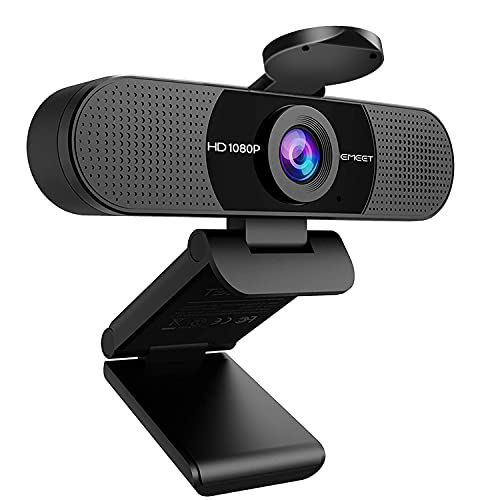
EMEET 1080P Webcam with Microphone, C960 Web Camera 2 Mics Streaming Webcam | 90°FOV Computer Camera, Plug and Play USB Web Cam for Online Calling/Conferencing, Zoom/Teams/Facetime/YouTube, Laptop/PC


As an Amazon Associate we earn from qualifying purchases. Product prices and availability are accurate as of the date/time indicated.
NexiGo N660P Pro 4K Webcam with Distortion-Free Lens, 1080p 60 fps Autofocus USB Streaming Camera, 3DNR, Noise-Canceling Mics & Privacy Cover, Web Cam for Gaming/Live Streaming/PC/Mac/Switch 2, Pink


As an Amazon Associate we earn from qualifying purchases. Product prices and availability are accurate as of the date/time indicated.
Galyimage 4K Webcam with Ring Light & Built-in Microphone for PC Streaming | PDAF Autofocus,Supports 1080P 60FPS, Comes with Privacy Cover, Compatible with Zoom, Skype, Google Meet, Laptop Desktop Mac


As an Amazon Associate we earn from qualifying purchases. Product prices and availability are accurate as of the date/time indicated.
NBPOWER 1080P 60FPS Streaming Camera Webcam with Microphone and Fill RGB Light,Autofocus,Work with Laptop/Desktop Computer/Winsdows/Mac OS/PC Computer for Camera


As an Amazon Associate we earn from qualifying purchases. Product prices and availability are accurate as of the date/time indicated.

Acer A640 4K Webcam with AI Noise Canceling Mic for Streaming Meetings | Sony 1/2.8" Sensor, PDAF Autofocus, 2K 1080P/60fps, A to C Adapter, Computer Camera for switch 2 Camera Teams Zoom Facetime


As an Amazon Associate we earn from qualifying purchases. Product prices and availability are accurate as of the date/time indicated.

EMEET S600 4K Webcam for Streaming, Sony 1/2.55'' Sensor, PDAF Autofocus | 1080P@60FPS, 2 Noise Reduction Mics, Built-in Privacy Cover, 73° FOV, Streaming Camera for Live Commerce/Gaming/Beauty


As an Amazon Associate we earn from qualifying purchases. Product prices and availability are accurate as of the date/time indicated.
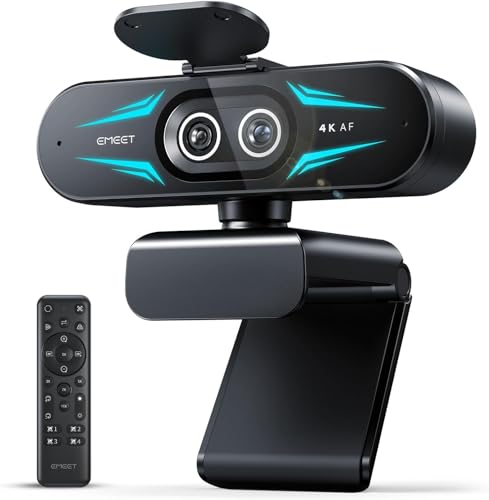
EMEET C60E Dual-Camera 4K Webcam for Streaming, Wide-Angle & Telephoto | Max 11X Hybrid Zoom & PDAF Autofocus, Remote Control, RGB Lighting, 2 Mics, Ideal for Livestreaming and Online Meeting


As an Amazon Associate we earn from qualifying purchases. Product prices and availability are accurate as of the date/time indicated.

Logitech Brio 101 Full HD 1080p Webcam for Streaming and Meetings - Black | 1080p with auto-light correction, built-in mic, privacy shutter, USB-A, compatible with Teams, Google Meet, Zoom and more


As an Amazon Associate we earn from qualifying purchases. Product prices and availability are accurate as of the date/time indicated.

Logitech C922x HD Pro PC Webcam, Full HD 1080p/30fps or 720p/60fps Video, HD Light Correction, Works with Microsoft Teams, Google Meet, Zoom, Nintendo Switch 2’s new GameChat mode, Mac/Tablet- Black


As an Amazon Associate we earn from qualifying purchases. Product prices and availability are accurate as of the date/time indicated.

OBSBOT Meet SE 1080P 100FPS Webcam for PC, AI Framing Streaming Camera | 1/2.8" Sensor, Beauty Mode, Gesture Control, Staggered HDR, Web Camera for Desktop Computer, Laptop, Meeting.(Space Grey)


As an Amazon Associate we earn from qualifying purchases. Product prices and availability are accurate as of the date/time indicated.
If you want one default, the dual-microphone 1080p60 models with autofocus and a ring or fill light cover most solo streams. Go for the wide, dual-lens EMEET C60E only if you move around or share a desk, and pick the Logitech C922x or Brio 101 when brand familiarity and plain setup matter more than headline specs.
Webcams at a glance
| Model | Key point from title | Price tier | Best for |
|---|---|---|---|
| EMEET C960 | 1080P, 2 mics, 90-degree FOV, plug and play | Budget | Casual streams and calls |
| NexiGo N660P Pro | 4K label, 1080p 60 fps, autofocus, 3DNR, privacy cover | Mid-range | Console or PC facecam |
| Galyimage 4K | Ring light, PDAF autofocus, supports 1080P 60FPS | Mid-range | Dim rooms |
| NBPOWER 1080P 60FPS | Fill RGB light, mic, autofocus | Budget | Color-lit setups |
| Acer A640 | Sony 1/2.8 inch sensor, PDAF, AI noise-canceling mic | Premium | Meetings plus streaming |
| EMEET S600 | Sony 1/2.55 inch sensor, PDAF, 73-degree FOV | Premium | Tight, clean framing |
| EMEET C60E | Dual camera, wide plus telephoto, 11X hybrid zoom, remote | Premium | Product demos |
| Logitech Brio 101 | Full HD 1080p, auto light correction, shutter | Budget | Simple setup |
| Logitech C922x | 1080p at 30 fps or 720p at 60 fps | Mid-range | Familiar brand |
| OBSBOT Meet SE | 1080P 100FPS claim, AI framing, staggered HDR | Mid-range | Moving presenters |
| NexiGo N680E Pro | 4K label, ring light, PDAF, dual mics | Mid-range | Ring-lit streaming |
The 11 webcams in detail
EMEET C960
The title lists 1080P video, two microphones, a 90-degree field of view and plug-and-play USB for laptops and desktops. It does not say whether autofocus is fixed or phase-detection, and it gives no 60 fps figure, so read the listing for both before ordering. The wide angle shows more of your room, which suits a bare wall better than a cluttered shelf.
Pros
- Wide 90-degree view
- Two mics at a low tier
- Plug and play over USB
Cons
- Frame rate and focus type unstated
- Shows a lot of background
Who it’s for: Anyone who wants a basic step up from a laptop camera.
NexiGo N660P Pro
A 4K label with a distortion-free lens, 1080p 60 fps autofocus, 3DNR noise reduction, noise-canceling mics and a privacy cover. The title also names Switch 2 and a pink finish, which is a styling choice rather than a performance one. Treat the 4K claim as a recording or still mode and confirm what the live stream mode supports.
Pros
- 1080p60 with autofocus
- Privacy cover included
- Noise reduction listed
Cons
- 4K wording may not apply while streaming
- Pink colorway is a niche taste
Who it’s for: Streamers who want smooth 1080p60 on a PC or console.
Galyimage 4K
Built-in ring light and microphone, PDAF autofocus and a privacy cover, aimed at PC streaming and meetings. The title says it supports 1080P 60FPS, which is vague on whether 4K runs at the same rate. A ring light this close to the lens is convenient, but it can reflect in glasses and flatten facial shadows.
Pros
- Ring light included
- PDAF autofocus
- Privacy cover
Cons
- Ambiguous frame-rate wording
- Light may reflect in glasses
Who it’s for: Streamers in a dim room who do not own a lamp yet.
NBPOWER 1080P 60FPS
A 1080P 60 fps camera with microphone, autofocus and an RGB fill light. The title contains a typo in its operating-system wording, a small sign of listing care worth keeping in mind. RGB color is decorative; it is not the same as a soft white key light that flatters skin tones.
Pros
- 1080p60 at a low tier
- Fill light built in
- Autofocus listed
Cons
- Typo in the listing title
- RGB light is not a true key light
Who it’s for: Budget streamers who like colored accent lighting.
Acer A640
The title lists a Sony 1/2.8 inch sensor, PDAF autofocus, an AI noise-canceling mic and an A-to-C adapter. It also says 2K 1080P/60fps, which mixes two resolution labels, so check what the live mode is. This is a sensible choice for streams that double as work meetings.
Pros
- Named Sony sensor
- A-to-C adapter included
- AI noise-canceling mic
Cons
- Muddled 2K and 1080p wording
- Sits in a higher tier than basic models
Who it’s for: People who stream and join meetings on the same camera.
EMEET S600
A 4K label, Sony 1/2.55 inch sensor, PDAF autofocus, 1080P at 60 fps, two noise-reduction mics, a privacy cover and a 73-degree view. The listed sensor format is larger than the Acer’s, which may help in dim light, though software tuning also matters. The tighter angle crops out clutter without a backdrop.
Pros
- Larger listed sensor
- Narrow view hides clutter
- Built-in privacy cover
Cons
- Narrow view limits group shots
- Higher tier
Who it’s for: Solo streamers who want a clean, tight frame.
EMEET C60E
A dual-camera 4K model with wide and telephoto lenses, up to 11X hybrid zoom, PDAF autofocus, remote control, RGB lighting and two mics. Hybrid zoom includes digital cropping, so expect softer detail at the top end. A frame rate is not given in the title, so confirm it in the listing.
Pros
- Wide and telephoto lenses
- Remote control
- Two mics
Cons
- Frame rate not stated
- Digital zoom softens detail
Who it’s for: Creators who switch between face view and product close-ups.
Logitech Brio 101
Full HD 1080p with auto light correction, a built-in mic, a privacy shutter and a USB-A connector. The title does not mention 60 fps or autofocus type, so check both. Think of it as a dependable, plain camera for calls and light streaming rather than a feature leader.
Pros
- Privacy shutter
- Recognizable brand
- Auto light correction
Cons
- Frame rate not stated
- Single mic listed
Who it’s for: Anyone who wants low-fuss meetings and occasional streams.
Logitech C922x
The title is clear: 1080p at 30 fps or 720p at 60 fps, with HD light correction. For fast gameplay facecam, 720p60 looks smoother but softer, so you pick between sharpness and motion. It also names Switch 2 GameChat, a claim worth confirming on the manufacturer page.
Pros
- Clear frame-rate wording
- Light correction
- Familiar brand
Cons
- 1080p only at 30 fps
- No built-in light
Who it’s for: Streamers who value a known name over the newest spec.
OBSBOT Meet SE
Lists 1080P at 100 FPS, a 1/2.8 inch sensor, AI framing, beauty mode, gesture control and staggered HDR. The 100 fps number is a seller claim; check which resolution and lighting it needs. AI framing keeps you centered if you lean or shift in your seat.
Pros
- AI framing follows you
- Gesture control
- High frame-rate claim
Cons
- 100 fps claim needs checking
- Beauty mode can look processed
Who it’s for: Presenters who move around during a stream.
NexiGo N680E Pro
A 4K label with a ring light, PDAF autofocus, 1080p 60 fps, dual noise-canceling mics and a privacy shutter. It is close in class to the N660P Pro and the Galyimage, mainly adding the ring light, so pick between them on light needs and current price. A near-duplicate in this set rather than a different tier.
Pros
- Ring light plus autofocus
- Privacy shutter
- Dual mics
Cons
- Overlaps other NexiGo and Galyimage options
- Light sits close to the lens
Who it’s for: Streamers who want one plug-in camera with its own light.
How we picked these
This list is built from published specifications, manufacturer documentation and buyer reviews, read from each listing title. Nobody on the team used or measured these units. We kept every webcam in the set, flagged unclear claims and grouped price tiers by feature level rather than checkout price, which changes often. Check the live listing before buying.
What to look for in a streaming webcam
Resolution and frame rate are two different numbers
A 4K badge describes the sensor or the maximum still size, not what you get while streaming. Read the frame-rate wording closely: 1080p at 60 fps looks smoother for fast gameplay facecam than 4K at 30 fps, and one listing here lists 1080p only at 30 fps with 60 fps reserved for 720p. Decide which resolution your encoder and upload speed can actually carry first.
Autofocus, sensor and low light
Fixed focus is fine if you sit still. If you lean in to show a controller or keyboard, phase-detection autofocus helps. Larger sensor formats, listed as fractions like 1/2.8 or 1/2.55 inch, tend to gather more light, but software tuning matters too. Auto light correction on the Logitech models is a convenience, not a substitute for a lamp.
Field of view: how much room you show
Visible width equals two times distance times the tangent of half the field of view. At 24 inches from the lens, a 90-degree view shows about 48 inches of scene, and a 73-degree view shows about 35 inches. At 30 inches the figures become roughly 60 and 44 inches. That is an estimate that ignores lens distortion, but it shows why the 90-degree EMEET C960 reveals far more of your room than the 73-degree S600.
Mounting and software
Most use a monitor clip, and thin or curved displays can make that clip unstable. Check for a tripod thread. Some cameras rely on companion software for zoom, framing and color, so confirm that it runs on your operating system.
Pre-purchase checklist
- Write down the resolution and frame rate your stream will use, then match the listing wording exactly.
- Measure your eye-to-lens distance and decide how much background you want to show.
- Count free USB ports and note whether you need a USB-C adapter.
- Check mount type against your monitor’s bezel thickness.
- Look for a privacy cover or shutter if the camera stays plugged in.
Mistakes buyers make
The first is paying for 4K and then streaming at 1080p anyway, which wastes the difference. The second is trusting a built-in ring light to fix a dark room; a lamp behind the monitor does more. A third is ignoring the connector and driver situation on a Mac or console. Others skip the frame-rate fine print, expect the built-in mic to match a boom mic, or mount the camera below chin level, which flatters nobody.
Verdict
For most streamers, a dual-mic 1080p60 camera with phase-detection autofocus and a fill light, such as the NexiGo N680E Pro or N660P Pro, is the sensible middle. Choose the EMEET S600 for a tighter, cleaner frame, the C960 or Brio 101 to save money, and the C60E only if you want the zoom.
Webcam questions answered
Is a 4K webcam worth it for streaming?
Usually not for the stream itself. Most platforms and encoders cap live video at 1080p, and several 4K-labeled listings here state 1080p at 60 frames per second as their live mode. The extra sensor detail can still help with cleaner downscaling and cropping in post, but smooth 1080p60 with reliable autofocus and good light matters more. Spend on lighting and a stable mount before paying for a higher resolution number.
Do I need a separate microphone if my webcam has built-in mics?
Built-in webcam mics pick up room echo and keyboard noise because they sit a foot or two from your mouth and face the whole room. They are fine for calls and casual streams. If voice is the main draw of your channel, a dedicated microphone on a boom arm will sound clearer. Keep the webcam mic as a backup rather than the main source.
What does PDAF autofocus mean on a webcam?
PDAF stands for phase-detection autofocus, the same family of focusing used in many cameras. In principle it locks onto a face faster and hunts less than basic contrast-based focus. Several listings here mention it, but how well it behaves depends on lighting and on the tracking tuning in the camera software, so check recent buyer feedback on focus speed before you commit.
Is a ring light on the webcam enough for good video?
A small light built into or around the webcam helps fill shadows on your face, but it is close to the lens and can look flat or reflect in glasses. A larger softbox or panel placed beside the monitor at about 45 degrees usually looks better. Treat the built-in light as a convenient extra, and adjust brightness and color in your streaming software.
Will these webcams work with a console or only a PC?
Some titles mention Switch 2, Mac or specific meeting apps, and others only say PC or laptop. Compatibility claims come from the seller, so confirm the exact console, operating system and app in the listing and the manufacturer’s support page. Also check the connector: a few cameras use USB-A, and one listing includes an A-to-C adapter in the title.
Related guides
- How To Clean Quest 3 Lenses And Facial Interface
- Micro Sd Cards For Samsung Galaxy Phones
- Vr Facial Interfaces For Glasses Wearers
Related guides
- Best Free MMOs on Steam: Subscription Limits, Pay-to-Win and Time Cost (2026)
- Best Free Horror Games on Steam: How to Pick One That Fits Your PC and Your Nerves (2026)
- Black Frame Insertion vs VRR: Which Smoothness Feature Should You Use?
- How Long Does a PS5 Controller Battery Last? What Drains It and How to Stretch It