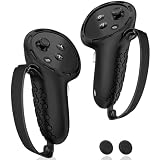
The KIWI design G4 Pro grips are the best overall VR controller grips in this group for Meta Quest 3 and Quest 3S owners, because the listing pairs a silicone, non-slip body with a secure knuckle strap and a battery opening, so you can swap the AA cell without peeling the grip off. VR controller grips and straps are silicone sleeves and strap systems that add friction to the controller and anchor it to your hand, which reduces slips and thrown controllers in active games. If you play intense titles, a knuckle-strap grip is the upgrade to consider first.
The six options below cover the same job in slightly different ways, and one is made for the older Quest 2.
Our Top Picks


Top 3 picks at a glance
Quick List
- AMZDM Controller Grip (black pair) – best for silicone grips with elastic knuckle straps and thumbstick covers
- Maecker Anti-Slip Controller Straps – best for adjustable knuckle straps with grip covers
- Quest 3S/3 Silicone Grip Covers with Thumbstick Caps – best for a protective sleeve with non-slip thumb caps
- Quest 2 Extended Silicone Grips – runner-up for Quest 2 owners with battery opening and anti-throw strap
- AMZDM Controller Grip (second listing) – best for a second pair from the same maker
- KIWI design G4 Pro Grips – best for a battery-opening grip with a secure knuckle strap
Which One Is Right for You?
| If you… | Choose |
|---|---|
| want to change batteries without removing the grips | KIWI design G4 Pro Grips |
| play active games and want elastic knuckle straps with thumbstick covers | AMZDM Controller Grip (black pair) |
| want straps you can adjust for different hand sizes | Maecker Anti-Slip Controller Straps |
| mainly need sweat-resistant sleeves with thumbstick caps | Quest 3S/3 Silicone Grip Covers with Thumbstick Caps |
| need a matching second pair for a family member | AMZDM Controller Grip (second listing) |
| still play on a Quest 2 | Quest 2 Extended Silicone Grips |
If you have a Quest 3 or 3S, five of these six fit your headset by their listing names. If you have a Quest 2, only the last one is made for you, and you should not try to force Quest 3 sleeves onto the older controllers because the shapes are different.
All 6 Picks in Detail
1. AMZDM Controller Grip (Black Pair) – Best for Elastic Straps and Thumbstick Covers
As an Amazon Associate we earn from qualifying purchases at no extra cost to you.

This AMZDM set is sold for Meta Quest 3S and Quest 3 controllers. The listing says the grips are silicone with a non-slip pattern, include vegan leather elastic knuckle straps and come with a pair of textured thumbstick covers. It is a one-pair, black set aimed at players who want protection from sweat, dust and scratches along with a more secure hold. The listing also says it can be cleaned with water or a damp cloth.
- Made for Quest 3S and Quest 3
- Silicone body with non-slip pattern
- Vegan leather elastic knuckle straps
- Textured thumbstick covers included
- One pair in black
- Battery access without removing the grips is not stated; confirm on the product page
Pros
- Straps, grips and thumb covers in one set
- Easy to wipe clean
Cons
- Battery access is not confirmed in the listing
- Elastic straps may stretch over time
Next to the Maecker straps, the AMZDM bundles the thumbstick covers, while the Maecker focuses on adjustability. The listing’s mention of cleaning with water or a damp cloth is handy for a shared headset, since sweat is the main wear factor. When you fit the grips, seat them fully around the controller body before tightening the strap so the buttons and trigger are not obstructed, and press each button once to confirm nothing is pinched.
2. Maecker Anti-Slip Controller Straps – Best for Adjustable Knuckle Straps

The Maecker listing describes anti-slip controller straps for Quest 3 and Quest 3S, sold with controller grips and covers, with adjustable knuckle straps. Adjustability is the point: hands vary a great deal in size, and a strap that tightens or loosens helps a small or large hand get a secure feel. It suits players who found stock wrist straps unsatisfactory or who share the headset among people with different hand sizes.
- Made for Quest 3 and Quest 3S per the listing
- Anti-slip controller straps
- Adjustable knuckle straps
- Controller covers included according to the listing
- Battery opening is not stated; confirm on the product page
- Material details should be confirmed on the product page
Pros
- Strap fit can be tuned to the hand
- Covers add protection and grip
Cons
- Extra adjustment takes a moment to set up
- Fewer stated details about thumbstick covers
Choose it over the KIWI if you value strap adjustment more than quick battery access. Because the listing does not describe the strap material, handle it on first fitting and check that it does not rub the back of your hand. If you share the headset, set the strap loosely for the first player and re-tighten per person, which takes only a few seconds with an adjustable design.
3. Quest 3S/3 Silicone Grip Covers with Thumbstick Caps – Best for Simple Protective Sleeves
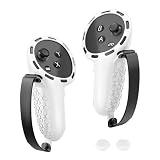
This listing is a generic-branded set of controller grips for Quest 3S and Quest 3: silicone covers that protect the touch controllers, with straps and non-slip thumb caps. It is the most basic entry in the group, aimed at players who mostly want a cover that guards against scratches and sweat. As the brand is not named in the listing name, treat the details as general and verify specifics on the product page.
- Made for Quest 3S and Quest 3
- Silicone covers that protect the controllers
- Non-slip thumbstick caps mentioned
- Straps are mentioned in the listing name
- Battery opening is not stated; confirm on the product page
- Number of pieces and colors should be confirmed on the product page
Pros
- Basic protection and grip
- Thumb caps help with sweaty hands
Cons
- Limited detail on materials and fit
- Unknown brand support
It is close in concept to the AMZDM sets, with less detail published, so the AMZDM is the better documented pick. That said, a plain sleeve with caps may be all you need if your goal is simply to keep the controllers looking new and to stop your thumbs slipping. Read the product page to confirm whether the sleeves have cut-outs for the charging contacts and the battery door, and whether the straps are removable if you prefer a bare grip.
4. Quest 2 Extended Silicone Grips – Runner-Up for Quest 2 Owners

These grips are made for the Oculus Quest 2, not for Quest 3 or 3S, so they are a runner-up here. The listing describes extended silicone grips with a protector cover, a battery opening, knuckle straps and an anti-throw hand strap. The extended shape fits the ring-style tracking cage of the Quest 2 controllers, and that is exactly why they should not be used on a Quest 3. Quest 2 owners will find the battery opening a welcome feature.
- Made for Oculus Quest 2 controllers
- Extended silicone grip cover
- Battery opening included
- Knuckle straps
- Anti-throw hand strap
- Quest 3 and 3S are not covered by this listing
Pros
- Designed around the Quest 2 controller shape
- Battery opening and anti-throw strap in one set
Cons
- Not for Quest 3 or 3S controllers
- Older design for a headset that is no longer the newest
It is the only Quest 2 pick in this guide, and the KIWI is its closest Quest 3 counterpart in features. If you plan to upgrade to a Quest 3 later, these grips will not carry over, which is worth remembering before you buy a second pair as a spare. For the time being, they remain the sensible choice for anyone with a Quest 2 who wants a battery opening and a secure strap together.
5. AMZDM Controller Grip (Second Listing) – Best for a Second Pair

This is another AMZDM listing for the Meta Quest 3S and Quest 3, with a nearly identical name to the black-pair set above. The listing text indicates silicone covers with straps, but the listing name does not show the color or pack contents, so confirm the color, the pair count and the strap type on the product page. It is a reasonable pick if you want a second color or a pair for another player.
- Made for Quest 3S and Quest 3
- Silicone covers that protect the touch controllers
- Strap design matches the sibling listing, but confirm on the product page
- Color and pack contents are not stated here; confirm
- Thumbstick cover inclusion is not stated here; confirm
- Battery access is not stated; confirm on the product page
Pros
- Matches the black set for easy swapping between players
- Same maker, so fit should be familiar
Cons
- Details differ by variation, so careful reading is needed
- Near-duplicate of the other AMZDM listing
Compared with the black pair, it is the same idea in a possibly different color, so pick whichever color you prefer. Because two near-identical listings exist from this maker, compare their photos and descriptions line by line, looking at the strap style, the number of thumb covers and whether the controller cutouts match your headset. If both look the same, the practical difference may come down to color and delivery options.
6. KIWI design G4 Pro Grips – Best for a Battery Opening and Secure Knuckle Strap

The KIWI design G4 Pro is described as a non-slip controller grip for Quest 3 and Quest 3S, built from silicone with a secure knuckle strap and a battery opening. The opening is the practical detail: Quest controllers run on a single AA cell, and having access to the battery door while the grip stays on makes swapping a cell a ten-second job instead of a fight with a sleeve. The listing calls it an upgraded G4 Pro design, so it is positioned as the premium option from this maker.
- Made for Meta Quest 3 and Quest 3S per the listing
- Non-slip silicone protector body
- Secure knuckle strap
- Battery opening for quick cell changes
- Upgraded G4 Pro design naming
- Strap material and sizing should be confirmed on the product page
Pros
- Change batteries without removing the grips
- Knuckle strap helps keep the controller on your hand
Cons
- Thumbstick covers are not mentioned in the listing name
- Silicone can feel warm in long sessions
Compared with the AMZDM black pair, the KIWI emphasizes the battery opening, while the AMZDM adds thumbstick covers and elastic straps. If you already own a set of silicone sleeves, a battery-opening design may not justify replacing them, but for players buying fresh, the access hole removes a recurring annoyance. Confirm the strap length on the product page so it reaches comfortably across the back of your hand, and check that the opening lines up with the battery door on your controller.
Specs Compared
| Product | Headset fit | Material | Strap type | Battery opening | Thumbstick covers |
|---|---|---|---|---|---|
| AMZDM Controller Grip (black pair) | Quest 3, 3S | Silicone with vegan leather straps | Elastic knuckle straps | Confirm on listing | Yes, textured pair |
| Maecker Anti-Slip Controller Straps | Quest 3, 3S | Confirm on listing | Adjustable knuckle straps | Confirm on listing | Confirm on listing |
| Quest 3S/3 Silicone Grip Covers | Quest 3, 3S | Silicone | Straps (confirm type) | Confirm on listing | Non-slip thumb caps |
| Quest 2 Extended Silicone Grips | Quest 2 only | Silicone | Knuckle straps plus anti-throw hand strap | Yes | Confirm on listing |
| AMZDM Controller Grip (second listing) | Quest 3, 3S | Silicone | Confirm on listing | Confirm on listing | Confirm on listing |
| KIWI design G4 Pro Grips | Quest 3, 3S | Silicone | Secure knuckle strap | Yes | Confirm on listing |
How We Chose These
We compared listing names, feature descriptions and manufacturer-published listing information for every grip set. The criteria were which controller generation each set fits, what material it uses, whether it includes knuckle straps or anti-throw straps, whether the battery door stays accessible and whether thumbstick covers are included. We placed the Quest 2 set as a runner-up because the rest of the list targets Quest 3 and 3S. Where a listing did not state a value, we say to confirm it on the product page. These notes come from published information and research, and no claim here rests on our own use.
What to Look For
Controller Generation and Fit
The biggest mistake is buying the wrong generation. Quest 2 controllers have a tracking ring that curves up and around the hand, while Quest 3 and 3S controllers use a ringless design with a smaller footprint. Grips are molded to those shapes, so a Quest 2 sleeve will not seat on a Quest 3 controller and vice versa. Check the headset name in the listing every time. Also note that some third-party controllers and aftermarket accessories change the shape, so confirm fit if you use any.
Knuckle Straps, Hand Straps and Grip Texture
There are three common anchoring designs. A knuckle strap runs across the back of your fingers and holds the controller to your hand even if you let go. A wrist or hand strap anchors to the wrist and prevents a thrown controller from flying away. Some grips combine both, as the Quest 2 set does with an anti-throw strap. Texture matters as well: a patterned silicone surface gives more friction, while a smooth surface is quicker to slide on and off. Rule of thumb: if you play fast, swinging games such as sword fighting or boxing, choose a strap-based grip; if you mostly play slower games, a simple sleeve is enough.
Battery Access and Thumbstick Covers
Quest controllers use an AA cell, and you will change it periodically. Grips with a battery opening let you do that without removal, which matters if the grip fits tightly. Without one, you may need to peel the silicone back every time. Thumbstick covers raise the stick slightly and add friction, helping those with sweaty or small thumbs. Not all players like the extra height, so look for a set that allows you to leave them off.
Material, Cleaning and Comfort
Silicone resists sweat and wipes clean, which suits shared headsets. Straps may use elastic or faux leather. Elastic stretches over time, so check periodically for fraying. A rough guide is to wipe the grips after a heavy session with a damp cloth and let them dry fully before putting the controllers away. Avoid harsh solvents, and watch for skin irritation from sweat trapped under a tight cover.
Worked example: a player who spends an hour a night in a boxing game will mostly sweat through the strap and the thumb area, so a wipe-clean silicone grip with elastic straps and thumb covers is a sensible match, whereas a player who mostly browses and watches video will be fine with a simple protector sleeve.
Fit Checks Before and After You Buy
Before buying, confirm the headset name in the listing, the number of pieces in the pack, and whether left and right sleeves are labeled. After fitting, run through a quick checklist: do the trigger and grip button press fully, can you reach the menu and system buttons, does the thumbstick move through its whole range, and does the battery door open? A grip that restricts any of these will frustrate you quickly. If the cover feels too tight, warm it slightly with your hands and ease it over rather than forcing it, because stretching the silicone past its limit shortens its life. Keep the box or packaging for the first few weeks in case the fit is not right.
Why Hands and Sweat Matter
Hand size, grip style and sweat level change which grip works best. Small hands often prefer an adjustable strap so the controller sits where fingers can reach the buttons, while large hands may want a looser, extended grip. People who sweat a lot do better with textured silicone and thumb caps, since a smooth plastic surface becomes slick quickly. Cold, dry rooms matter too: silicone grips can feel stiff when cold and soften as your hands warm them. If several people share a headset, wipe the grips between players and let them air dry.
Safety Around Play Space
Grips and straps reduce slips, but they do not replace clearing your play area. Keep the Guardian boundary set, move breakable items out of reach, and keep TVs and windows well outside your arm span. Make sure straps are fastened before you swing, and stop if a strap feels too tight or cuts off circulation. If a strap frays or the silicone tears, replace it before it fails mid-game.
Questions
Do Quest 3 controllers need grips?
They are not required, but they add friction, absorb sweat and protect the controller from scratches. If you play active games, a knuckle-strap grip also reduces the chance of a thrown controller.
Can I use Quest 2 grips on a Quest 3?
No. The Quest 2 controllers have a tracking ring and a different shape, and grips are molded to match. Use a set that names Quest 3 or 3S.
Will the grips affect tracking?
Well-fitted silicone sleeves are designed not to block the controller sensors, but thick or poorly cut covers could in theory interfere. If tracking seems off after you fit them, check the fit and, if needed, switch to a different set.
How do I clean silicone controller grips?
Wipe them with a damp cloth or rinse them lightly with water, then let them dry fully before refitting. Avoid solvents, and do not submerge the controllers themselves.
Do I need a battery opening on the grip?
It is a convenience, not a necessity. If you change batteries rarely, removing the grip is fine, but frequent players will enjoy being able to swap the cell in seconds.
How often should I replace grips and straps?
Replace them when the silicone tears, the elastic loses tension or the strap frays. Heavy daily players may notice wear within a year, while occasional players can keep a set far longer.
Update History
- October 20, 2026 – Initial publication; product set drawn from current catalog listings.
- Check the product page for current specifications and availability before buying.
Sources
- Retailer listing titles, feature fields and specification fields for each grip set
- Manufacturer-supplied product descriptions available on the listings
- Meta Quest product information for controller and headset generations