For most Quest 3 and Quest 3S owners, the Kinwin magnetic charging dock is the best first accessory: it parks the headset, charges both controllers with included rechargeable batteries, and ends the AA-battery scramble. If comfort is your main complaint, the KIWI design K4 head strap is the better buy, and the AMZDM grips and sarlar case round out protection and travel. Here, “Quest 3 accessories” means add-ons built to fit the Quest 3 and 3S headset and Touch controllers. One listed item is the headset itself, so we treat it as a runner-up reference rather than an accessory.
Our Top Picks


Top 3 picks at a glance
Quick List
- Kinwin Magnetic Charging Dock – best for keeping the headset and both controllers charged in one spot
- KIWI design K4 Head Strap – best for reducing front-heavy pressure on a budget
- sarlar Hard Carrying Case – best for travel and compact storage
- AMZDM Controller Grips – best for sweaty hands and controller protection
- alcopanda Headset Stand – best for a simple display stand that charges the headset only
- Meta Quest 3 512GB Gorilla Tag Bundle – best for buyers who still need the headset itself (not an accessory)
Which One Is Right for You?
| If you… | Choose |
|---|---|
| are tired of swapping AA batteries in the controllers | Kinwin Magnetic Charging Dock |
| get a sore forehead or cheeks after 30 minutes of play | KIWI design K4 Head Strap |
| carry the headset to friends’ houses or on trips | sarlar Hard Carrying Case |
| let go of the controllers during swings and throws | AMZDM Controller Grips |
| only want a tidy place to rest the headset and plug in USB-C | alcopanda Headset Stand |
| do not own a Quest 3 yet and want a bundle with a game offer | Meta Quest 3 512GB Gorilla Tag Bundle |
Think in terms of problems, not products. Power and storage problems point to the dock, the stand, or the case. Comfort problems point to the strap. Grip problems point to the silicone covers. Buy one fix at a time and see what still bothers you before adding more. If you have to pick a pair, the dock plus the strap covers the two things people complain about most: dead batteries and a sore face. Households with kids or shared headsets may prefer the grips and a case first, since those protect the hardware from drops and scratches.
All 6 Picks in Detail
1. AMZDM Controller Grips – Best for Sweaty Hands and Controller Protection
As an Amazon Associate we earn from qualifying purchases at no extra cost to you.

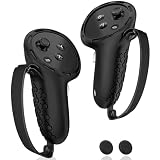
These are silicone covers with elastic knuckle straps, sold as one pair for the Quest 3 and 3S Touch controllers. They suit players who use fast, arm-swinging games where a controller can slip, and anyone who wants a barrier against scratches, dust and sweat. The listing also includes a pair of textured thumbstick covers. They make the most sense in rhythm, boxing and sports-style games, where hands sweat and controllers get swung hard. Because the listing states a one-pair package, you will not get spares, so wash them gently and let them dry fully before the next session.
- Material: silicone body with a non-slip pattern
- Strap: vegan-leather elastic knuckle strap, adjustable
- Included: one pair of grips plus thumbstick covers
- Colour: black
- Cleaning: wipe with a damp cloth or rinse, per the listing
Pros
- Adds grip and a safety strap in one piece
- Easy to wash after a sweaty session
Cons
- Silicone sleeves can add bulk, so confirm that the dock or stand you own still accepts covered controllers
- Thumbstick covers change stick feel slightly
Compared with the Kinwin dock, these solve a handling problem rather than a power one, so many owners end up wanting both.
2. Kinwin Magnetic Charging Dock – Best for Charging Everything in One Spot

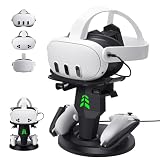
This white station charges the headset and both Touch controllers at once, and it ships with two controller covers and two rechargeable batteries. A magnetic USB-C connection replaces the plug-in contact, so alignment is easier and the port sees less wear. The listing quotes about three hours for a full headset charge and about four for the controllers, and adds RGB ambient lighting that shows orange while charging and green when full. In practice this makes it the most complete answer to a common complaint: the headset is dead the moment you want to play. Leave it plugged in and docked, and the whole kit is ready when you are. Confirm on the product page which power adapter is included or required.
- Fits: Quest 3S and Quest 3
- Charges: headset plus two controllers simultaneously
- Batteries: two customized rechargeable batteries included, listed for 1,000-plus uses
- Connection: magnetic USB-C interface
- Weight: 1.3 pounds per the listing field
Pros
- Removes disposable batteries from the routine
- Doubles as a display spot that keeps the play area tidy
Cons
- Requires using the supplied rechargeable battery covers on the controllers
- RGB lighting is a matter of taste; confirm you can switch it off
Unlike the alcopanda stand, which charges the headset only, this dock covers controllers too.
3. sarlar Hard Carrying Case – Best for Travel and Compact Storage

The sarlar case is a small hard shell for the Quest 3S, Quest 3 and Quest 2, and the listing also names Steam Frame and Vision Pro. It is meant for people who find the official-style boxes bulky. Inside, a fixed elastic band and individual slots hold the headset, official strap and a few small accessories in place. The listing leans on a mini design, so think of it as a case for the headset and essentials rather than a full kit box. Pack the controllers and cable in the slots, and keep a microfiber cloth with the lenses.
- Outside dimensions: 11 x 7.9 x 4.7 inches
- Colour: grey, size listed as S
- Lining: eco-friendly felt, described as free of strong glue odor
- Protection: shockproof and scratch-resistant per the listing
- Capacity: official strap and some accessories
Pros
- Compact enough for a backpack or overhead bin
- Slots keep cables and controllers from rattling
Cons
- A bulky third-party head strap may not fit; confirm before buying if you use one
- Little spare room for large add-ons
It pairs naturally with the KIWI strap only if the strap folds flat, so check the interior size first.
4. alcopanda Headset Stand – Best for a Simple Display Stand

This is a plastic stand that holds the headset at an angle and lets you plug a USB-C cable into it while it rests. It works for the Quest 3, 3S and 2. The listing is clear that it cannot charge the controllers, so it fits people who already have a controller solution or who charge those separately. It is a good match for a desk or shelf where you want the headset visible, off the floor and away from pets. The tilted tray is said to keep the center of gravity balanced so the stand does not wobble.
- Material: ABS plastic with four non-slip base pads
- Charging: headset only, via your own Type-C cable, roughly 3 to 5 hours per the listing
- Power advice: use a 5V-3A, 9V-3A or 12V-3A adapter or charging will be slow
- Controller storage: Quest 3 controllers sit on the base, even in silicone sleeves
- Assembly: tool-free
Pros
- Simple setup with no tools or batteries to manage
- Holds headsets that wear third-party straps
Cons
- Does not charge the controllers
- Needs a capable adapter and your own cable
If you want every device topped up, the Kinwin dock is the more complete alternative.
5. KIWI design K4 Head Strap – Best for Reducing Front-Heavy Pressure

The K4 is a no-battery replacement strap described as a budget option for newer players. It uses memory foam and soft PU leather, with an enlarged rear headrest that spreads weight toward the back of the head. A dial adjusts size and a 52-degree hinge lets you install or flip the strap up quickly. The stock cloth strap is the usual source of forehead pressure, and a rigid rear-weighted strap is the standard fix. The listing says it suits adults and kids, though you should confirm the smallest adjustment range if a child will use it.
- Weight: 233 g per the listing
- Padding: memory foam with PU leather
- Adjustment: dial plus a 52-degree hinge
- Power: none, so no extra charging
- Colour: white; folded dimensions listed as 9.3 x 2.4 x 9.3 inches
Pros
- Never needs charging
- Back-weighted design aims to relieve face pressure
Cons
- Adds its own weight and bulk to the setup
- May not fit inside smaller cases
Next to the sarlar case, this is the pick that improves play time rather than storage.
6. Meta Quest 3 512GB Gorilla Tag Bundle – Runner-Up: The Headset Itself

Strictly speaking, this listing is the headset, not an accessory, so it ranks last for this page. It is relevant to anyone who landed here before buying a Quest 3. It carries 512GB of storage, a Snapdragon XR2 Gen 2 processor, a display the listing calls a nearly 30 percent resolution leap over its predecessor, and a three-month Horizon+ trial. Meta’s public specs list 8GB of RAM and 2064 x 2208 pixels per eye for the Quest 3, which explains why so many accessories target it. The listing does not state which controllers or cables are in the box, so confirm contents before assuming a charging cable is included.
- Storage: 512GB
- Processor: Snapdragon XR2 Gen 2, listed as double the graphics power of Quest 2
- Bundle: Gorilla Tag cosmetic items and 2,000 Shiny Rocks, per the listing
- Subscription: three-month Meta Horizon+ trial
- Weight field: about 0.88 pounds; confirm on the listing
Pros
- Untethered play with mixed-reality features
- Large storage for a growing library
Cons
- Not an accessory; every other item here is an add-on to it
- Battery life is limited, so a dock or stand helps
Treat it as the starting point, with the Kinwin dock the most useful add-on to follow it.
Specs Compared
| Product | Type | Fits | Power | Key feature | Material / size note |
|---|---|---|---|---|---|
| AMZDM Controller Grips | Controller covers | Quest 3 / 3S Touch controllers | None | Knuckle straps, thumbstick covers | Silicone, vegan-leather straps |
| Kinwin Magnetic Charging Dock | Charging dock | Quest 3 / 3S | USB-C, magnetic | Charges headset and 2 controllers | Weight about 1.3 lb |
| sarlar Hard Carrying Case | Hard case | Quest 3S / 3 / 2, others named | None | Elastic band, slots | 11 x 7.9 x 4.7 in |
| alcopanda Headset Stand | Stand with charging pass-through | Quest 3 / 3S / 2 | Your Type-C cable | Headset only; no controller charging | ABS plastic, 4 non-slip pads |
| KIWI design K4 Head Strap | Head strap | Quest 3 / 3S | None (no battery) | Dial, 52-degree hinge | 233 g, memory foam |
| Meta Quest 3 512GB Bundle | Headset (not an accessory) | Itself | Built-in battery | Snapdragon XR2 Gen 2, 512GB | Confirm on listing |
How We Chose These
We started from the six listings assigned to this page and read each one for compatibility statements, materials, included parts and stated limits. We cross-checked what the Quest 3 and 3S are and how their controllers draw power against Meta’s public hardware information. Where a listing did not give a number, we said so instead of filling it in. We ranked by how many common problems an item solves, how clear its compatibility claims are, and how few extras it needs to work. We have not used these products ourselves, and nothing here is a lab measurement.
What to Look For
Confirm the model name first
Quest 3 and Quest 3S share a processor and many accessories, but they are not identical. The Quest 3 uses pancake lenses and a higher-resolution display; the 3S uses a lower-resolution panel and different lenses. Strap and case fit usually carries over, but a faceplate or lens accessory may not. Always read the listing title for both “3” and “3S”, and do not assume Quest 2 parts will fit just because the headset looks similar.
Power: dock, stand, or batteries
Quest 3 Touch Plus controllers take a single AA battery each, which gets expensive if you play every day. A dock with rechargeable batteries, like the Kinwin, shifts you to recharging. A charging stand that only handles the headset leaves the controllers on AA cells. For headset charging itself, a 5V-3A or 9V-3A USB-C adapter is a safe target; a weak phone brick will work but slowly. Meta quotes about 2.2 hours of typical headset use, so charge between sessions.
Comfort: strap weight and balance
The headset sits at the front, so most comfort fixes move weight rearward. Look for a rear pad, a dial that lets you tighten at the back of the head, and a stated weight. A strap around 230 g like the K4 adds roughly a quarter kilogram to the setup, so pick it for balance, not for lightness. Test the fit by tightening from the back first, then the top, and leave the face pad barely loaded.
Protection and storage
Silicone covers handle sweat and drops; hard cases handle travel. If you own a bulky strap, measure it folded and compare it with the case’s interior. A simple rule of thumb: add 0.5 inch of clearance on every side for a cable and a cloth. Keep lenses out of direct sun, because sunlight through the lenses can damage the display, and store the headset with the lenses covered.
A worked example
Suppose you play 45-minute sessions four times a week and share the headset with a roommate. Disposable AA cells would cost you eight batteries a month; the dock removes that. Add the strap if you feel pressure after 30 minutes, and the grips if the controllers get slick. Buy the case only if the headset leaves the house. A second household might reverse the order: with children swinging controllers in a small room, grips come first, then the dock. The point is to match the purchase to the failure you actually see, not to buy a complete kit on day one.
Compatibility red flags
Be cautious with listings that name “Oculus” or Quest 2 only, with accessories that cover the headset’s sensors or cameras, and with chargers that do not state an output rating. A dock should say which models it supports and what it plugs into. A strap should say whether it blocks the top vent or the front sensors. Items that mention several headsets, like the case here, are fine, but verify the exact interior shape if you plan to store an extra strap or a link cable.
Wi-Fi, space and daily habits
Accessories matter most when they fit a routine. Pick a single place where the headset lives, whether a dock, a stand or a case, and return it there after every session so the lenses stay covered and the battery stays charged. Keep the play area clear by at least two meters in each direction, and wipe the facial interface with a dry microfiber cloth after sweaty sessions so skin oils do not transfer to the lenses. Replace worn straps and covers when the elastic loosens, since a loose controller strap defeats its own purpose. If you store the headset on a stand near a window, close the blinds or place it out of direct sunlight, which can harm the display through the lenses.
Questions
Do these accessories work with both the Quest 3 and Quest 3S?
Most listed items name both models, but a few also name the Quest 2. Read the listing title and bullets for the exact model list, because some stands accept different controller shapes than others.
Is a charging dock worth it over a stand?
A dock that charges controllers too saves you from buying AA batteries and keeps everything together. A headset-only stand costs less in complexity but leaves the controller power problem unsolved.
Will a third-party head strap fit in a hard case?
Not always. Straps with large rear pads can exceed a compact case’s interior, so check the strap’s folded size against the case’s stated dimensions before buying both.
Do controller grips affect tracking?
Covers are designed to leave the tracking rings exposed, but poorly fitted sleeves can block them. Confirm the cutouts match the Touch Plus ring shape on the product page.
Can I charge the headset with any USB-C adapter?
Most USB-C adapters work, but a higher-output one charges faster. The stand listed here recommends 5V-3A, 9V-3A or 12V-3A adapters, and a low-output brick will charge slowly.
Is the Quest 3 bundle an accessory?
No. It is the headset plus a game cosmetic bundle and a short Horizon+ trial. We list it here for readers who have not bought a headset yet.
Update History
- October 14, 2026 – Initial publication; product set drawn from current catalog listings.
- Check the product page for current specifications and availability before buying.
Sources
- Retailer listing titles, bullet points and specification fields for each product
- Manufacturer product information for Meta Quest 3 and Quest 3S hardware
- Manufacturer listings from KIWI design, Kinwin, alcopanda, sarlar and AMZDM as shown in retailer pages