The best Nintendo Switch 2 accessory to buy first for most owners is the Nintendo Switch 2 Pro Controller, because it fixes the single biggest comfort complaint of long sessions on a docked console: small detached controllers that cramp the hands. It has rear GL and GR buttons you can remap, a C button for GameChat, a 3.5 mm headphone jack, and a stated battery life of about 40 hours. If your priority is protecting the 7.9-inch screen, the ivoler four-pack of tempered glass with an alignment frame gives you spares for mistakes. If your priority is storage, the Samsung microSD Express card is the type of card the console actually accepts for Switch 2 games, since older microSD cards will not work for them. Racing fans should look at the Joy-Con 2 Wheel set, and commuters should look at the Game Traveler Deluxe case. This guide covers all ten products, who each one suits, the honest trade-offs, and how to decide without wasting money on duplicates.
Our Top Picks
 Game Traveler Deluxe Licensed Travel Case for Nintendo11.4 x 6.5 x 4.1 inches11.6 x 6.1 x 4.3 inches1.4 PoundsCheck on Amazon
 ivoler 4-Pack Tempered Glass Screen Protector Designed for7.9''7.5 x 4.23 x 0.5 inches0.4 PoundsCheck on Amazon


Top 3 picks at a glance


Top 3 Picks
Best Overall: Nintendo Switch 2 Pro Controller
The official Pro Controller is the accessory that changes how the console feels every day. Remappable GL and GR rear buttons, HD Rumble 2, motion controls and a headphone jack make it the most complete upgrade on this list. It works with Switch 2 only, so check that you are not expecting to share it with an older console.
Best Budget and Value Pick: ivoler 4-Pack Tempered Glass Screen Protector
Four protectors plus an alignment frame is the lowest-risk way to protect a large handheld screen. Applying a protector is the step most people get wrong, and having spares turns a botched first attempt from a disappointment into a minor inconvenience.
Best for a Key Use (Storage): Samsung microSD Express Card, 256GB
The Switch 2 uses microSD Express cards for Switch 2 games, a different technology from the standard microSD cards of the first Switch. The Samsung card is sold specifically for the console, which removes the guesswork about whether the card will be recognized.
Quick Comparison
| Product | Best for | Key specs |
|---|---|---|
| Nintendo Switch 2 Pro Controller | Docked and couch play | GL/GR remappable buttons, C button, 3.5 mm audio jack, about 40 hours stated battery life, Switch 2 only |
| amFilm Auto-Alignment OneTouch Screen Protector | Easy, bubble-free installation | Auto-alignment application tool, made for Switch 2 (2025) |
| Samsung microSD Express Card 256GB | Expanding game storage | microSD Express format, 256GB, made for Switch 2, rated read speed up to roughly 800 MB/s |
| Pro Controllers 2 Pack, 18-in-1 Bundle | Two-player households on a tight budget | Two third-party controllers plus bundled extras, 18 items in the kit |
| Nintendo Joy-Con 2 (L)/(R) Light Purple/Light Green | Spare or replacement pair, color choice | Official pair, magnetic attachment, color set as listed |
| Game Traveler Deluxe Licensed Travel Case | Commuting and trips | Licensed case, fits Switch, Switch 2 and OLED, black, medium size |
| ivoler 4-Pack Tempered Glass Screen Protector | Spare protectors and value | Four tempered glass sheets, alignment frame, clear HD finish |
| Joy-Con 2 Charging Grip | Playing while Joy-Con 2 charge | Two-handed grip with charging, official, no internal battery |
| Charge Inside Case Bundle for Switch 2 | Starter bundle for new owners | Case plus bundled add-ons, designed around the 2025 console |
| Nintendo Joy-Con 2 Wheel (set of 2) | Racing games, party play | Two wheel shells for Joy-Con 2, official, Joy-Con 2 only |
How We Chose
This ranking is built from desk research of listings and established product facts. We started with the product names and descriptions in each listing, then cross-checked well-established facts about the console itself: the 7.9-inch 1080p screen, the microSD Express storage requirement, the magnetic Joy-Con 2 attachment, and the way official accessories are documented by the platform holder. We weighted five criteria. First, compatibility, because a surprising number of accessories only fit specific console generations. Second, how much of a daily annoyance the product removes, whether that is comfort, storage or scratches. Third, the risk of buying the wrong version, which is higher for third-party bundles. Fourth, how much value a buyer gets from duplicates or spares. Fifth, durability signals in the listing name such as tempered glass, licensed status or metal parts. Where a spec was not stated, we describe the class of product and tell you to confirm details on the product page before you buy.
1. Nintendo Switch 2 Pro Controller – Best for Comfort and Control
As an Amazon Associate we earn from qualifying purchases at no extra cost to you.
The Switch 2 Pro Controller suits anyone who spends most of their time with the console on the dock, on a desk or on a living room table. If you play long RPGs, shooters, fighting games or platformers, a full-size pad with proper grips is easier on the hands than the detached Joy-Con 2 pair. It also suits people who plan to use GameChat, because the dedicated C button opens the chat menu at any time, and it suits anyone who games late at night and wants to plug headphones straight into the controller.
- Remappable GL and GR rear buttons, which you assign to any other button.
- C button for GameChat access.
- A 3.5 mm stereo headphone jack, with the platform holder noting it cannot guarantee operation with every headset.
- HD Rumble 2 haptics plus gyroscope and accelerometer for motion aiming.
- NFC support for compatible figures, and Bluetooth wireless connection.
- Stated battery life of about 40 hours from a built-in rechargeable battery that charges over USB-C; a full charge is stated at about three and a half hours.
- Works with Switch 2 only, according to the maker.
The strongest argument for this controller is how few compromises it asks you to make. The rear buttons let you move actions off the face buttons in games that otherwise force awkward thumb gymnastics, and the headphone jack matters if you play in a shared room. Battery life is long enough that most people will charge it once or twice a week rather than every session. The shape follows the familiar Pro Controller layout, so players coming from the original console will adapt in minutes. Motion controls remain available, which keeps gyro aiming possible in games that support it.
Think about the limits as well. The battery is built in, so when it eventually ages you cannot simply swap it yourself; the maker offers a fee-based service route. The pad is a Switch 2 accessory, which means it will not double as your controller on older hardware. And because it is the official model, the cost sits above the third-party two-pack in this list, which makes sense only if you value fit, finish and long-term support. One more practical tip: keep a short USB-C cable by the dock so the controller can top up between sessions without being tied to the wall adapter.
Pros
- Remappable rear buttons add real flexibility.
- Headphone jack and C button integrate well with online play.
- Long stated battery life for a rechargeable pad.
- Official support and consistent firmware behavior.
Cons
- Switch 2 only, so no cross-generation use.
- Non-removable battery.
- Higher outlay than third-party alternatives.
- One controller does not cover local multiplayer on its own.
Against its nearest alternative, the Pro Controllers 2 Pack bundle, this is the better single controller but the weaker multiplayer deal. If you play alone most of the time, buy this. If you routinely play with a partner or child and want two pads without a large outlay, the two-pack makes more sense, accepting that third-party firmware and feel can vary. Compared with the official Joy-Con 2 pair, the Pro Controller wins on long-session ergonomics but loses on portability and motion-based party games.
2. amFilm Auto-Alignment OneTouch Screen Protector – Best for Easy Installation

This protector is for people who have been burned by crooked screen protectors before. The Switch 2 has a roughly 7.9-inch display that is larger than the first console’s, so a misaligned sheet is more visible and a dust bubble is harder to ignore. The OneTouch auto-alignment approach in the listing name points to an installation tool that holds the sheet in the correct position while you press it down in one motion, which is exactly where most manual installs go wrong.
- Designed for the 2025 Nintendo Switch 2, as the listing states.
- Auto-alignment application method, branded OneTouch.
- Screen protection class: typically a tempered glass or film layer; check the listing for the exact material and thickness.
- Installation kit contents vary by listing, so confirm whether cleaning wipes and dust-removal stickers are included.
A good installation tool matters more than most buyers expect. The common failure points are dust trapped under the sheet, a cut-out that sits a millimeter off near the sensors, and bubbles that never fully press out. A tray or frame that locks to the console body solves the alignment half of that problem. You still need to clean the display carefully with the supplied wipe, use a dust-removal sticker for stubborn particles, and apply in a clean room such as a bathroom after a hot shower, where airborne dust settles.
Remember what a screen protector does and does not do. It resists scratches from keys, sand and grit in a bag, and a glass layer can add some resistance to minor knocks. It does not make the console drop-proof, and it can slightly change the feel of touch input and glare. Matte options reduce reflections but soften sharpness; glossy options keep the picture crisp but show fingerprints. Check the listing for the finish and for any note about compatibility with the console’s display sensors.
A quick installation routine helps whichever protector you choose. Power the console off, wipe the screen with the alcohol wipe, then the microfiber cloth, and lift any dust with a sticker. Fit the frame, check that the cut-outs line up with the sensor area, and lower the sheet in a single motion rather than in stages. Press from the center outward with a soft card. Small bubbles often fade in a day or two, while a hair or speck of dust will not, so remove the sheet and start again at once if you see one.
Pros
- The alignment mechanism reduces the main risk of installation.
- Made specifically for the 2025 console, so the cutouts should match.
- Suits first-time installers who want a guided process.
Cons
- Pack contents are less clear from the listing name than a multi-pack.
- If a single sheet is ruined, you may be left without a spare.
- Material and finish details need confirming on the product page.
Compared with the ivoler four-pack, this is the more guided option and the ivoler is the more forgiving one. If you are confident but clumsy, spares matter more. If you are nervous and want a controlled one-shot application, the OneTouch method is the better pick. Neither protects the back of the console or the Joy-Con 2 controllers, so a case still matters for travel, and neither replaces careful handling when you carry the console in a bag.
3. Samsung microSD Express Card, 256GB – Best for Expanding Storage
The console ships with built-in storage, but digital game libraries fill it quickly, especially with large downloads and updates. This card suits digital buyers, people who keep many games installed, and anyone who is tired of deleting software to make room. It is a different kind of card from the microSD cards used by the original console, and that difference is the main thing to understand before you shop.
- 256GB capacity, made for Nintendo Switch 2 per the listing.
- microSD Express format, which uses a faster interface than conventional microSD.
- Rated read speeds in the region of 800 MB/s according to the maker; confirm the exact figures on the product page.
- Standard microSD cards cannot be used to store or run Switch 2 games.
The practical lesson is to look for the Express designation rather than chasing speed numbers. Differences between mainstream Express cards are small in everyday use; the real difference is between an Express card and a conventional one, which will simply not work for Switch 2 titles. A licensed card removes any doubt about compatibility. Plan capacity honestly: a 256GB card roughly doubles the headroom of the console for most owners who already use the internal drive, while heavy digital buyers may eventually want a larger card.
Take care of the card physically. Power the console off before swapping, avoid bending the card, and keep a small case for spares. Know where your save data lives and use the console’s own backup features where available, since a failed card can take installed content with it, although purchased games can generally be downloaded again. If you still own first-generation games, remember that those are handled differently from Switch 2 titles, so read the console’s storage menu before you move anything around.
When deciding on capacity, count the games you replay rather than the games you own. Large modern titles can occupy tens of gigabytes each, and system updates and add-on content push that higher. A simple rule is to keep your current top five games installed on the fastest storage and archive the rest, since archived software can be redownloaded later. That habit stretches a 256GB card much further than most owners expect, and it makes the case for a bigger card only when you genuinely rotate through many large games at once.
Pros
- Made specifically for Switch 2, so compatibility is clear.
- Fast Express interface helps with load times.
- Simple plug-in upgrade with no tools.
Cons
- Costs more per gigabyte than standard microSD.
- 256GB can feel small for large digital libraries.
- No benefit for physical-cartridge-only players.
Compared with the other products here, this one is the least glamorous and often the most useful. It beats the Pro Controller on practical necessity for digital buyers, but it does nothing for comfort. If you buy only physical games, skip it and spend the money on the controller or the case.
4. Pro Controllers 2 Pack, 18-in-1 Accessories Bundle – Best for Two-Player Value

This bundle suits households that want two extra controllers for local multiplayer without paying the official rate twice. The listing name describes two Pro-style controllers inside an 18-in-1 accessories kit for Nintendo Switch 2, which implies the box holds the pads plus a set of extras such as grips, caps, cables or cleaning items. Because the name does not list the extras individually, treat the exact contents as something to confirm on the product page before you buy.
- Two third-party Pro-style controllers for Nintendo Switch 2.
- An 18-item accessory bundle, contents as described on the listing.
- Third-party design, so features such as rear buttons, motion controls, NFC and headphone jacks may differ from the official pad.
- Wireless or wired operation depends on the model; confirm connection type, battery size and charging method.
The sensible way to judge a bundle like this is to separate the controllers from the filler. The controllers are the reason to buy. Extras such as thumbstick caps and screen cloths are nice, but they should never be the deciding factor. What matters is whether the pad pairs easily, whether the buttons feel firm, whether the sticks have noticeable drift or dead zones, and whether the vendor offers a return or warranty path if one of the pair misbehaves. Third-party controllers also vary in how well they support features like wake-from-sleep, gyro and vibration, so read the compatibility section on the listing carefully.
This type of product makes the most sense as a casual multiplayer solution. If your children play platformers, party games or sports titles on weekends, having two inexpensive pads you do not worry about is practical. It makes less sense as your single main controller for competitive play or marathon sessions, where the consistency of an official pad is easier to trust. Keep the receipt or order record in a safe place, because defects in budget controllers tend to show up in the first weeks of use.
Pros
- Two controllers in one box for shared play.
- Extra accessories add convenience.
- Lower commitment than buying two official pads.
Cons
- Feature set and build quality vary from the official pad.
- Bundle contents are padded with items you may never use.
- Firmware and compatibility can be less predictable after console updates.
Against the official Pro Controller, this bundle trades polish for quantity. If you want one pad that feels right and will be supported for years, the official model wins. If you simply need a second and third pair of hands in the living room, this bundle wins. Compared with the official Joy-Con 2 pair, a Pro-style pad is more comfortable for long sessions but less convenient for games that use motion pointing or split controllers.
5. Nintendo Joy-Con 2 (L)/(R) Light Purple/Light Green – Best for a Spare or Replacement Pair

A second pair of Joy-Con 2 is the most direct way to turn the console into a four-player system without buying separate gamepads. It also suits owners who want a replacement after stick drift, a lost controller, or a color change. This listing is for the left and right pair in light purple and light green, so you get both halves ready to attach to the console or share between two players.
- Official Nintendo left and right controllers for Switch 2.
- Magnetic attachment to the console, rather than the rail-slide system of the first generation.
- Color set as stated in the listing: light purple and light green.
- Supports motion controls and HD vibration, and the right controller carries the C button for GameChat.
- Optical sensor functionality for mouse-style play in supported games, according to the maker.
- Stated battery life in the region of 20 hours; confirm on the product page.
The pair makes sense for families who play together because it adds two more players instantly: each Joy-Con 2 can be held sideways as a small standalone controller. It also makes sense for travelers who dock rarely and want a second set to hand to a friend. Because the attachment is magnetic, snapping the controllers on and off is quick, which is genuinely useful in short bursts of play. Note that Joy-Con 2 and first-generation Joy-Con are not interchangeable on the console, so old controllers cannot stand in for the new pair in games that need them.
Think about the purchase against the alternatives. The Joy-Con 2 pair is small, light and flexible, but the compact size is less comfortable for large hands over long sessions. If your main complaint is hand cramps, a Pro-style controller is a better fix than a second Joy-Con pair. If your main complaint is that you cannot play multiplayer without sharing, the pair is the correct purchase. If you own the Charging Grip, you can also use the pair as one two-handed controller while it charges.
Pros
- Official quality and full feature support, including motion and the C button.
- Adds two-player capability in one purchase.
- Cheerful color combination helps tell controllers apart.
Cons
- Small controllers can be tiring in long sessions.
- Not compatible with first-generation Joy-Con rails or consoles.
- Stick wear is a known concern with small analog sticks in general; ask the maker about service options.
Compared with the Pro Controller, this pair is more social and more portable, while the Pro Controller is more comfortable. Compared with the Joy-Con 2 Wheel, the pair is the controller and the wheel is a shell that holds it; you need the controllers to use the wheels at all, so the pair and the wheel set are complementary rather than competing choices.
6. Game Traveler Deluxe Licensed Travel Case – Best for Commuting and Trips

This is a licensed case from R.D.S. Industries, listed for the Nintendo Switch, Switch 2 and OLED models, in black and a medium size. It suits anyone who carries the console in a backpack, a carry-on or a car, and who wants a protective shell with organized storage for game cards and small accessories. Licensed status means the design carries the platform holder’s approval, which is a sign of attention to fit but not a guarantee of any specific drop rating.
- Licensed deluxe travel case, model NS230 per the listing.
- Fits Nintendo Switch, Nintendo Switch 2 and OLED, as the listing states.
- Black color, medium size.
- Expected features for a deluxe travel case: padded or molded interior, game card slots, and room for a small cable or accessory.
- Confirm interior dimensions if you plan to carry the console with a bulky grip or a thick case on.
Because the console is larger than its predecessor, universal cases can be tight. The fact that this product names Switch 2 in its title is useful, but check how much room it leaves for a screen protector, a silicone skin or controllers attached. A deluxe case usually trades size for protection: it is larger than a simple sleeve but safer against crushing in a packed bag. If you travel with a docked setup, check whether a charger, dock cable and Pro Controller will fit too, because most medium cases are designed for the console, controllers attached, and a handful of games only.
Care tips: keep game cards in their slots so they do not rattle, leave a microfiber cloth inside to protect the screen, and avoid leaving the case in a hot car. Heat can warp plastics and shorten battery life. Wipe the interior occasionally, since pocket lint and grit are the real sources of screen scratches. If you also carry a dock or a Pro Controller, plan a second pouch for them rather than forcing everything into one shell, because a bulging case puts pressure on the lid hinge and the screen.
Pros
- Licensed product with a console-specific fit.
- Protects against crushing, scratches and loose game cards.
- Works across multiple Switch models, useful in mixed households.
Cons
- Medium size may not fit the console with bulky add-ons attached.
- No built-in charging or extra power features.
- Hard-shell protection adds bulk to a small bag.
Compared with the Charge Inside Case Bundle, this is the cleaner and more traditional option, while the bundle packs extras into a single purchase. If you already own screen protectors, controllers and cables, this case is the simpler buy. If you are starting from nothing, the bundle may save a few separate orders, at the cost of less certainty about the quality of each piece.
7. ivoler 4-Pack Tempered Glass Screen Protector – Best for Spares and Value

The ivoler set is aimed at buyers who would rather have extras than a premium installation tool. The listing describes a four-pack of tempered glass screen protectors designed for the 2025 Switch 2 with an alignment frame and a clear HD finish, labeled as an updated version. For anyone sharing a console with children, replacing a scratched protector is a routine task, so four sheets can last a long time.
- Four tempered glass screen protectors per pack.
- Alignment frame included, according to the listing name.
- Transparent HD clear finish; glossy rather than matte.
- Made for the 2025 Nintendo Switch 2, so cutouts should match the console.
- Check the product page for glass thickness, hardness rating and any anti-fingerprint coating.
Four sheets change how you think about installation. The first can be a practice run, and the second can be the installation you actually keep. That removes the frustration that makes many people give up on protectors altogether. Tempered glass is also thicker than plastic film, which improves resistance to scratches and gives a more glass-like touch, but it adds a little edge height. Some users find that edges can catch on a case lining, so choose a case with a smooth interior or confirm that the protector is slightly smaller than the display for a case-friendly fit.
A glossy finish keeps colors vivid and text sharp, which suits handheld play, but it reflects light. If you play near windows or on trains, a matte option may be more comfortable, although matte surfaces tend to look slightly grainier. Whichever you choose, install the sheet before you take the console anywhere, and keep the other three sheets flat in their packaging so they stay clean. Date the packaging when you apply a new sheet so you know when you last replaced it, and swap it once you see chips or deep scratches rather than waiting for a crack that reaches the display underneath.
Pros
- Four sheets mean spares and room for mistakes.
- Alignment frame helps with accurate installation.
- Tempered glass resists everyday scratches better than basic film.
Cons
- Glossy finish shows fingerprints and glare.
- Glass edges may interact with tight cases.
- Installation tools may be simpler than premium kits.
Also remember that tempered glass is rigid, so a sheet that is cracked at the corner should be replaced promptly to avoid sharp edges against your fingers. Compared with the amFilm OneTouch protector, the ivoler is the better value and the better family choice, while the amFilm is the better single-attempt choice. If you are confident in your installation skills and travel often, the ivoler gives you a permanent supply of replacements. If you want guided accuracy and do not expect to reapply, the amFilm approach has the edge.
8. Joy-Con 2 Charging Grip – Best for Playing While Charging
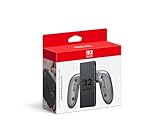
The Charging Grip is for owners who like detached Joy-Con 2 in the hand for comfort but are tired of the controllers running out of power. It holds the left and right controllers together as a single two-handed pad, and the maker states that it can charge them while they are attached. The grip bundled with the console does not charge the controllers, so this is a genuine upgrade rather than a duplicate.
- Official accessory for Joy-Con 2, with GL and GR button support when the controllers are attached, per the maker.
- Charges attached Joy-Con 2 while you play; a full charge is stated at roughly three and a half hours.
- Connects by USB to the dock or directly to the console’s AC adapter.
- No internal battery of its own, so it needs to stay plugged in to charge.
- Sold separately from console bundles.
The best use case is a long session on a desk or sofa where a cable running to the dock is not a problem. It gives you a fuller grip than holding the Joy-Con 2 loosely, while still letting you detach the controllers for motion or two-player moments. Because it is powered through a cable, it is less useful for flight or car trips unless you carry a power bank that can supply the right output, so check the console’s power requirements before relying on a battery pack. If you already own a Pro Controller, the grip is a smaller upgrade, because you have a comfortable pad with its own battery.
Be sensible about electrical safety. Use the cable and power adapter recommended for the console, avoid damaged cords, and do not charge in hot, enclosed spaces. Unplug the grip if it feels unusually warm, and keep liquids away from the dock area. Charging contacts can collect dust and skin oils, so a dry microfiber wipe now and then keeps the connection reliable. If the controllers do not seem to charge, reseat them firmly in the grip, try a different cable, and confirm the adapter is connected to a working outlet before assuming a fault.
Pros
- Lets you keep playing while the Joy-Con 2 charge.
- Gives a larger, more comfortable shape than loose controllers.
- Official design with consistent compatibility.
Cons
- Needs a cable, so it is not fully wireless.
- Less comfortable and less capable than a full Pro Controller.
- Charging speeds depend on the adapter and the connection.
Compared with the Pro Controller, this is the budget-friendlier comfort fix if you already own Joy-Con 2, but the Pro Controller is the more complete solution. Compared with the Joy-Con 2 pair, it is a companion rather than a rival: it makes the pair you own more useful, but it cannot work without them.
9. Switch 2 Accessories Charge Inside Case Bundle – Best for New Owners

This listing is a case-led bundle for the 2025 Nintendo Switch 2, and the name highlights a Charge Inside feature, which suggests the console can sit in the case with a charging connection available. It suits new owners who want to buy one box that covers transport and a handful of small extras instead of piecing together separate products. Because third-party bundles differ widely, the specifics matter more here than the headline.
- Case bundle designed for the 2025 Nintendo Switch 2, per the listing.
- Charge Inside design, meaning charging is intended to work with the console in the case; verify how the cable passes through and whether the dock is supported.
- Additional bundled accessories, with contents defined on the listing.
- Confirm interior dimensions, game card capacity and whether controllers can stay attached.
The attraction of Charge Inside is convenience. If you travel with the console in a hard case, being able to top up from a power bank or wall adapter without unpacking everything is a real time-saver. The trade-off is that charging a console in an enclosed case means heat has less room to escape. Do not run intensive games while charging inside a closed case, avoid leaving it on soft surfaces such as bedding, and use only a cable and charger you trust. If the case or the console feels hot, remove the console and let it cool.
Think of this type of bundle as a starter kit. It tends to include a protective shell, a few add-ons such as thumb caps or a cloth, and sometimes cables. These can be handy, but they rarely match the quality of dedicated individual products. If you value the convenience, the bundle is a fair pick; if you value long-term durability, buy a single quality case and add items separately. Before you commit, measure the console with any skin or protector applied and compare it with the interior size on the listing, because a case that is a few millimeters too small will strain the lid and may press on the screen. Check the return path, since fit problems are common with accessories for a console that is new to the market.
Pros
- One purchase covers protection and some extras.
- Charging with the console in the case saves unpacking time.
- Built around the 2025 console.
Cons
- Enclosed charging raises heat considerations.
- Bundle extras vary in quality.
- Details such as interior size are not obvious from the name.
Next to the Game Traveler Deluxe case, this bundle is the more feature-heavy option and the Game Traveler is the more conventional, licensed one. If you want the safest bet for fit and approval, choose the licensed case. If you want a single box with a charging feature and extras, choose the bundle and confirm the specifics first.
10. Nintendo Joy-Con 2 Wheel (Set of 2) – Best for Racing and Party Play

The Joy-Con 2 Wheel set turns each controller into a small steering wheel. It is a fun, inexpensive accessory for families, parties and racing fans, especially in games that support motion steering. You slot a Joy-Con 2 into each wheel, which attaches magnetically according to the platform holder, and the wheel’s rim gives you something to hold and turn.
- Official set of two wheel shells for Joy-Con 2.
- Designed for Joy-Con 2 only; the wheels are not meant to be used with first-generation controllers.
- Passive plastic shells with no electronics or battery of their own; the controller inside does the work.
- Best with games that support motion steering; confirm support on each game’s page.
The big benefit of a wheel is accessibility. Younger children and casual players often find a steering wheel more intuitive than an analog stick, and the shell reduces the chance of the controller being dropped. It also makes two-player racing feel like a shared event. The drawback is that a Joy-Con wheel is a novelty compared with a proper racing rig; it does not offer force feedback or pedals, so serious racing fans will quickly feel its limits.
Because the wheels are shells, they are compact and easy to store. Keep them in the case with the controllers when traveling, and wipe them clean after party sessions. Make sure the controller is seated fully and does not wobble, since a loose fit can cause sudden steering jumps. If you play with children, supervise use so that wheels are not swung around like toys while still attached to controllers. For storage, a small zip pouch keeps the pair together and prevents the shells from scratching the console screen in a bag.
Pros
- Makes racing games more intuitive and fun for casual players.
- Small, lightweight and easy to store.
- Official accessory with a good fit for the controllers.
Cons
- Requires Joy-Con 2 controllers to function.
- Useful mainly in games that support motion steering.
- No force feedback or pedals.
Compared with the Joy-Con 2 pair, the wheel is an add-on that depends on the pair. Compared with the Charging Grip, it is the more playful and less practical accessory. If you play racing games with other people, the wheels are a cheap way to turn a living room into an arcade; if you play mostly solo, they will spend most of their time in a drawer. Also check whether the games you actually own support motion steering and how they handle sensitivity settings, since a wheel only feels good when the game offers calibration and a forgiving steering response.
How to Choose the Right Switch 2 Accessories
Start with how you play
The right shopping list depends on how you use the console. A person who mostly docks the console needs a controller and storage. A person who mostly plays handheld on the bus needs a screen protector and a case. A parent with two children needs extra controllers and probably a wheel set. Before you add anything to a cart, write down your three most common play situations and match accessories to those situations rather than to the product pictures.
Check compatibility first
Three rules prevent most wasted purchases. Storage must be microSD Express, with the EX logo, because standard microSD will not work for Switch 2 games. Controllers must be built for the new console, since first-generation Joy-Con do not attach to it. Screen protectors and cases must name the 2025 Switch 2 or list it explicitly, because the display and body are larger than before.
Decision matrix
| Your situation | Best pick | Why |
|---|---|---|
| Docked player, long sessions | Nintendo Switch 2 Pro Controller | Full-size grips, rear buttons, long battery |
| Two kids, local multiplayer | Pro Controllers 2 Pack or Joy-Con 2 pair | Extra pads without sharing |
| Digital game buyer | Samsung microSD Express Card | Compatible expansion storage |
| Commuter | Game Traveler Deluxe case plus a protector | Protects the screen and body in a bag |
| Clumsy installer | ivoler 4-Pack | Spares and an alignment frame |
| Careful installer, one shot | amFilm OneTouch | Guided single-motion alignment |
| Joy-Con 2 owner who plays at a desk | Joy-Con 2 Charging Grip | Charges while you play |
| Racing fans and parties | Joy-Con 2 Wheel set | Intuitive steering for casual players |
| New owner wanting one box | Charge Inside Case Bundle | Case plus extras |
A worked storage calculation
Suppose you own eight digital games averaging 15 GB each, which is 120 GB, and you expect to add four more over the year at 20 GB, which is another 80 GB. Add roughly 10 percent for updates and add-on content: 200 GB x 1.10 equals 220 GB. The console’s internal drive holds a portion of that, but you also need room for system data, saves and screenshots. A 256GB card gives you a comfortable buffer on top of internal storage, while a player who expects to double that library should plan for a larger card later. Use the console’s storage menu to check actual sizes instead of relying on estimates.
Think about total protection
Protection works in layers. A screen protector guards against scratches, a case guards against crushing and drops in a bag, and careful habits guard against everything else. Do not assume one layer replaces another. A tempered glass sheet does little if the console slides out of a pocket, and a hard case does little for a naked screen rubbing against loose cards inside. If you must choose, buy the case first and the protector second for travel, and reverse that order for a console that mostly stays at home.
A worked budget-order example
Imagine a household with one console, two children and a commute. Rank the needs by consequence rather than excitement. A scratched screen is permanent, so protection comes first: one four-pack of tempered glass and one licensed case. Shared play comes second, which means a second controller option such as the two-pack or a Joy-Con 2 pair. Storage comes third, and only becomes urgent when a download fails for lack of space. Fun extras such as the wheel set come last. Writing the order down in this way keeps a wish list from turning into ten separate purchases.
Match accessories to the console’s strengths
The console has a large display, a magnetic controller system and a fast storage format, and the best accessories respect those traits. A protector should fit the larger screen without lifting at the edges. A case should leave room for the controllers to stay attached if you travel with them. A card should use the Express format so that load times benefit from the faster interface. Read each listing for those three signals and you will filter out most poor matches before you spend anything.
Avoid duplicate spending
Many buyers pay for two products that overlap. A bundle that includes a case and a screen protector makes a separate case redundant, and a Pro Controller makes a Charging Grip less necessary. Take stock of what you already own, buy the item that closes the biggest gap, and wait on the rest until a real need appears.
Frequently Asked Questions
Do I need a microSD Express card for the Switch 2?
You only need one if the built-in storage fills up. Switch 2 games require microSD Express cards for external storage, and standard microSD cards will not work for them. Look for the EX marking before you buy.
Can I use my old Joy-Con on the Switch 2?
First-generation Joy-Con are not designed to attach to the new console, because the attachment system changed to a magnetic design. Some first-generation controllers can connect wirelessly for certain uses, but features differ, so check the platform holder’s compatibility information before relying on them.
Is a screen protector necessary?
It is optional but inexpensive insurance. A protector helps against scratches from keys, grit and loose cards, which are the most common sources of damage in a bag. It will not make the screen immune to a hard drop.
Is the official Pro Controller worth it over a third-party pad?
If you play a lot, the official pad is easier to trust because of its consistent feel, firmware support and full feature set. A third-party pad can be fine for casual or occasional multiplayer. Read the listing for rear buttons, motion support and wake-from-sleep before choosing.
Can I charge the console inside a case?
Only if the case is designed for it, and even then caution is wise. Enclosed spaces trap heat, so avoid running demanding games while charging inside a closed case and use a charger you trust.
Are Joy-Con 2 wheels worth buying?
They are worth it for households that play racing games together, since they make motion steering more intuitive. If you play alone or prefer a standard controller, you may not use them much.
Should I buy a bundle or individual accessories?
Bundles are convenient for new owners, but quality varies across the pieces. Individual products let you spend more on the items you use daily, such as the case or controller, and less on filler you may never touch.
How do I avoid bubbles when installing a protector?
Clean the screen thoroughly, remove dust with a sticker, and lower the sheet in one smooth motion using the alignment frame. Press from the center outward. If a speck of dust is visible, lift the sheet and try again immediately.
Our Recommendation by Situation
If you want one purchase that improves everyday play, buy the Pro Controller. If you are mostly handheld, pair the Game Traveler case with the ivoler four-pack. If your library is digital, add the Samsung card. Families should consider the Joy-Con 2 pair and the wheel set, and anyone with Joy-Con 2 and a desk setup should consider the Charging Grip. Treat the two bundles as convenience buys: confirm contents, check the return path, and keep the receipt.