The best premium whole-home smart security system with monitoring for most houses is the SimpliSafe 12 Piece Wireless Home Security System with HD Camera, because it pairs genuinely optional 24/7 professional monitoring with no long-term contract, covers a typical three-bedroom home out of the box, and installs in an afternoon with a screwdriver and adhesive pads. Choose the abode 8 Piece system instead if you want Apple HomeKit, Z-Wave and Zigbee devices living in the same app as your alarm. Choose the Arlo Home Security System if cameras and multi-function sensors matter more than a deep sensor count, and the Hiseeu 5MP wired kit if you want continuous recording without paying a subscription. Budget and mid-range kits — PGST, Cove, X-Sense, eufy and Hapippofa — serve flats, rentals and smaller houses well, but they trade away cellular backup depth, integration breadth or 24/7 human response to get there. The sections below compare monitoring plans, sensor coverage, installation requirements, app ecosystems, privacy controls and support across home sizes.
Our Top Picks
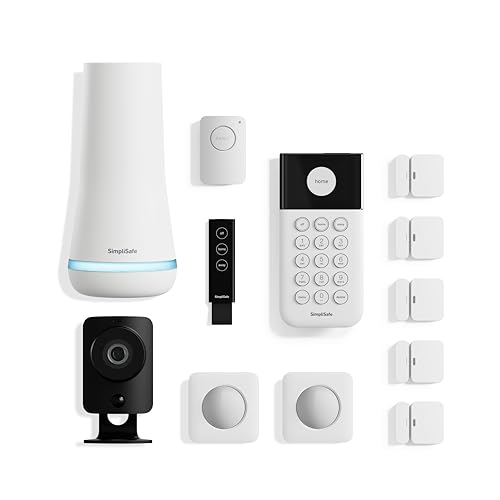 SimpliSafe 12 Piece Wireless Home Security System w/HD12 Piece Set13.3 x 13.2 x 6.8 Inches5.85 poundsCheck on Amazon


Top 3 picks at a glance
Quick Comparison
| Product | Best for | Key specs | Price tier |
|---|---|---|---|
| abode 8 Piece Wireless Smart Security System | Apple HomeKit and multi-protocol households | 8 pieces; Apple HomeKit, Z-Wave and Zigbee radios in one hub; expandable; optional professional monitoring with no contract | Premium |
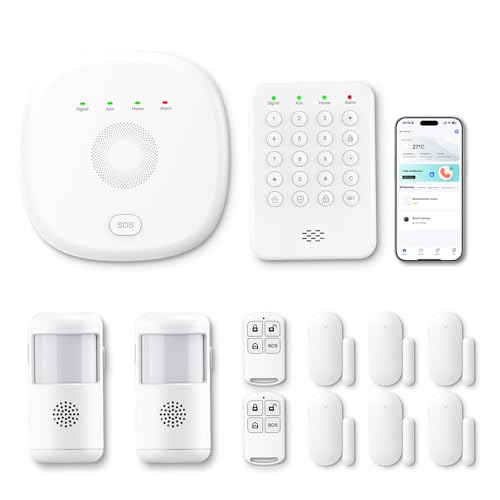
| Hapippofa GEN 2 Wireless Home Security System | Renters wanting a large sensor count cheaply | 16-piece DIY kit; Wi-Fi plus 4G; touchscreen panel; house and apartment focus | Mid-range |
| SimpliSafe 12 Piece Wireless Home Security System | Most houses wanting optional pro monitoring | 12 pieces including HD camera; optional 24/7 monitoring; no contract; cellular backup on monitoring plans | Premium |
| Arlo Home Security System | Camera-first homes with no contract | Wired keypad sensor hub; 5 × 8-in-1 sensors; yard sign; no-contract plans; deep Arlo camera ecosystem | Premium |
| Google Nest Cam Indoor (Wired, 3rd Gen) | Adding one indoor camera to a Google Home | Single wired indoor camera; Google Home app; on-device person detection; Nest Aware subscription for history | Mid-range |
| PGST Home Security Systems 12-Piece Kit | Budget starter kit for flats and small rentals | 12 pieces; Wi-Fi plus GSM/4G; mobile app control and alerts; no-fee self-monitoring | Budget |
| Cove 6 Piece DIY Home Security System | Cheapest route to real professional monitoring | 6 pieces; 3 months of monitoring included; touchscreen panel; cellular backup on paid plans | Budget |
| eufy Security 5-Piece Home Alarm Kit | Local storage with no monthly fee | 5 pieces; hub with local storage; app alerts; subscription-free core features | Mid-range |
| PGST A107F Home Security System | SIM-based alerts where Wi-Fi is unreliable | Door sensors; 4G call, SMS and app alerts; no Wi-Fi dependency for the alert path | Mid-range |
| Hiseeu Home Security System | 24/7 recording without a subscription | 5MP wired plug-in outdoor bullet cameras; 2.4 GHz and 5 GHz Wi-Fi; NVR-class local recording | Premium |
| X-Sense Smart Home Security System | Households already using X-Sense safety alarms | 5-piece wireless set; app alerts; broad compatibility with voice assistants | Budget |
| D1D9 24pcs Wireless DIY Home Burglar Alarm System | Maximum sensor count on a shoestring | 24 pieces; 4G, Wi-Fi and GSM; no monthly fee; app alerts | Budget |
How We Chose
We picked these twelve by comparing published specification sheets, vendor documentation for monitoring terms, and the practical requirements of different home sizes — not by handling the hardware. Four criteria did most of the filtering. First, monitoring structure: does the system offer a genuinely optional professional tier, is there a contract, and does the alert path survive a broadband outage through cellular backup? Second, sensor coverage per pound spent, measured in door/window contacts and motion sensors rather than headline piece counts that pad the box with key fobs and stickers. Third, installation reality: whether a system needs drilling, mains sockets near every camera, or a permanently powered hub, and whether it can move house with a renter. Fourth, app ecosystem and privacy controls — HomeKit, Matter, Alexa and Google Home support, plus local storage, encryption and two-factor authentication.
We also weighted upgrade path heavily. A cheap kit that cannot accept a glass-break sensor or a second keypad in 2027 is a worse buy than one that costs a little more and grows. Every price tier here is described as a tier, not a figure, because listings move daily.
1. abode 8 Piece Wireless Smart Security System – Best for Apple HomeKit and multi-protocol homes
As an Amazon Associate we earn from qualifying purchases at no extra cost to you.

abode is the pick for households where the alarm has to be one part of a bigger automation picture rather than a standalone box. The 8-piece kit is a hub-and-sensor system with Apple HomeKit, Z-Wave and Zigbee radios built in, which means a single app can host your door contacts alongside Z-Wave smart locks and Zigbee bulbs instead of forcing a second hub onto a shelf. If you already run an Apple-centric home, this is the shortest path from “we should get an alarm” to “the lights come on when the front door opens after dark.”
Who it suits: HomeKit users, tinkerers with existing Z-Wave or Zigbee devices, and owners of larger homes who want to add sensors incrementally over a couple of years rather than buy a 20-piece bundle on day one. It is also a sensible fit for anyone who dislikes contracts — abode’s monitoring tiers are month-to-month, and the free tier keeps self-monitoring and app alerts working indefinitely.
Key specs
- Kit contents: 8 pieces — hub, door/window contacts, motion sensor, key fob and supporting accessories as listed.
- Radios: Apple HomeKit, Z-Wave and Zigbee in the same hub, plus the manufacturer’s own sensor protocol.
- Monitoring: Free self-monitoring tier; paid tiers add cellular backup and professional monitoring, generally in the $7–$25/month band depending on how much you want included.
- Contract: No long-term commitment required on the published plans.
- Expansion: Sensor-by-sensor, plus third-party Z-Wave and Zigbee devices rather than a closed accessory list.
- Install: Fully wireless, adhesive or screw mounting, one mains socket for the hub.
Strengths. The protocol breadth is the whole argument. Most sub-$300 kits speak exactly one language and only to their own accessories; abode speaks three plus HomeKit, so your security system stops being a dead end. HomeKit integration also means automation triggers you can build without the vendor’s app, and the Z-Wave and Zigbee radios let you reuse devices you already own. The monitoring tiers are flexible enough to switch on for a two-week holiday and off again, which suits households that want human response only part of the year. The hardware is discreet, the sensor lineup is broad, and the free tier is unusually complete — self-monitoring with push alerts costs nothing ongoing.
Weaknesses. You pay premium money for integration rather than for camera hardware. abode’s own camera lineup is thinner than Arlo’s or Google’s, so if you want four or five well-integrated cameras with rich AI detection, you will be bolting on a second ecosystem anyway. The app is powerful but busier than SimpliSafe’s, and the setup process expects you to understand the difference between a Z-Wave device and a Zigbee one. Some features that competitors bundle — advanced video analytics, generous cloud retention — sit behind subscription tiers here.
Pros
- Apple HomeKit, Z-Wave and Zigbee in one hub — rare at any price
- Month-to-month monitoring with a genuinely useful free tier
- Expands device by device, including third-party Z-Wave and Zigbee gear
- Wireless install with no drilling required for most sensors
- Good fit for larger homes that will grow over time
Cons
- Premium pricing for what is, in raw piece count, a modest kit
- Camera ecosystem is weaker than dedicated camera brands
- Setup assumes some smart-home literacy
- Best features sit behind subscription tiers
How it compares. Against the SimpliSafe 12 Piece kit, abode wins on integration and loses on simplicity and camera quality: SimpliSafe gives you more pieces and a cleaner app for roughly similar money, but it will not talk to your Z-Wave lock. Against the Arlo Home Security System, abode is the better automation hub and Arlo is the better camera system — if video is your priority, Arlo; if your doorbell, lock and lights all need to cooperate, abode. Against eufy’s 5-piece kit, abode costs more but adds HomeKit and third-party radios rather than keeping everything in one closed, subscription-free bubble.
2. Hapippofa GEN 2 Wireless Home Security System – Best for renters who want a big sensor count for the money

The Hapippofa GEN 2 is a 16-piece DIY kit aimed explicitly at houses and apartments, with a touchscreen panel and both Wi-Fi and 4G connectivity. It is the sort of package that exists to answer a very specific question: how do I cover every ground-floor window and both doors without spending premium money? Sixteen pieces goes a long way in a two-bedroom flat, and the touchscreen panel means you get an on-wall control point rather than a keypad you have to dig out of a drawer.
Who it suits: Renters and first-time buyers who want wide contact coverage on a mid-range budget, and anyone who prefers a visible panel to a phone-only interface. The dual Wi-Fi and 4G design also suits homes where the broadband router sits far from the front door, since the cellular path can carry alerts when Wi-Fi drops.
Key specs
- Kit size: 16 pieces, described as suitable for houses and apartments.
- Connectivity: Wi-Fi plus 4G, so alerts have two routes out of the building.
- Interface: Touchscreen panel, plus a mobile app for arm, disarm and alerts.
- Install: DIY, wireless sensors, no proprietary installer required.
- Monitoring: Self-monitoring by default; the listing does not describe a contracted professional tier.
- Expansion: Additional sensors of the same family, subject to the vendor’s accessory range.
Strengths. Piece count per pound is the headline, and it is not a cheat: sixteen sensors in a flat means you can protect every window rather than only the ones nearest the front door, which is exactly where cheap systems usually fail. The touchscreen panel makes daily use easier for anyone who does not want to open an app to disarm before walking out, and it gives visitors or cleaners a simple code entry point. The 4G path is a genuine redundancy win at this price tier — most budget kits are Wi-Fi only and simply go quiet if the router loses power, which is precisely when a burglar is least worried about being filmed.
Weaknesses. Brand support and documentation are the risk with any newer or lesser-known label. Expect a functional app rather than a polished one, and expect integration to stop at the vendor’s own ecosystem — there is no HomeKit, Z-Wave or Zigbee story here. Professional monitoring is not the point of the product, so if you want a human calling the police at 3 a.m., this is the wrong shelf. Sensor build quality and battery life at this tier are usually adequate rather than excellent, and the 4G path typically needs a SIM and a data plan that the vendor may or may not make easy to provision. Check the accessory range before buying if you plan to add glass-break sensors or a second keypad later.
Pros
- Sixteen pieces covers a whole flat or small house properly
- Wi-Fi plus 4G gives a second alert path when broadband fails
- Touchscreen panel is friendlier than app-only control
- Mid-range price with no contract attached
- Fully wireless install that a renter can reverse in an hour
Cons
- No HomeKit, Matter, Z-Wave or Zigbee integration
- No contracted professional monitoring tier
- App and documentation quality vary with smaller brands
- 4G backup may need its own SIM and data plan
- Accessory range is narrower than mainstream ecosystems
How it compares. Against the PGST 12-Piece kit, Hapippofa gives you four more pieces and a touchscreen panel for a mid-range rather than budget outlay — worth it if the panel matters to your household. Against the Cove 6 Piece kit, the trade is coverage versus monitoring: Hapippofa covers roughly twice the openings, Cove gives you three months of professional monitoring out of the box. Against the D1D9 24-piece set, D1D9 wins on raw count and loses on interface quality, since a 24-piece budget bundle with no panel is a phone-only system. If you are a renter who wants maximum coverage and no monthly bill, Hapippofa sits in the sweet spot; if you want a person answering the alarm, jump to Cove or SimpliSafe.
3. SimpliSafe 12 Piece Wireless Home Security System – Best for most houses that want optional professional monitoring
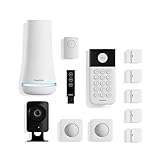
SimpliSafe’s 12-piece kit is the default recommendation for a reason: it is the most straightforward path from a box on the doorstep to a monitored home, and the monitoring is genuinely optional. You can run it self-monitored forever, or switch on 24/7 professional monitoring for a month while you travel, without signing anything. The kit includes an HD camera, and the sensor set covers the entry points of a typical three-bedroom house.
Who it suits: Owner-occupiers of houses between roughly 90 and 200 m² who want a professional monitoring option without a contract, plus anyone who values a simple app over deep automation. It is also the easiest system here to recommend to a household that has never owned an alarm.
Key specs
- Kit contents: 12 pieces including an HD camera, entry sensors, motion sensor, keypad and siren.
- Monitoring: Optional 24/7 professional monitoring, typically in the $20–$30/month band; camera recording usually requires the higher tier.
- Contract: None required — month-to-month on published plans.
- Backup: Cellular backup on monitoring plans, so the alarm still reports during a broadband or power cut.
- Install: Fully wireless, adhesive mounts, no drilling for most sensors; base station needs one mains socket.
- App: Single-purpose app focused on arm, disarm, alerts and camera clips.
Strengths. The monitoring model is the differentiator. Because there is no contract, the effective cost of trying professional monitoring is one month rather than three years, and you can downgrade the moment you decide the false-alarm calls are not worth it. Cellular backup on paid plans is the feature that separates a real monitored system from a Wi-Fi toy — if someone cuts your broadband or the power fails, the base station still reaches the monitoring centre. Installation is genuinely tool-free for the sensor set, which matters if you rent or dislike putting holes in door frames. The app is deliberately narrow, which makes it fast and easy to teach to a partner, a parent or a housesitter. Sensor expansion is simple and the accessory list is broad enough to cover a garage, a second keypad or a water-leak sensor without changing systems.
Weaknesses. The camera is the weakest part of the package — fine for a doorway, unimpressive next to Arlo’s or Hiseeu’s video hardware, and camera recording is tied to the higher monitoring tier, so the free tier gives you live view rather than a searchable clip history. Integration is limited compared with abode: no Z-Wave or Zigbee radios, so your alarm stays separate from your smart-home automations. The 12-piece kit is sized for a three-bedroom house; a four-bedroom with a garage and a garden office will need extra sensors, and a large detached home will need a second motion sensor per floor. Finally, the app’s simplicity is also its ceiling — advanced automation rules are not the point here.
Pros
- No-contract professional monitoring you can switch on and off
- Cellular backup on monitoring plans
- Tool-free installation for the sensor set
- Easy app that any household member can use
- Broad, well-supported accessory range for expansion
Cons
- Camera quality trails dedicated camera brands
- Camera clip history requires the higher monitoring tier
- No Z-Wave, Zigbee or HomeKit integration
- Kit size suits a three-bedroom house, not a large detached home
- Automation depth is deliberately limited
How it compares. Against the Cove 6 Piece kit, SimpliSafe costs more and gives you twice the pieces, a camera and a stronger hardware ecosystem — Cove is the cheaper way to get monitored, SimpliSafe is the better long-term system. Against abode, SimpliSafe wins on simplicity and camera inclusion and loses on integration. Against the Arlo Home Security System, the split is monitoring culture versus camera culture: Arlo’s sensors are more capable per unit, SimpliSafe’s monitoring offer is easier to understand and switch on. Against the Hiseeu 5MP kit, SimpliSafe is the alarm with a camera attached and Hiseeu is a camera system with no alarm — pick based on whether you want a call from a monitoring centre or a hard drive full of footage.
4. Arlo Home Security System – Best for camera-first homes with no contract

Arlo’s security system arrives as a wired keypad sensor hub with five 8-in-1 sensors and a yard sign, and it is explicitly sold without a contract. The 8-in-1 sensor is the interesting part: instead of one sensor per job, each unit covers several detection types, which changes how you plan coverage. Arlo’s real strength, though, is that this system slots into an existing Arlo camera estate rather than competing with it.
Who it suits: Households that already own Arlo cameras, or that plan to buy several, and anyone who wants a modern sensor design with a keypad on the wall. It also suits people who dislike contracts on principle and are willing to pay for hardware instead of a monthly fee.
Key specs
- Kit contents: Wired keypad sensor hub, 5 × 8-in-1 sensors, yard sign.
- Sensor design: Multi-function sensors — each unit handles several detection roles, so five units cover more than five single-purpose contacts.
- Monitoring: No contract required; subscription tiers add cloud recording, extended history and richer detection.
- Hub power: Wired, so the hub needs a permanent mains socket and is not a battery device.
- Ecosystem: Designed to work alongside Arlo cameras in the same app.
- Install: DIY, adhesive or screw mounting for sensors; hub plugs in.
Strengths. The 8-in-1 sensor is a genuine design advantage. A conventional kit makes you buy a door contact, then a motion sensor, then a water-leak sensor, then a temperature sensor; Arlo’s approach collapses several of those into one unit, which lowers the total device count and the number of batteries you will eventually have to change. The wired keypad hub removes the “hub battery died while we were away” failure mode entirely, and it doubles as a wall-mounted arm/disarm point. Because Arlo’s camera ecosystem is deep, the system scales into video in a way that alarm-only brands struggle to match — you can add outdoor cameras, a doorbell and floodlight cameras without introducing a second app. The no-contract stance is consistent across the range, and the yard sign remains one of the cheapest deterrents in security.
Weaknesses. The subscription is where Arlo’s value concentrates. Cloud recording history, richer person and package detection, and extended clip retention all sit behind paid tiers, and without a subscription the video side of an Arlo home is much thinner than the marketing implies. Five sensors is a modest starting count for a large house even accounting for multi-function coverage — you will be buying more. The wired hub is a constraint for renters who cannot put a keypad on the wall or find a permanent socket near the front door. Arlo’s pricing sits at the premium end for both hardware and subscriptions, and the system’s automation integration is narrower than abode’s HomeKit and Z-Wave approach.
Pros
- 8-in-1 sensors reduce device count and battery maintenance
- Wired keypad hub never runs out of power
- Deep camera ecosystem to grow into
- No contract on hardware or plans
- Strong, well-supported app with regular feature updates
Cons
- Video features depend heavily on a subscription
- Five sensors is a small starting kit for a large home
- Wired hub needs a permanent socket and wall space
- Premium hardware and subscription pricing
- Limited third-party automation integration
How it compares. Against SimpliSafe, Arlo is the better video-first system and SimpliSafe is the better monitored-alarm-first system: if you want a monitoring centre calling you, SimpliSafe; if you want a searchable archive of what happened, Arlo. Against abode, Arlo wins on camera integration and sensor design and loses on Z-Wave, Zigbee and HomeKit support. Against the Google Nest Cam Indoor, Arlo is a whole-home system and Nest is a single camera — different jobs. Against eufy’s 5-piece kit, Arlo costs more and asks for a subscription, while eufy keeps core features free with local storage.
5. Google Nest Cam Indoor (Wired, 3rd Gen) – Best for adding one indoor camera to a Google Home
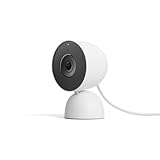
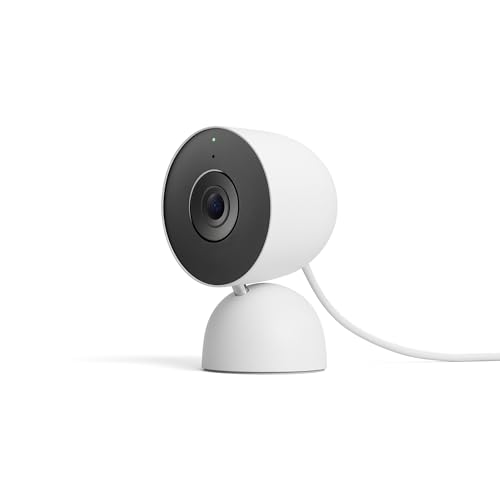
The Nest Cam Indoor is not a security system and does not pretend to be one. It is a single wired indoor camera in Snow, sold as a 2025 model, and it earns its place in this roundup because a lot of “whole-home security” projects start with one camera in a hallway and grow from there. If your household already lives in the Google Home app, this is the least friction you can add.
Who it suits: Google Home users who want a dependable indoor camera for a hallway, a nursery or a front room, and anyone building a camera-led setup who wants one ecosystem rather than four. It is a poor fit for someone who needs door contacts and a siren.
Key specs
- Type: Single wired indoor camera; mains power, no battery.
- App: Google Home app, with live view and event notifications.
- Processing: Nest cameras have historically run person detection on the device rather than shipping every frame to the cloud.
- History: Clip history and extended recording require a Nest Aware subscription, typically in the $8–$20/month band depending on tier and device count.
- Placement: Indoor use; needs a socket or a cable run to one.
- Ecosystem: Native to Google Home; works alongside other Nest and Google-compatible devices.
Strengths. The Google Home integration is seamless in a way third-party cameras rarely manage — one app, one notification style, one place to review events across a doorbell, a camera and a thermostat. On-device person detection is a real privacy advantage: the camera decides whether a frame contains a person locally, which means less footage leaving the house and fewer false alerts from headlights or moving branches. The wired design removes battery anxiety entirely, which matters for a camera you want running continuously in a hallway. Setup is genuinely quick, the industrial design is unobtrusive in white, and the field of view is wide enough to cover a landing or an entry hall from a shelf. If you already pay for Nest Aware, adding a camera costs nothing extra on many tiers.
Weaknesses. Without a subscription, a Nest camera is a live view with basic alerts — the clip history that makes footage useful after the fact sits behind Nest Aware. That is a different philosophy from eufy or Hiseeu, which record locally for free. There is no alarm panel, no door contacts, no siren and no professional monitoring option, so this camera cannot be the whole answer to a whole-home security question. Nest’s ecosystem also assumes you are comfortable with Google’s cloud services and privacy model; there is no local NVR path. The wired requirement limits placement to wherever you can reach a socket, and the Snow finish is not subtle against dark interiors.
Pros
- Native, frictionless Google Home integration
- On-device person detection reduces cloud exposure
- Wired power means no battery changes
- Fast setup and a discreet indoor design
- Cheap to add if you already subscribe to Nest Aware
Cons
- Clip history requires a subscription
- No alarm panel, contacts or siren
- No local storage option
- Wired placement limits where it can go
- Not a standalone security system
How it compares. Against the Arlo Home Security System, Nest is a single camera and Arlo is a full sensor system — but if all you want is one indoor view inside Google Home, Nest is simpler and cheaper to start. Against the Hiseeu 5MP kit, the philosophies diverge sharply: Hiseeu records 5MP footage continuously to local storage with no subscription, Nest gives you a polished app and on-device detection but charges for history. Against eufy’s 5-piece kit, eufy bundles contacts and a hub for roughly the price of a camera-plus-subscription over two years. Treat Nest as the camera you add to an existing Google setup, not as the foundation of a monitored home.
6. PGST Home Security Systems 12-Piece Kit – Best budget starter kit for a flat or small rental
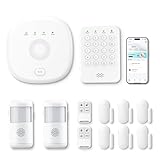
PGST’s newest 12-piece kit is a Wi-Fi plus GSM/4G alarm bundle with mobile app control and alerts, positioned at the budget end of the market. It is the classic “cover the front door and the ground-floor windows” package, and for a one-bedroom flat or a small rental it is often enough. The dual Wi-Fi and GSM/4G design is the most interesting part at this price.
Who it suits: Tenants in flats and small houses who want basic intrusion alerts without a monthly bill, and anyone who wants a first alarm to learn what they actually need before spending premium money.
Key specs
- Kit size: 12 pieces covering entry contacts, motion detection and control accessories.
- Connectivity: Wi-Fi plus GSM/4G for alerts, so a broadband outage does not automatically silence the system.
- App: Mobile app control, arm/disarm and push alerts.
- Monitoring: Self-monitoring; no contracted professional tier described.
- Install: Fully wireless, adhesive mounting, DIY.
- Expansion: Additional sensors within the vendor’s own accessory range.
Strengths. Value per opening protected is the point. Twelve pieces covers a small flat completely, and the GSM/4G alert path is unusual at the budget tier — most cheap kits go silent the moment the router loses power, which is exactly when you need a notification. The app handles the basics competently: arm, disarm, zone status and alerts. Because everything is wireless and adhesive-mounted, a tenant can install it in an afternoon and take it down without leaving marks, and there is no contract to cancel when you move. If you are unsure whether you will actually use an alarm, this is a low-cost way to find out whether you check the app or ignore it.
Weaknesses. This is a functional system, not a polished one. Expect the app to be serviceable rather than elegant, expect the accessory range to be narrow, and expect integration to end at the vendor’s own devices — there is no HomeKit, Matter, Z-Wave or Zigbee support, so it will not join your smart-home automations. Professional monitoring is absent, meaning alerts reach you and nobody else; if you are asleep or out of signal, no one is calling. Sensor build quality and battery life at this tier are adequate rather than excellent, and GSM/4G typically requires a SIM with an active plan. Documentation is often thin, and false-alarm tuning may take a week of adjusting motion sensor sensitivity and placement.
Pros
- Twelve pieces covers a small flat or rental fully
- Wi-Fi plus GSM/4G alert path at a budget price
- No contract and no monthly monitoring fee
- Wireless, reversible install for tenants
- Low entry cost to test whether you use an alarm
Cons
- No professional monitoring option
- No smart-home ecosystem integration
- App and documentation quality are basic
- GSM/4G needs a SIM and data plan
- Sensor hardware is entry-tier
How it compares. Against the Hapippofa GEN 2, PGST is cheaper and gives up four pieces and a touchscreen panel — Hapippofa is the better mid-range buy if you want a wall control point. Against the D1D9 24-piece set, D1D9 doubles the sensor count for similar money but with the same app-only control model. Against Cove, PGST is cheaper up front and gives up professional monitoring entirely, which is the single biggest functional gap. Against eufy’s 5-piece kit, PGST gives more pieces and eufy gives better hardware, local storage and a stronger brand. If your budget is fixed and you want coverage now, PGST delivers; if you can stretch, eufy or Cove are better long-term homes for the same money.
7. Cove 6 Piece DIY Home Security System – Best budget route to real professional monitoring

Cove’s 6-piece DIY system comes with three months of monitoring included, which makes it the cheapest credible way to find out whether professional monitoring is worth paying for. It is a panel-led system rather than a phone-only kit, with a touchscreen control panel and a monitoring service behind it. Six pieces is a starter count, not a whole-house count, so plan for expansion.
Who it suits: Budget-conscious households that specifically want a monitoring centre rather than self-monitoring, and anyone who wants to trial professional monitoring before committing to a monthly bill. Also a good fit for a flat or a small house where six sensors genuinely cover the entry points.
Key specs
- Kit size: 6 pieces — panel plus entry and motion sensors as listed.
- Monitoring: Three months included with the hardware; ongoing plans typically sit in the $15–$25/month band depending on tier.
- Panel: Touchscreen control panel as the system’s hub and interface.
- Backup: Cellular backup is generally part of the paid monitoring tiers in this category — confirm the tier before relying on it.
- Install: DIY, wireless sensors, adhesive or screw mounting.
- Contract: Cove has historically sold month-to-month rather than multi-year contracts.
Strengths. The included monitoring period is the hook, and it is a genuinely sensible one: three months is long enough to learn how many false alarms your household generates and whether the response protocol suits you. The touchscreen panel gives you a proper on-wall control point with code entry, which is easier for guests and family than a phone-only system. Because the monitoring tiers are month-to-month in the brand’s established model, you can run it during a holiday period and cancel after, which is the flexibility that contract-based providers do not offer. Six pieces is honest for a flat: front door, back door, a couple of ground-floor windows and a motion sensor covers the realistic intrusion paths. Setup is DIY and quick, and the panel needs only a mains socket and a Wi-Fi connection.
Weaknesses. Six pieces will not cover a three-bedroom house with a garden, so budget for additional contacts from the start — the headline price is a starting point, not a total. The camera hardware is not the draw here; if you want continuous 24/7 recording or high-resolution outdoor video, this system is the wrong shape. Integration is limited, with no Z-Wave, Zigbee or HomeKit radios, so the alarm stays separate from your automations. Cellular backup and some alert features depend on which tier you buy, so read the tier comparison carefully rather than assuming the cheapest plan includes everything. Finally, ongoing costs accumulate: three years of monitoring at the mid-tier rate will comfortably exceed the hardware cost, which is the trade-off for having a human respond.
Pros
- Three months of monitoring included with the hardware
- Month-to-month plans rather than long contracts
- Touchscreen panel with simple code entry
- Quick DIY install for a flat or small house
- Cheapest credible route to professional response
Cons
- Six pieces is a starter count, not whole-house coverage
- Camera capabilities are limited
- No Z-Wave, Zigbee or HomeKit integration
- Cellular backup depends on the tier
- Monitoring costs overtake hardware cost within a few years
How it compares. Against SimpliSafe, Cove is cheaper to start and gives you monitoring immediately, while SimpliSafe gives twice the pieces, a camera and a larger accessory ecosystem — SimpliSafe is the better long-term system, Cove is the better low-risk trial. Against the PGST 12-Piece kit, Cove costs more and gives up sensor count in exchange for actual human monitoring, which is the only feature that matters when you are asleep. Against the Hapippofa GEN 2, Hapippofa wins on coverage and Cove wins on monitoring. Against eufy, the split is a monthly bill versus local storage: eufy keeps everything in your house and free, Cove sends it to a monitoring centre for a fee.
8. eufy Security 5-Piece Home Alarm Kit – Best for local storage with no monthly fee

eufy’s 5-piece alarm kit is built around a hub with local storage, which is the single most important thing about it. Where most alarm brands push you toward a subscription for anything beyond basic alerts, eufy’s core proposition is that the system keeps working and keeps recording whether or not you ever pay a monthly fee. Five pieces is a starter kit; the ecosystem behind it is what makes it worth considering.
Who it suits: Households that dislike subscriptions on principle, privacy-conscious buyers who want footage stored at home, and mid-range buyers who plan to add cameras over time. It suits a flat or a small house well, and a larger house with incremental expansion.
Key specs
- Kit size: 5 pieces — hub, entry and motion sensors plus control accessories as listed.
- Storage: Local storage in the hub, so clips stay in your home rather than a vendor cloud.
- Subscription: Core features work without one; cloud storage is optional.
- App: eufy Security app for alerts, arm/disarm and camera management.
- Ecosystem: Designed to expand into eufy’s camera, doorbell and lock range.
- Install: Wireless sensors, DIY mounting; hub needs mains power.
Strengths. Local storage is the differentiator and it pays off twice. First, cost: over three years, a subscription at even $10/month adds $360 to the bill, and eufy’s core features do not require it. Second, privacy and resilience: footage recorded to a hub in your hallway keeps working during an internet outage and does not depend on a company’s retention policy or continued existence. The hub architecture also makes expansion straightforward — eufy’s range covers cameras, video doorbells and smart locks, so a 5-piece alarm can grow into a full home system without introducing a second app. Hardware quality at this tier is generally a step above budget kits, with better plastics and more consistent app behaviour. Battery life on eufy sensors is typically in the multi-year class under normal use.
Weaknesses. Five pieces does not cover a large house; treat it as a starting point and price the additional contacts you will actually need. Professional monitoring is not the focus of the eufy ecosystem, so if you want a monitoring centre calling the police, this is not the system for you — it is self-monitoring with good alerts. Integration with HomeKit, Z-Wave and Zigbee is limited, so eufy stays largely its own island. Local storage also means you own the failure mode: if someone takes the hub, they take the footage with it, which is an argument for placing the hub somewhere non-obvious or adding an off-site backup. App features vary by region, and some advanced detection options have historically been tied to newer hardware.
Pros
- Local storage with no mandatory subscription
- Footage keeps recording during an internet outage
- Strong expansion path into cameras, doorbells and locks
- Better-than-budget hardware quality
- Multi-year sensor battery life in normal use
Cons
- Five pieces is a starter kit only
- No professional monitoring service
- Limited HomeKit, Z-Wave and Zigbee support
- A stolen hub means stolen footage unless you back up off-site
- Regional feature differences in the app
How it compares. Against the Cove 6 Piece kit, eufy is the no-fee option and Cove is the monitored option — decide which you actually want before comparing prices. Against the Arlo Home Security System, eufy wins on subscription-free operation and Arlo wins on sensor design and camera polish. Against SimpliSafe, eufy wins on long-run cost and local storage, SimpliSafe wins on monitoring and simplicity. Against the Google Nest Cam Indoor, eufy is a system with storage you own and Nest is a camera that needs a subscription for history — the privacy and cost argument favours eufy for most buyers.
9. PGST A107F Home Security System – Best for SIM-based alerts where Wi-Fi is unreliable

The PGST A107F is a door-sensor-led alarm system whose headline feature is 4G call, SMS and app alerts. That combination matters more than it sounds: SMS and voice-call alerts arrive on a phone that may have no data connection, no app installed, or a dead battery on the receiving end of a push notification. For a workshop, a garage conversion or a rural property where broadband is patchy, the SIM path is the whole point.
Who it suits: Owners of outbuildings, garages, static caravans or rural properties where Wi-Fi is unreliable or absent, and anyone who wants alerts to reach a phone number rather than an app account. Also useful for households where an elderly relative needs a simple alert path.
Key specs
- Core function: Door sensors plus a control unit that sends 4G call, SMS and app alerts.
- Connectivity: 4G/GSM cellular as the primary alert path, with app control.
- Monitoring: Self-monitoring via calls, texts and push notifications.
- SIM requirement: Needs an active SIM and data/credit plan, usually a pay-as-you-go or IoT tariff.
- Install: Wireless sensors, DIY.
- Expansion: Additional sensors within the vendor’s own range.
Strengths. Alert redundancy is the selling point. A push notification requires data, an app, a logged-in account and a phone that is not in a focus mode; an SMS or an automated voice call needs none of that. In a building with no broadband at all — a garage, a shed, a storage unit — a cellular alarm is the only workable design, and the A107F is a low-cost way to get one. Setup is simple, sensor pairing is quick, and because the alert path does not depend on a router, there is one fewer device to fail. Monthly running cost is typically the price of a SIM tariff rather than a monitoring subscription, which is a very different order of magnitude. For a mid-range price, it solves a problem that Wi-Fi-only kits simply cannot.
Weaknesses. Cellular coverage is now the single point of failure, so check the signal at the installation site with a phone on the same network before buying — a system with one bar of signal will miss alerts. There is no professional monitoring, so a text at 3 a.m. is still just a text. Integration is minimal: no HomeKit, Matter, Z-Wave or Zigbee, and the app is a basic control surface rather than a smart-home platform. Sensor counts are modest and expansion is limited to the vendor’s accessories. The SIM adds an administrative chore — top-ups, credit expiry and occasional carrier changes — and if the SIM lapses, the system goes quiet without telling you. Battery life on cellular sensors is typically shorter than on Wi-Fi-only equivalents because the radio works harder.
Pros
- SMS and voice-call alerts work without an app or data connection
- Functions in buildings with no broadband at all
- Low ongoing cost — a SIM tariff rather than a subscription
- Simple DIY installation and quick pairing
- Good fit for garages, outbuildings and rural properties
Cons
- Cellular coverage becomes the single point of failure
- No professional monitoring
- No smart-home ecosystem integration
- SIM top-ups and expiry need managing
- Cellular radios shorten sensor battery life
How it compares. Against the PGST 12-Piece Wi-Fi plus GSM kit, the A107F leans harder into the cellular path and gives up some piece count — pick the 12-piece for a flat with decent broadband, the A107F for a site without it. Against the D1D9 24-piece set, which also uses 4G, Wi-Fi and GSM, D1D9 wins on sensor count and the A107F wins on a cleaner, more focused alert design. Against the Hapippofa GEN 2, Hapippofa offers a touchscreen panel and more pieces, while the A107F is the more reliable alerter when broadband is the weak link. Against eufy or SimpliSafe, the A107F is not competing on app polish or monitoring — it is competing on reaching your phone when nothing else can.
10. Hiseeu Home Security System – Best for 24/7 recording without a subscription

Hiseeu’s system is a different animal from everything else here: 5MP wired plug-in outdoor bullet cameras with 24/7 recording and 2.4 GHz/5 GHz Wi-Fi connectivity. There are no door contacts and no alarm panel, because this is a camera system designed to record continuously and keep the footage locally. For a lot of households, that is a better answer than an alarm.
Who it suits: Homeowners who want continuous outdoor coverage, evidence-grade footage and no subscription, and who can reach mains power at each camera position. It suits driveways, side passages, gardens and commercial-style perimeters better than flats.
Key specs
- Cameras: 5MP wired, plug-in outdoor bullet cameras.
Related guides