Our Top Picks
 Dri Mark Flash Test Counterfeit Bill Detector0.7" x 2.8" x 4.5"4.5 x 2.8 x 0.7 inches0.25 PoundsCheck on Amazon
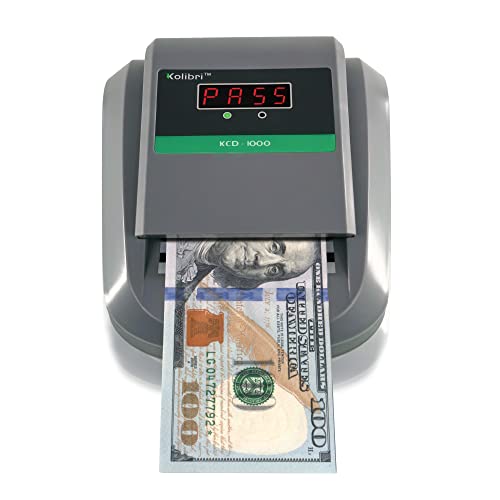 Kolibri KCD-1000 4-Way Orientation Portable Fake Currency ReaderMedium (KCD-1000)6.3 x 5.1 x 3.6 InchesCheck on Amazon


Top 3 picks at a glance
Best Counterfeit Bill Detectors for Retail Stores
The best counterfeit bill detector for a retail store is usually a multi-sensor automatic validator with UV, magnetic, infrared and image or watermark checks; choose a compact single-note unit for low-volume tills, a high-speed sorter for busy checkout lanes, and a currency-specific validator when transaction errors are more costly than purchase price.
Quick comparison
| Detector type | Typical processing speed | Best for | Typical market range | Main limitation |
|---|---|---|---|---|
| UV and magnetic pen or lamp | 1–3 seconds per note | Very low-volume tills and backup checks | Usually $10–$60 | Depends heavily on staff judgment; many counterfeits pass simple tests |
| Automatic UV/MG/IR validator | 0.5–1 second per note | Most small and medium retail stores | Usually $100–$250 | May support only selected currencies or denominations |
| Multi-currency automatic validator | 0.5–1 second per note | Tourist areas, hotels and mixed-currency tills | Usually $150–$400 | Currency libraries require updates and careful configuration |
| Counter and validator | 600–1,500 notes per minute when batch counting | Cash offices, supermarkets and daily cash reconciliation | Usually $250–$800 | Larger footprint; not always convenient beside a customer-facing till |
| High-speed sorter with authentication | 800–1,500 notes per minute | High-volume stores and cash rooms | Usually $600–$2,000+ | Higher cost, training requirement and maintenance workload |
These are market ranges and practical class estimates rather than guarantees for every model. Actual speed depends on note condition, denomination, feed direction and whether the machine is validating or counting.
As an Amazon Associate we earn from qualifying purchases at no extra cost to you.


Best choices by retail situation
| Your situation | Recommended choice | Why |
|---|---|---|
| One checkout, fewer than 100 cash notes per day | Compact automatic validator | Fast enough for individual transactions without paying for sorting functions |
| Several lanes and 100–500 notes per day | One validator per busy lane, or a shared counter/validator in the cash office | Reduces queues while keeping end-of-day verification efficient |
| More than 500 notes per day | Counter with authentication or a sorter | Batch processing saves more labor than a basic till-side detector |
| Multiple currencies accepted | Multi-currency validator with USB or service-port updates | Currency libraries can be refreshed as new note designs enter circulation |
| Frequent deposits of mixed denominations | Sort-and-count machine with denomination recognition | It verifies, totals and separates cash instead of checking notes one at a time |
| Limited counter space | Small rear-loading or front-loading validator | It can sit beside the cash drawer without obstructing the customer area |
Detection methods: what each sensor actually adds
Ultraviolet detection
UV sensors inspect fluorescent security features that react under ultraviolet light. This is useful for quickly rejecting ordinary printer copies, but UV alone is not enough. Some genuine notes have weak fluorescence because of wear, dirt or exposure to chemicals, while sophisticated counterfeits may imitate a visible UV pattern.
Magnetic detection
Magnetic sensors look for magnetic ink or security threads. They are particularly useful on currencies that use magnetic ink in specific areas of the note. A detector should check more than one magnetic location; a single magnetic test gives less protection than a multi-point check.
Infrared detection
Infrared sensors compare how note materials and printed areas absorb or reflect infrared light. This can reveal differences invisible to the eye and is one reason a multi-sensor validator is more reliable than a UV lamp. Infrared patterns are currency- and denomination-specific, so the machine must have the correct currency profile.
Image, size and watermark checks
Optical systems compare printed features, note dimensions and, in some machines, watermark or portrait placement. These checks help detect denomination substitution and badly reproduced images. They also explain why a validator can reject a genuine note if it is folded, torn, heavily stained or inserted incorrectly.
Manual pens and lamps
Pens generally test the paper rather than authenticating all security features. They are inexpensive backups, but should not be the primary control in a store handling meaningful cash volume. A UV lamp is more useful when staff know exactly where that currency places its fluorescent marks, yet it still relies on human interpretation.
Models and product families worth comparing
Recognized examples include the Safescan 155-S automatic detector, the Safescan 185-S portable detector, and the Safescan 2865-S counting and sorting machine. AccuBANKER’s D490 is another compact multi-test detector, while Cassida sells automatic counterfeit detectors and money counters aimed at small-business cash handling.
These products are not interchangeable simply because they list UV, MG and IR detection. Before buying, verify the exact model’s supported currencies, denominations, software version, note orientation, rejected-note behavior and update procedure. A model sold for one market may not authenticate every version of a currency used in another country.
Speed and queue impact
For a till-side validator, the relevant figure is not the manufacturer’s maximum notes-per-minute rating. It is the complete customer interaction: pick up the note, insert it, wait for the result, return it or place it in the drawer, and continue the sale.
For example, suppose a store takes 240 cash notes during a six-hour shift. A validator that processes each note in 0.7 seconds adds about 168 seconds of machine time. If staff spend another 1.3 seconds positioning each note, the total is about eight minutes. A slower 2.5-second process plus the same handling time becomes 15.2 minutes. The difference is noticeable during rushes, but it rarely justifies a large cash-office sorter unless the store also needs batch counting.
For 1,000 notes counted at closing, the calculation changes: a 1,000-notes-per-minute counter has a nominal processing time of one minute, while a 100-notes-per-minute machine needs about ten minutes. Add loading, rejected-note checks and recounts, and the practical saving is larger than the nominal difference.
Staff usability matters more than a long feature list
- Use a clear pass/fail signal: a large light, audible alert and readable display reduce hesitation at the register.
- Choose the right feed direction: front-loading is often easier for a cashier; rear-loading can keep the customer-facing area tidier.
- Prefer automatic denomination recognition: it avoids asking staff to select a denomination before every check.
- Check the reject path: a machine that returns a suspect note toward the cashier is easier to manage than one that traps it in a difficult compartment.
- Keep a human escalation procedure: staff should not argue with a customer or mark a note. They should set it aside, call a supervisor and follow the store’s cash policy.
Train employees to insert notes flat, one at a time, and to retry a suspicious result only after checking for folds or obstructions. Repeated rejection of the same note should be treated as a reason for supervisor review, not as proof that the customer intended fraud.
Currency support and update requirements
Currency support is often the most overlooked buying criterion. Some detectors support only a fixed group of currencies; others allow a larger library but need a USB, network or service update when note designs change. “Multi-currency” does not necessarily mean that every denomination or regional issue is supported.
Make a list of every currency and denomination the store accepts, including older notes that customers may still present. Ask the supplier:
- Are all current denominations supported?
- Does the detector identify the denomination automatically?
- Are updates free, paid, remote or service-center only?
- Can the machine keep more than one currency active at the same time?
- What happens when a note is genuine but too worn for a confident reading?
Maintenance checklist
Automatic detectors need less maintenance than counters, but their sensors still become less reliable when dust, lint or paper fibers accumulate. Inspect the feed slot weekly in a busy store and clean it according to the manufacturer’s instructions. Do not spray cleaner into the machine or use abrasive materials on optical windows.
- Wipe accessible surfaces with a dry, lint-free cloth.
- Remove paper scraps from the feed path while the machine is powered off.
- Keep the detector away from receipt printers, drinks and direct sunlight.
- Record firmware or currency-library updates in the cash-control log.
- Test the unit with an approved training or test note when the manufacturer provides one.
- Arrange service if false rejects increase, the feed becomes inconsistent or the result changes when the note is inserted correctly.
Frequently asked questions
Does a counterfeit detector guarantee that every suspicious note will be identified?
No; the article describes detectors as adding checks, not guaranteeing detection. UV alone can miss some counterfeits, and results depend on the currency profile and the note’s condition and insertion. A genuine note may also be rejected if it is folded, torn, heavily stained or inserted incorrectly, so staff should follow a supervisor-review procedure.
What should staff do when a detector rejects a customer’s note?
Set the note aside, call a supervisor and follow the store’s cash policy. Staff should not argue with the customer or mark the note. If it may have been inserted with a fold or obstruction, they can check that and retry; repeated rejection should prompt supervisor review, not be treated as proof of fraud.
Can one detector authenticate every currency and denomination a store accepts?
Not necessarily. The article says that “multi-currency” does not mean every denomination or regional issue is supported. Before buying, list the currencies and denominations the store accepts, including older notes, and confirm support, simultaneous currency use and how updates are delivered.
Why might a detector reject a genuine banknote?
A genuine note can be rejected when it is folded, torn, heavily stained or inserted incorrectly. Wear, dirt or chemical exposure can also weaken a note’s visible UV fluorescence. The article advises staff to insert notes flat, one at a time, and retry a suspicious result only after checking for folds or obstructions.
How can a store tell when its detector needs cleaning or service?
Inspect the feed slot weekly in a busy store and clean it as the manufacturer instructs. Arrange service if false rejects increase, feeding becomes inconsistent or the result changes when a note is inserted correctly. Keep the unit away from receipt printers, drinks and direct sunlight, and power it off before removing paper scraps.
Bottom line
For most retail stores, select an automatic validator using at least UV, magnetic and infrared checks, with optical analysis where available, and buy a separate unit for each busy lane rather than forcing customers to wait for a shared detector. Choose a multi-currency model only when its current currency library matches your actual notes. If your main problem is end-of-day counting rather than individual transaction authentication, move up to a counter or sorter with built-in counterfeit detection.