This review analyzes published product information. We have not performed detailed research of this unit.
As an Amazon Associate, we earn from qualifying purchases.
A wired PC VR cable with a separate power consideration
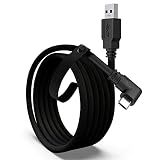
The Maxonar Next-Gen Chip VR Charging Link Cable reviewed here is the black, 16FT USB-A-to-USB-C configuration with an advertised 18W charging port. Its intended role is to connect a supported VR headset to a gaming PC while also supporting charging during play. That makes its buying case more specific than simply needing a long USB cable: you need the right headset, a suitable computer port and an appropriate charger.
This is a specification-based assessment of the supplied retailer listing, not a hands-on test. Maxonar’s descriptions establish the advertised connections and functions, but they do not establish sustained headset battery levels, measured connection stability or how comfortable the cable feels in motion.
The configuration at a glance
| Cable configuration | 16FT USB-A to USB-C VR charging link cable |
|---|---|
| Listed headset compatibility | Meta Quest 3S, Quest 3, Quest 2 and Pico 4 |
| Computer connection | USB-A connected to a computer’s USB 3.0, 3.1 or 3.2 port |
| Data standard | USB 3.2 Gen 1, also described as USB 3.0; advertised 5Gbps support |
| Charging specification | Advertised 18W charging port; fast-charge-capable charger required for fast charging |
| Power management | SmartProtect3.0 and fourth-generation safety chip; claimed power reduction above 65% battery under Quest charging protocols |
| Connector and retention | Reinforced L-shaped USB-C connector, anti-slip design and Velcro strap |
| Manufacturer support claim | 36-month guarantee; detailed terms not supplied |
Check both the headset and the computer connection
Maxonar explicitly lists Quest 3S, Quest 3, Quest 2 and Pico 4 compatibility. The listing also references PC and SteamVR use. Those statements should be read as a cable compatibility claim, not a promise that every headset uses identical software or that every computer can run the same VR applications.
The computer-side requirement is unusually important here: Maxonar instructs users to connect the USB-A plug to a USB 3.0, 3.1 or 3.2 port. A computer offering only USB-C connections is therefore not a direct physical match for this configuration. Adapter compatibility is not established by the evidence, so buyers should not assume an unspecified adapter will preserve the advertised behavior.
For a connection that is detected as USB 2.0 or fails to connect, the seller recommends updating the headset system and PC Link software, then restarting the devices. This is useful troubleshooting guidance, but not a guarantee that software updates will resolve every connection issue. The published listing information does not provide PC hardware requirements or a separate Pico software setup procedure. Confirm those requirements for your headset before choosing the cable.
If you are still deciding which headset to connect, our VR headset buying guide provides a broader starting point. This cable’s compatibility list should remain the relevant check for this accessory.
Charging support is not a promise of a full battery
The charging feature is the main reason to consider this configuration rather than select a cable solely by length. Maxonar advertises an upgraded charging board and an 18W charging port, with charging-board compatibility specifically described for Quest 3S, Quest 3 and Quest 2. Although Pico 4 appears in the general compatibility list, the evidence is less explicit about its charging behavior. Pico owners should distinguish data-link compatibility from confirmation of the same power-management functions.
Maxonar recommends an official or higher-power charger and says the charger must support fast charging to enable that function. The published listing information do not identify exact charger protocols or clearly establish what charging accessories are included. Plan to verify the power input connection and charger compatibility rather than treating the 18W label as a complete setup specification.
The seller says charging power decreases above 65% battery under Quest charging protocols, with battery longevity and reduced heat presented as the intended benefits. Those benefits have not been independently demonstrated here. More importantly, automatic power reduction means the cable is not described as delivering maximum charging power continuously. Nothing supplied proves that battery percentage will remain constant during every game.
Maxonar also says reinserting the charger can enable fast charging when the battery is low. Its warning against charging phones, tablets or laptops further limits the cable’s appeal as a general-purpose charging accessory.
Bandwidth claims need careful interpretation
The advertised data interface is USB 3.2 Gen 1, also called USB 3.0 in the listing, with 5Gbps support. Maxonar separately claims a connected bandwidth of 2.5–3.2Gbps depending on computer performance. These are seller-provided figures, not results obtained in this review.
The practical distinction is that an interface rating does not establish the complete VR experience. Maxonar associates the bandwidth with higher resolutions and refresh rates, but supplies no headset-specific operating modes or validated settings. Buy it for the stated connection standard and supported devices, not as proof that a particular visual setting will work on your PC.
Reach helps, but comfort details remain incomplete
The 16FT length offers routing flexibility between headset and computer. The L-shaped USB-C connector and Velcro strap also give you features to consider when planning how the lead will leave the headset and where it will be secured. Sensible routing could help avoid leaving the connector to bear unnecessary pull, though actual comfort will depend on your arrangement.
Maxonar claims flexibility, abrasion resistance and reinforced construction. Cable weight, diameter and measured bend stiffness are not supplied, so those claims cannot establish how noticeable the tether will feel. Extra length also needs managing around the play area; it is useful reach, not freedom from a physical connection.
Frequently asked questions
Can this cable be used with a computer that has only USB-C ports?
No direct connection is established for a computer that has only USB-C ports. This configuration uses USB-A on the computer side, and Maxonar instructs users to connect it to a USB 3.0, 3.1 or 3.2 port. Adapter compatibility is not established in the published listing information, so buyers should not assume an unspecified adapter will preserve the advertised behavior.
Which headsets are listed as compatible with this cable?
The listed headsets are Meta Quest 3S, Quest 3, Quest 2 and Pico 4. The listing also references PC and SteamVR use. However, the general compatibility list does not provide equally explicit charging information for every headset. In particular, charging-board compatibility is specifically described for Quest 3S, Quest 3 and Quest 2, while Pico 4 charging behavior is less clearly established.
Does the cable include a charger or specify which charger to use?
The published listing information does not clearly establish which charging accessories are included or identify exact charger protocols. Maxonar recommends an official or higher-power charger and says the charger must support fast charging for that function. Buyers should verify the power input connection and charger compatibility rather than treating the advertised 18W charging port as a complete setup specification.
What should I do if the headset connection is detected as USB 2.0?
If the connection is detected as USB 2.0 or fails to connect, the seller recommends updating the headset system and PC Link software, then restarting the devices. This is troubleshooting guidance rather than a guarantee that every connection issue will be resolved. The advertised data standard is USB 3.2 Gen 1, also described as USB 3.0, with 5Gbps support.
Can the cable charge phones, tablets or laptops?
No; the seller specifically warns against using this cable to charge phones, tablets or laptops. Its intended role is to connect a supported VR headset to a gaming PC while also supporting charging during play. The cable is therefore presented as a VR accessory rather than a general-purpose charging cable, and its charging behavior depends on the supported headset and suitable charger.
Verdict: a conditional fit for supported PC VR setups
This Maxonar configuration merits consideration if you have a listed headset, a suitable USB-A computer port and a compatible charging setup. Its useful combination is 16FT reach, an angled headset connector, retention strap and advertised charging support. The main reasons to pause are incomplete charger details, less explicit Pico charging coverage and no verified sustained battery or comfort results. Resolve those questions before relying on it for extended sessions.
Sources: Maxonar retailer listing and supplied specifications.
Check the exact product and current offer on Amazon