
Our Top Picks


The Short Answer
Yes, a high-speed micro SD card is absolutely worth the investment, but only if your host device supports UHS-I DDR200 or UHS-II bus speeds. If you are inserting a premium card into a device with an older hardware controller—such as a standard Nintendo Switch or a budget smart home security camera—the host device will bottleneck the card’s performance, throttling it down to basic speeds and rendering your extra investment useless.
What You Actually Get
When you shop for micro SD cards, the marketing materials often highlight eye-popping read speeds. For example, you will find premium options like the SanDisk 256GB Extreme with up to 190MB/s read speeds for around $71, or the top-tier SanDisk 256GB Extreme featuring up to 245MB/s read speeds for around $74. These cards pack immense performance into a tiny physical footprint of just 15mm x 11mm x 1mm, weighing less than 0.5 grams.
As an Amazon Associate we earn from qualifying purchases at no extra cost to you.

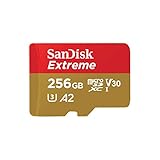
However, understanding what you actually get requires looking past the maximum read speeds to understand write speeds and bus interfaces. Standard UHS-I micro SD cards are technically limited by the official SD Association interface standard to a maximum transfer rate of 104MB/s. To achieve speeds like 190MB/s or 245MB/s, manufacturers use proprietary overclocking technologies (such as SanDisk QuickFlow). To actually experience these speeds when transferring files to your computer, you must use a compatible proprietary card reader. Without it, the card defaults back to standard UHS-I limits.
More importantly, high-speed cards offer superior minimum sequential write speeds, certified by ratings like V30 (Video Speed Class 30) or V60. A V30 rating guarantees that the card will never write data slower than 30MB/s. This consistency prevents dropped frames when recording 4K video at high bitrates. Additionally, look for the Application Performance Class 2 (A2) rating, which ensures high random Read/Write Input-Output Operations Per Second (IOPS). This rating allows smartphones, tablets, and single-board computers to run applications directly from the expandable storage smoothly, minimizing load screens and stuttering.
Pros
- Rapid File Offloading: Transferring 100GB of 4K footage or high-resolution photos to your computer can take over 25 minutes on a standard card. With a high-speed card capable of 190MB/s to 245MB/s, that transfer time drops to under 8 minutes, streamlining your creative workflow.
- Flawless 4K and 8K Video Capture: High-speed cards prevent write buffer bottlenecks. This ensures your action cameras, drones, and professional mirrorless setups record high-bitrate video without sudden interruptions or corrupted files.
- Snappy Application Performance: Thanks to the A2 rating, these cards handle random read and write requests quickly. This makes them ideal for running operating systems on a Raspberry Pi or storing heavy mobile applications on Android tablets.
- Robust Environmental Durability: Premium high-speed cards are built to withstand harsh environments. They are typically waterproof, shockproof, x-ray proof, and rated to operate in extreme temperatures ranging from -13 degrees Fahrenheit to 185 degrees Fahrenheit.
Cons
- Hardware Bottlenecks: Many popular consumer electronics cannot physically read or write at these advanced speeds. If your device maxes out at 90MB/s, paying a premium for a 245MB/s card provides zero performance benefit during active use.
- Confusing Marketing Jargon: Buyers must navigate a dense sea of symbols—U3, V30, A2, Class 10, UHS-I—making it incredibly easy to purchase the wrong class of card for your specific hardware needs.
- Higher Cost per Gigabyte: High-speed performance comes at a premium. While basic 256GB cards can be found for under $25, elite high-speed options can easily range from $70 to $80, representing a significant price jump for casual users.
Who Should Buy It
You should invest in a high-speed micro SD card if you are a drone pilot, action camera enthusiast, or professional videographer. Shooting in 4K at 60 or 120 frames per second requires massive amounts of data to be written to the card instantly; anything less than a V30-rated card will cause your camera to stop recording unexpectedly. Similarly, if you frequently transfer massive files to a PC for editing, the time saved during offloading easily justifies the around $71 to around $74 price tag.
Homeowners utilizing high-end, 4K smart home security cameras with local continuous recording also benefit. These cameras write data 24/7, and a high-speed, high-endurance card ensures that crucial security footage is captured smoothly without gaps or artifacts.
Who Should Skip It
If your primary goal is to expand the storage of your Nintendo Switch, you should skip these ultra-high-speed cards. The Nintendo Switch hardware reader caps out at approximately 95MB/s. Buying a card that boasts 245MB/s will not make your games load any faster than a quality budget card that caps at 100MB/s.
Additionally, casual users who only need extra storage for family photos on a budget smartphone, simple document backups, or standard 1080p dash cams do not need to spend top dollar. For these everyday tasks, standard Class 10 or U1 cards are more than sufficient and far gentler on your wallet.
Cheaper Alternatives
If you realize your devices do not require top-tier performance, several cost-effective alternatives offer excellent reliability at a fraction of the cost. Below is a comparison of standard options available on the market:
| Option | Cost Range | Trade-off |
|---|---|---|
| Standard UHS-I / U1 Cards (e.g., SanDisk Ultra 256GB) | around $18 – around $25 | Write speeds are significantly slower (often under 40MB/s). Not suitable for 4K video recording or heavy app execution. |
| Mid-Tier U3 / V30 Cards (e.g., Samsung EVO Select 256GB) | around $22 – around $30 | Offers solid 130MB/s read speeds, but lacks the extreme 190MB/s+ transfer speeds required for fast professional workflows. |
| High-Endurance Cards (e.g., SanDisk High Endurance 256GB) | around $25 – around $35 | Optimized for continuous writing (dash cams/security) but offers slower maximum read speeds for computer file transfers. |
FAQ
Will a high-speed micro SD card make games load faster on my Nintendo Switch?
No. The Nintendo Switch’s internal microSD card reader utilizes a UHS-I bus interface that maxes out at a theoretical speed of 104MB/s, with real-world speeds peaking around 95MB/s. Purchasing a card rated for 190MB/s or 245MB/s will offer no speed improvement over a quality card that meets the console’s maximum threshold of 100MB/s.
What is the difference between UHS-I and UHS-II micro SD cards?
UHS-I cards feature a single row of physical pins on the back of the card to transfer data. UHS-II cards add a second row of pins, allowing them to achieve much faster transfer speeds, often exceeding 300MB/s. However, you must have a UHS-II compatible host device to utilize those extra pins; otherwise, the card operates at standard UHS-I speeds.
Do I need a special card reader to get the advertised 245MB/s speed?
Yes. Standard USB card readers are bound by the 104MB/s limit of the UHS-I standard. To achieve proprietary speeds above 104MB/s, you must use a compatible USB 3.0 (or newer) reader designed by the card’s manufacturer that utilizes their specific speed-boosting technology.
How long do high-speed micro SD cards last under continuous use?
Micro SD cards use flash memory, which has a finite number of write cycles before the sectors begin to degrade. Under normal use in a phone or camera, a premium card can easily last five to ten years. However, if used in a 24/7 write environment like a security camera, a standard high-speed card may wear out within one to two years. By 2026, advances in 3D NAND technology are expected to improve write endurance across all tiers, but for continuous recording, specialized “High Endurance” cards remain the safest choice.
Related guides
- Best Free MMOs on Steam: Subscription Limits, Pay-to-Win and Time Cost (2026)
- Best Free Horror Games on Steam: How to Pick One That Fits Your PC and Your Nerves (2026)
- Black Frame Insertion vs VRR: Which Smoothness Feature Should You Use?
- Best Webcams for Streaming: 11 Listings Compared by Resolution, Focus and Light (2026)








