
Our Top Picks

The Short Answer
No, you do not strictly need a dedicated router for Air Link, but you will almost certainly want one if you share your home network with other people or devices. The single condition that dictates whether you need a dedicated unit is network congestion within your immediate physical playspace. If your Meta Quest headset and your gaming PC are the only two devices utilizing a high-speed 5GHz or 6GHz wireless band, and you are playing in the same room as your router, your existing setup will work beautifully. However, if your family is streaming 4K video, downloading files, or even browsing on their phones over that same router, your VR experience will suffer from distracting micro-stutters, latency spikes, and frame drops.
What You Actually Get
To understand why a dedicated router is so highly recommended by VR enthusiasts, it helps to look at how Meta Quest Air Link works. Unlike normal internet browsing, which downloads data in comfortable buffers, PC-VR streaming requires real-time, low-latency video transmission. Your gaming PC renders the virtual environment, compresses it into a video stream, sends it to your router via an Ethernet cable, and the router broadcasts that stream wirelessly to your Quest 3S, 3, or 2. The headset then decodes the video and tracks your movement, sending that data back to the PC. This entire loop must happen in under 40 milliseconds to prevent motion sickness.
As an Amazon Associate we earn from qualifying purchases at no extra cost to you.


When you introduce a dedicated router into your home setup, you are essentially creating a private, high-speed highway solely for this data loop. This hardware does not even need to be connected to the internet to run Air Link; its sole job is to bridge the gap between your PC and your headset.
From a home design and hardware perspective, adding another device to your living room or home office can be a hard sell. Traditional routers are often bulky, sporting four to eight aggressive “spider” antennas that disrupt a clean, minimalist aesthetic. Fortunately, the market has evolved to offer solutions that cater to both performance and interior design. There are two primary approaches to setting up a dedicated Air Link node:
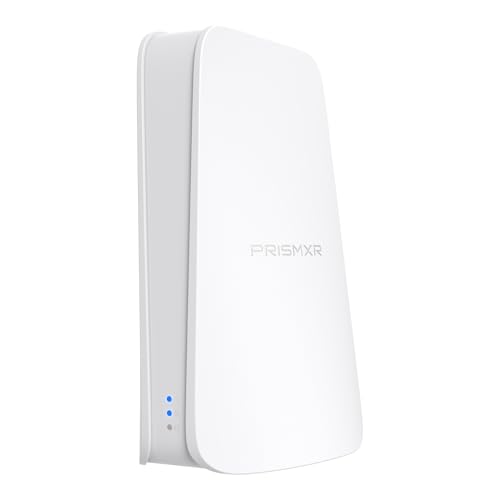
- The Budget Utility Option: Products like the PC-VR Streaming Air Link WiFi6 VR Router Compatible with Meta Quest 3S/3/2 (priced at around $49) are compact, utilitarian devices designed to sit quietly on your desk or behind your PC tower. They are plug-and-play, offering a direct, fuss-free 5GHz channel specifically tuned for VR data packets.
- The Design-Forward Wall Mount: If you prefer to keep your desk surfaces completely clear of clutter, a premium option like the TP-Link AX3000 Wall-Mounted Wi-Fi 6 Router Archer Air R5 (priced at around $120) is an exceptional choice. Measuring a mere 0.31 inches (8mm) thick and weighing only 0.63 pounds, this ultra-thin, stark-white device can be adhered directly to your wall using damage-free adhesive strips. It operates at a modest 12-watt power draw, keeping energy consumption low while delivering a clean, modern aesthetic that blends seamlessly into Nordic, minimalist, or contemporary home offices.
Pros
- Zero Network Interference: By placing your Quest on its own dedicated 5GHz or 6GHz channel, you isolate it from smart home devices, smartphones, and streaming boxes, eliminating sudden latency spikes.
- Consistent 1200+ Mbps Bandwidth: A dedicated Wi-Fi 6 connection ensures you can max out your Air Link bitrate (up to 200 Mbps for h.264/h.265 encoding) without experiencing compression artifacts or blurry visuals.
- Flexible Playspace Placement: Because the dedicated router only needs to connect to your PC via an Ethernet cable, you can place the router in whichever room you actually use for VR, rather than being forced to play right next to your home’s main internet gateway.
- Improved Battery Life and Thermals: A stable, strong wireless signal means your Quest’s internal wireless chip doesn’t have to work overtime to maintain a connection, which slightly reduces heat generation and preserves battery life.
Cons
- Added Cable Clutter: Even a sleek, wall-mounted router requires a power cable and an Ethernet run back to your PC, which can disrupt clean wall lines if not properly managed with wire covers.
- Initial Setup Complexity: You will need to configure the dedicated unit as an “Access Point” (AP) and assign it a unique SSID and non-overlapping wireless channel to prevent it from interfering with your main home network.
- Extra Cost: Adding a dedicated unit requires an upfront investment ranging from $50 for basic dongle-style routers to $120 or more for premium, high-aesthetic wall units.
- Occupies a LAN Port: Your PC will need an open Gigabit Ethernet port to connect directly to the dedicated router, which might require adding a secondary network card if your main port is already used for wired internet.
Who Should Buy It
You should invest in a dedicated router if you live in a multi-person household where someone is always streaming, gaming, or working on the Wi-Fi. It is also a must-buy for those whose main household router is located in another room or on a different floor, as Wi-Fi signals degrade rapidly when passing through drywall, studs, and concrete floors. If you are an enthusiast who demands pristine visual clarity in high-speed games like Half-Life: Alyx or Beat Saber, the investment is entirely justified. Looking ahead to 2026, as display resolutions on standalone headsets continue to push past 2K per eye, having a dedicated, high-throughput local pipeline will become even more critical to avoid performance bottlenecks.
Who Should Skip It
You can safely skip a dedicated router if you live alone or in a quiet household where you have complete control over network traffic. If your PC is already hardwired to a high-end Wi-Fi 6 or 6E router that sits in the exact same room as your VR playspace, a secondary router will offer virtually zero performance improvement. Furthermore, if you do not mind being physically tethered to your computer, a high-quality, 16-foot USB-C Link Cable is a significantly cheaper and more reliable way to achieve flawless PC-VR performance.
Cheaper Alternatives
If you aren’t ready to spend $50 to $120 on a secondary router, there are several cost-effective workarounds to optimize your wireless PC-VR experience. The table below outlines these options, their estimated costs, and what you must sacrifice in exchange.
| Option | Cost | Trade-off |
|---|---|---|
| Third-Party Link Cable (16ft / 5m) | $20 – $35 | Loss of wireless freedom; physical tether can pull on your headset and limit your physical rotation during intense gameplay. |
| 5GHz Band Splitting (Existing Router) | $0 | Requires logging into your existing ISP router to separate the 2.4GHz and 5GHz bands. You must kick all other household devices off the 5GHz band to prevent stuttering. |
| USB Wi-Fi 6 Dongle (Hotspot Mode) | $30 – $45 | Relies on Windows Mobile Hotspot, which can be notoriously unstable, prone to driver conflicts, and frequently throttles bandwidth. |
FAQ
Can I use a dedicated router for Air Link if my PC is connected to the internet via Wi-Fi?
Yes, but it requires a specific configuration. You can keep your PC connected to your home’s main internet router via its internal Wi-Fi card, and then connect your dedicated VR router directly to your PC’s Ethernet port. By bridging these connections in your Windows network settings, your Quest can access both your local PC-VR stream and the internet simultaneously.
Does the dedicated router need to be plugged into a wall internet jack?
No. A dedicated router for Air Link does not require an active internet connection to stream games from your PC to your Quest. It only needs a physical Ethernet connection to your computer and a power source. It acts as a local local-area network (LAN) bridge, passing data back and forth locally.
Is Wi-Fi 6 absolutely necessary, or can I use an older Wi-Fi 5 (802.11ac) router?
While Wi-Fi 5 can work under perfect conditions, Wi-Fi 6 (802.11ax) is highly recommended. Wi-Fi 6 introduces OFDMA (Orthogonal Frequency-Division Multiple Access) and better beamforming, which significantly reduces latency and handles the high-volume, packet-heavy data streams required by VR much more efficiently than older standards.
How close do I need to be to my dedicated Air Link router?
For the best experience, you should be in the same room, with a direct line of sight to the router, no more than 10 to 15 feet away. High-frequency 5GHz and 6GHz wireless bands are easily absorbed by walls, furniture, and even human bodies, which can instantly drop your connection speed and cause severe in-game stuttering.
Related guides
- Best Free MMOs on Steam: Subscription Limits, Pay-to-Win and Time Cost (2026)
- Best Free Horror Games on Steam: How to Pick One That Fits Your PC and Your Nerves (2026)
- Black Frame Insertion vs VRR: Which Smoothness Feature Should You Use?
- Best Webcams for Streaming: 11 Listings Compared by Resolution, Focus and Light (2026)








