
You’ve found a headset you like, and now comes the part most product pages gloss over: how it actually connects to your console. The real decision isn’t which brand to buy — it’s whether you go with a dedicated wireless dongle (a small USB receiver that creates a private radio link between headset and console) or standard Bluetooth. Both are wireless. Both cut the cord. But they behave very differently when it comes to delay, compatibility, and how many devices you can pair at once. If you’ve ever watched someone’s lips move a full beat before you heard their voice on a Bluetooth setup, you already understand the stakes.
This guide breaks down both connection methods for console gaming — what each one is good at, what it costs over time, and which one fits your home and your setup. Prices for capable gear in each category generally run $30–$50, so neither route requires a big investment. The difference is in how the technology works, not the price tag.
As an Amazon Associate we earn from qualifying purchases at no extra cost to you.



Our Top Picks


Top 3 picks at a glance
Quick Verdict
For competitive and fast-paced console gaming, a dedicated wireless dongle is the better choice. Dongle-based systems use 2.4 GHz proprietary protocols tuned for audio, delivering latency typically in the range of 20–40 milliseconds — fast enough that you won’t perceive any delay between on-screen action and sound. Bluetooth, even with low-latency codecs like aptX LL or aptX Adaptive, generally lands between 60–150 ms depending on the codec chain, and many consoles don’t support those codecs natively.
That said, Bluetooth wins on versatility. One pair of headphones can move between your phone, tablet, laptop, and console (with the right transmitter), and it costs nothing extra if your devices already have Bluetooth built in. If you play story-driven single-player games, watch movies, or mostly listen to music, Bluetooth’s flexibility may matter more than shaving 60 milliseconds. If you play shooters, fighting games, or anything where audio cues drive reaction time, get the dongle.
Side by Side
| Factor | Wireless Headset with Dongle | Bluetooth for Console Audio |
|---|---|---|
| Typical latency | Roughly 20–40 ms; effectively imperceptible | Roughly 60–150 ms with standard codecs; 30–80 ms only with aptX LL/Adaptive on both ends |
| Console compatibility | Plug-and-play on PS5, PS4, Switch (dock USB), and most PCs | PS5 and Xbox have no native Bluetooth audio out; requires a USB transmitter like a around $29 USB-C adapter |
| Setup complexity | Very low — plug in dongle, power on headset | Low on devices with built-in Bluetooth; moderate when adding a transmitter to a console or TV |
| Comfort | Gaming headsets run heavier, often 9–13 oz, with padded earcups built for long sessions | Standard Bluetooth headphones weigh 7–11 oz; office-style single-ear models can be under 5 oz |
| Microphone quality | Boom mics tuned for voice chat, often with noise cancellation | Built-in mics vary widely; dedicated boom-mic Bluetooth headsets exist for around $44 |
| Range | Typically 30–50 ft line of sight through the 2.4 GHz link | Typically 30–33 ft (Class 2 Bluetooth), similar in practice |
| Price range | $35–$150 for console-ready gaming headsets; entry models near around $35 | $30–$80 for a good transmitter plus headphones you may already own |
| Maintenance | Minimal; keep the dongle plugged in or stored in a console USB port, recharge via USB-C | Minimal; charge headphones, occasionally re-pair after firmware updates |
| Multi-device use | Usually locked to the paired dongle — one headset, one system | Excellent — multipoint Bluetooth pairs to phones, laptops, and transmitters simultaneously |
| Best for | Competitive gaming, voice chat, single-console setups | Shared headphones across TV, phone, and computer; casual and single-player gaming |
Where Wireless Headset Dongle Wins
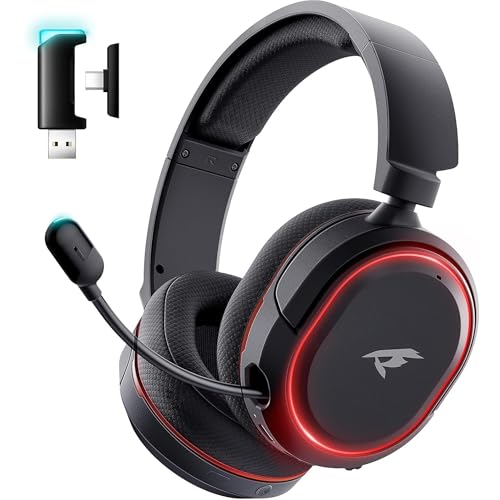
Latency you can’t perceive. Proprietary 2.4 GHz protocols prioritize speed over compatibility. At 20–40 ms of delay, footsteps, gunfire, and dialogue line up with the visuals exactly the way a wired connection would. This is why virtually every headset marketed for PS5 or Xbox ships with a USB dongle rather than relying on Bluetooth.
Native console support. Plug the dongle into a PS5, PS4, or Nintendo Switch dock and it just works — no pairing menus, no codec negotiations. This matters because neither PlayStation nor Xbox consoles transmit audio over standard Bluetooth to headphones, so a plain Bluetooth headset won’t connect directly at all. A dongle sidesteps that wall entirely.
Voice chat that just works. Dongle headsets integrate the microphone into the same low-latency link, so your teammates hear you in real time with no echo or drift. Many also include hardware mute buttons and noise-cancelling boom mics — features borrowed from office headsets, where they’re proven.
Battery life. Gaming headsets built around dongles routinely hit 30–100 hours per charge because the radio protocol is efficient and there’s no Bluetooth stack overhead. A 100-hour rated headset can go weeks of evening play between charges.
No interference juggling. Because the dongle creates a dedicated point-to-point link, your headset doesn’t compete with your phone, smart TV, and laptop for a Bluetooth connection. Audio doesn’t drop when a phone rings in the room.
Where Bluetooth for Low Latency Console Audio Wins
One headset, everything. The strongest argument for Bluetooth is reuse. The same headphones that handle your console (via a transmitter) also pair with your phone for calls, your laptop for work, and your tablet for travel. A multipoint Bluetooth headset can stay connected to a computer and a phone at once — which is exactly why single-ear Bluetooth models with USB dongles for computers and mute buttons have become standard for remote work. Note the nuance there: many “Bluetooth headsets with USB dongle” for office use use the dongle only to add Bluetooth to desktops that lack it, not to bypass latency.
Closing the gap with modern codecs. Bluetooth 5.3 transmitters and receivers supporting aptX Low Latency and aptX Adaptive can push delay down toward the 30–80 ms range — not dongle-fast, but fine for single-player games, RPGs, and movie watching. The catch: both the transmitter and the headphones must support the same codec. If your headphones only handle SBC or AAC, you’re back in the 150–250 ms territory where lip-sync becomes noticeable.
TV and living room use. A dedicated Bluetooth transmitter plugged into a TV’s USB or optical output can drive two pairs of headphones simultaneously — ideal for couples where one partner watches late-night TV at high volume. Gaming consoles aren’t the only audio source in a home, and Bluetooth hardware tends to work across all of them.
Lower total cost if you already own headphones. If you have a decent pair of Bluetooth headphones, a $30–$37 transmitter is your only purchase. That’s cheaper than any dedicated gaming headset, and it upgrades every screen in the house, not just the console.
Cost Over 5 Years
Dongle route: A console-ready wireless gaming headset costs $35–$150 upfront, with $35–$70 covering solid entry-to-mid options. Batteries in these headsets are typically sealed but rated for 300–500 charge cycles; expect 3–5 years of life, so budget one replacement headset over five years, roughly $40–$80. Total: approximately $75–$230, with zero recurring costs and no subscription or extra hardware.
Bluetooth route: If you already own Bluetooth headphones, a quality low-latency transmitter runs $29–$40 and may need replacing once mid-decade as Bluetooth versions advance — figure $60–$80 over five years. If you’re buying headphones too, add $50–$150, plus possible replacement. Total: approximately $60–$300 depending on what you already own. The flexibility value — headphones that work with your phone, gym bag, and laptop — is real but hard to price.
The honest takeaway: over five years the costs are comparable. Choose based on how you play, not the receipt.
Which One for Your Home
Small Apartment
Space isn’t the issue — noise and neighbors are. A Bluetooth transmitter paired with over-ear headphones lets you play at 2 a.m. without waking anyone, and the same headphones move to your desk the next morning. If your gaming leans competitive, a compact dongle headset with a flip-to-mute mic keeps voice chat clean in a room that’s also your office. Either way, look for headsets under about 11 oz so long sessions don’t fatigue your neck in a small space where the headset rarely comes off.
Family with Kids or Pets
Durability and simplicity rule. A single dongle headset means fewer dangling cables for pets to chew and fewer devices to re-pair when a toddler gets curious with the TV remote. Dongles stay plugged into the console, so nothing gets lost between couch cushions. If multiple family members game at once, note that most dongle systems are one-headset-per-dongle; Bluetooth transmitters that drive two headphone pairs simultaneously are the better fit for sibling movie nights — just accept slightly higher latency for shared viewing.
Rental or Frequent Mover
Everything you buy should leave with you easily. A Bluetooth transmitter is wonderfully portable — most are under 1.5 oz and smaller than a matchbox, drawing power from the TV or console’s own USB port. It works with any TV or monitor you encounter in future apartments. A dongle headset is equally portable as a single unit, but keep the tiny USB receiver in the headset’s charging port or a labeled case; a lost dongle usually means a dead headset, since few manufacturers sell replacements cheaply.
Long-Term Home
With a permanent setup, invest in the dongle route. A well-built wireless gaming headset with a dedicated USB receiver gives you years of lag-free play, and you can standardize: one dongle per console, labeled and left in place. Since PS5 and Xbox don’t speak native Bluetooth audio, the dongle ecosystem is simply the path of least resistance for a dedicated gaming room. Add one Bluetooth transmitter for the living room TV so guests and family can use wireless headphones for late-night viewing — by 2026, low-latency Bluetooth codecs are common enough that this dual setup covers gaming and household audio without compromise.
FAQ
Can I connect a Bluetooth headset directly to a PS5 or Xbox?
No — neither console family transmits audio to headphones over standard Bluetooth. You’ll need either a USB dongle headset or a USB Bluetooth transmitter designed for consoles. Even then, expect added latency and the possibility that in-game voice chat won’t route through the Bluetooth link, since console chat protocols are proprietary.
How much latency is actually noticeable?
Most people begin noticing audio delay around 80–100 ms, especially with dialogue and rhythmic games. Below roughly 40 ms — typical for dongle-based wireless — the delay is effectively imperceptible. Bluetooth with aptX Low Latency on both ends can land near that threshold; standard SBC Bluetooth generally cannot.
Do I need aptX Low Latency headphones for gaming?
Only if you go the Bluetooth route and care about sync. Both the transmitter and headphones must support the same codec, or they’ll fall back to a standard one with more delay. With a dedicated dongle headset, codec support is irrelevant — the proprietary protocol handles timing itself.
Can one headset work for both my console and my computer?
Sometimes. Many dongle headsets include a USB-C dongle that works on PCs and consoles alike, and some gaming headsets add Bluetooth as a secondary mode for phone use. Check the spec sheet for “dual wireless” or “2.4 GHz + Bluetooth” — that combination gives you console-grade latency at the desk and phone connectivity everywhere else, usually in the $60–$150 range.
Related guides
- Best Free MMOs on Steam: Subscription Limits, Pay-to-Win and Time Cost (2026)
- Best Free Horror Games on Steam: How to Pick One That Fits Your PC and Your Nerves (2026)
- Black Frame Insertion vs VRR: Which Smoothness Feature Should You Use?
- Best Webcams for Streaming: 11 Listings Compared by Resolution, Focus and Light (2026)








