Our Short List of 3

- Best for: PC gamers who want a sharp QHD screen with smooth motion and a stand that adjusts in every direction.
- 27-inch QHD (2560 x 1440) Nano IPS display
- 165Hz refresh rate
- 1ms response time
- NVIDIA G-SYNC Compatible

- Best for: competitive players who want a 180Hz QHD screen with speakers included for a tidy desk.
- 27-inch QHD (2560 x 1440) display
- 180Hz refresh rate
- 1ms response time
- Fast IPS panel

- Best for: players who want a flat 180Hz QHD screen that works with either major graphics card brand.
- 27-inch QHD resolution gaming monitor
- 180Hz refresh rate
- Fast IPS panel
- HDR10
All 4 Picks at a Glance
| Product | Specs | Action |
|---|---|---|
| LG 27GP850-B UltraGear |
| Check price on Amazon |
| ASUS TUF Gaming VG27AQ3A |
| Check price on Amazon |
| Samsung Odyssey G5 G50F |
| Check price on Amazon |
 LG 27G850A-B UltraGear |
| Check price on Amazon |
A 27 inch monitor sits in a useful middle ground, and that is why choosing one takes more thought than the size suggests. The panel is large enough for split-screen work and reading sessions, yet small enough to fit a desk without pushing the keyboard back or forcing the viewer to turn their head. The real decision is not the diagonal measurement, because every screen here measures 27 inches. It is the combination of resolution, refresh rate, panel type and stand that decides whether the monitor suits fast competitive play, slower story-driven games, console sessions or a full working day.
This guide is written for PC gamers who want a sharper step up from a smaller screen, console players looking for a desk display, and home workers who need one screen for documents, video calls and evening games. Every monitor below is a 27 inch model, and every specification comes from its Amazon listing title and product details, so the comparison stays tied to what the listing itself states.
Our Top Picks
- LG 27GP850-B Ultragear Gaming Monitor 27-Inch QHD14.4"x24.2"x2"11.5 x 24.2 x 22.7 inches13.9 poundsCheck on Amazon
- ASUS TUF Gaming VG27AQ3A 27 Inch 1440p 180Hz14.4" x 24.2" x 2.1"24.2 x 8.4 x 17.9 inches10.1 poundsCheck on Amazon
Top 3 picks at a glance
Quick Picks
As an Amazon Associate we earn from qualifying purchases.
| Product | Best for | Key spec from title |
|---|---|---|
| LG 27GP850-B UltraGear | Smooth QHD gaming with an adjustable stand | 27-Inch QHD Nano IPS, 165Hz, 1ms |
| ASUS TUF Gaming VG27AQ3A | Fast-paced play with built-in speakers | 27-Inch QHD, 180Hz, 1ms, Fast IPS |
| Samsung Odyssey G5 G50F | A curved-free QHD screen for PC and console use | 27-Inch QHD, 180Hz, Fast IPS, HDR10 |
| Dell S2721DGF | Colour-rich gaming with a fully adjustable stand | 27-Inch QHD, 165Hz, 1ms, HDR IPS |
| LG 27G850A-B UltraGear | Sharp 4K gaming at a high refresh rate | 27-Inch 4K UHD, Dual-Mode 240Hz, 1ms |
How to Choose
Start with resolution, because it sets the daily workload
Resolution decides how hard the graphics card must work to fill the screen. A 2560 x 1440 QHD panel, which four of the five monitors here use, looks clearly sharper than a 1920 x 1080 screen while remaining far easier for a mid-range graphics card to drive than a 3840 x 2160 4K panel. Text stays readable and two windows can sit side by side without feeling cramped. A 4K panel suits players with a strong graphics card and people who edit photos or video, because fine detail renders more cleanly. Before choosing, check the graphics card and the games played most often, since a resolution the hardware cannot sustain turns a sharper screen into a slower one.
Match refresh rate and response time to the games played
Refresh rate sets how many frames the screen can show each second, while response time describes how quickly a pixel changes colour. A 165Hz or 180Hz panel makes camera movement and fast turns look smoother than a 60Hz office screen, and a 1ms response time helps fast motion stay readable instead of smearing. Competitive shooters and racing games benefit most from the higher rates, while slower strategy games gain less. The 240Hz dual-mode option on the LG 27G850A-B suits players who want the highest rate available, although it needs a graphics card and a cable that can deliver it. Check the refresh rate over each input, because some monitors reach their headline rate only over DisplayPort.
Pick the panel type for colour, contrast and viewing angle
Most 27 inch gaming monitors in this guide use an IPS panel, which keeps colours steady when viewed from the side and suits shared rooms, work and games. Nano IPS, used by the LG 27GP850-B, is a variant with a wider colour range, while Fast IPS aims to keep the quick response that competitive play needs. A VA panel can show deeper blacks and stronger contrast, which suits dark game scenes and films, although its viewing angles differ from IPS. Players who sit directly in front of the screen and favour dark games may lean toward stronger contrast, while anyone who shares the screen or edits images will usually prefer the consistent colour of an IPS panel.
Check ports, the stand and the desk before ordering
A monitor that cannot connect to the hardware already on the desk creates a problem on arrival day. Look for the exact inputs listed for each model, including HDMI and DisplayPort, and confirm which input supports the full refresh rate. A USB hub, found on the Dell model, reduces cable clutter for a keyboard, mouse or headset, while built-in speakers, offered by the ASUS model, help in a setup without separate audio. The stand matters just as much, because height, tilt, swivel and pivot adjustments decide whether the screen can sit at eye level. Measure the desk depth, check the VESA mount pattern if a monitor arm is planned, and confirm the stand footprint leaves room for the keyboard.
The 5 Best Options
LG 27GP850-B UltraGear
- Best for: PC gamers who want a sharp QHD screen with smooth motion and a stand that adjusts in every direction.
- 27-inch QHD (2560 x 1440) Nano IPS display
- 165Hz refresh rate
- 1ms response time
- NVIDIA G-SYNC Compatible
PC gamers who want a sharp QHD screen with smooth motion and a stand that adjusts in every direction.
the headline refresh rate and variable refresh behaviour depend on the input used, so confirm the DisplayPort connection before expecting the full rate.
The LG 27GP850-B suits players who want a proven QHD gaming screen without moving to 4K. The 2560 x 1440 resolution keeps text and game detail sharp on a 27 inch screen, while the 165Hz refresh rate and 1ms response time keep fast movement readable during shooters and racing games. Support for NVIDIA G-SYNC Compatible and AMD FreeSync Premium helps the screen stay in step with the graphics card, so tearing is less likely when frame rates change. The stand adjusts for tilt, height and pivot, which makes it easier to set the screen at eye level and to turn it upright for reading long documents.
Watch out for: the headline refresh rate and variable refresh behaviour depend on the input used, so confirm the DisplayPort connection before expecting the full rate.
ASUS TUF Gaming VG27AQ3A
- Best for: competitive players who want a 180Hz QHD screen with speakers included for a tidy desk.
- 27-inch QHD (2560 x 1440) display
- 180Hz refresh rate
- 1ms response time
- Fast IPS panel
competitive players who want a 180Hz QHD screen with speakers included for a tidy desk.
built-in monitor speakers suit casual listening and voice chat, so players who care about game audio detail should still plan for headphones or separate speakers.
The ASUS TUF Gaming VG27AQ3A is the pick for players who want a higher refresh rate than the usual QHD standard and a monitor that can handle sound. Its 180Hz refresh rate and 1ms response time suit fast shooters, where quick camera turns need to stay readable, and the Fast IPS panel keeps colours steady. The listing also notes 130 percent sRGB coverage, which helps games and video look vivid, and Extreme Low Motion Blur Sync is aimed at keeping moving images clearer. Built-in speakers remove the need for separate desktop speakers, while FreeSync Premium and G-SYNC Compatible support cover variable refresh from the two main graphics card makers.
Watch out for: built-in monitor speakers suit casual listening and voice chat, so players who care about game audio detail should still plan for headphones or separate speakers.
Samsung Odyssey G5 G50F
- Best for: players who want a flat 180Hz QHD screen that works with either major graphics card brand.
- 27-inch QHD resolution gaming monitor
- 180Hz refresh rate
- Fast IPS panel
- HDR10
players who want a flat 180Hz QHD screen that works with either major graphics card brand.
Samsung sells several monitors under the Odyssey G5 name, so confirm the listing shows model LS27FG502ENXZA before ordering.
The Samsung Odyssey G5 G50F fits buyers who want a straightforward 27 inch QHD gaming monitor with a high refresh rate and no curved panel to work around. Its 180Hz refresh rate and 1ms response time put it alongside the fastest QHD screens in this guide, and the Fast IPS panel keeps the image consistent when the viewer shifts position. HDR10 support is listed for compatible games and video, which can add depth to brighter highlights. The adjustable stand helps the screen sit at a comfortable height, and NVIDIA G-Sync compatibility and AMD FreeSync support mean the monitor can work with graphics cards from either maker.
Watch out for: Samsung sells several monitors under the Odyssey G5 name, so confirm the listing shows model LS27FG502ENXZA before ordering.
Dell S2721DGF
The Dell S2721DGF suits buyers who split their time between gaming and colour-sensitive work, because its Fast IPS panel and wide stand adjustment cover both uses. The 27 inch QHD screen runs at 165Hz with a 1ms response time, which keeps competitive games smooth, while the HDR IPS panel and the listing’s FreeSync and G-SYNC Compatible support handle variable frame rates from either graphics card maker. Height, tilt, swivel and pivot adjustment all feature in the listing, so the screen can be set at eye level or turned upright for documents. A USB hub on the monitor gives a tidy place to connect a keyboard, mouse or headset.
Specs
- 27-inch QHD (2560 x 1440) HDR IPS LED gaming monitor
- 165Hz refresh rate
- 1ms response time
- FreeSync and G-SYNC Compatible
- Height, tilt, swivel and pivot adjustment
- HDMI 2.0 and DisplayPort 1.2 inputs
- USB hub
Best for: gamers who also work with images or documents and want full stand adjustment plus a USB hub.
Watch out for: the listing states different refresh behaviour by input in its wider product details, so use DisplayPort for the full 165Hz rate and check the HDMI rate before relying on it.
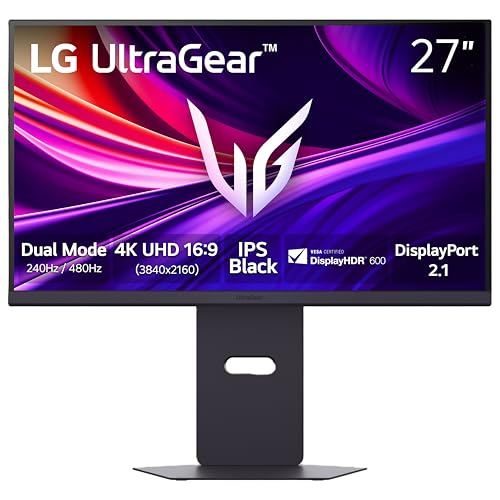
LG 27G850A-B UltraGear
- Best for: players with a strong graphics card who want 4K sharpness without dropping to a low refresh rate.
- 27-inch 4K UHD (3840 x 2160) IPS gaming monitor
- Dual-mode 240Hz refresh rate
- 1ms response time
- NVIDIA G-Sync Compatible
players with a strong graphics card who want 4K sharpness without dropping to a low refresh rate.
4K at a high refresh rate demands a capable graphics card and a suitable cable, so confirm both can deliver the chosen mode before ordering.
The LG 27G850A-B is the choice for players whose graphics card can drive a 4K screen and who do not want to give up a high refresh rate. Its 27 inch 4K UHD panel shows 3840 x 2160 pixels, which makes fine detail in games, small interface text and edited photos look cleaner than on a QHD screen. The dual-mode design allows a 240Hz refresh rate, and the 1ms response time keeps fast motion readable. Support for NVIDIA G-Sync Compatible and AMD FreeSync Premium Pro covers variable refresh, while VESA DisplayHDR 600 is listed for HDR content. HDMI and DisplayPort 2.1 inputs are included for newer graphics cards.
Watch out for: 4K at a high refresh rate demands a capable graphics card and a suitable cable, so confirm both can deliver the chosen mode before ordering.
Which One Fits Your Situation
You play fast competitive games most evenings
Choose the ASUS TUF Gaming VG27AQ3A or the Samsung Odyssey G5 G50F, because both offer a 180Hz refresh rate with a 1ms response time on a QHD panel. The ASUS model adds built-in speakers for a compact desk, while the Samsung model suits players who already own headphones or separate speakers. Either one keeps fast camera movement readable, and both support variable refresh from the two main graphics card makers.
You want one screen for work by day and games at night
Choose the Dell S2721DGF, because its height, tilt, swivel and pivot stand makes it easy to set the screen at eye level for long working days, then turn it upright for documents. The QHD resolution gives enough room for two windows side by side, the USB hub keeps peripherals close, and the 165Hz rate is ready when the working day ends.
You want the sharpest picture your graphics card can drive
Choose the LG 27G850A-B UltraGear, because its 4K panel shows far more detail than the QHD models in this guide. The dual-mode 240Hz refresh rate means sharpness does not come with slow motion, although the full combination needs a strong graphics card and a DisplayPort 2.1 connection. It is the right pick only when the hardware can keep up with it.
You want a balanced QHD screen with a flexible stand
Choose the LG 27GP850-B UltraGear, because its Nano IPS panel, 165Hz refresh rate and 1ms response time cover gaming well, while the tilt, height and pivot stand adapts to different desks and seating positions. It suits players who do not need 4K or 180Hz, and who would rather have a well-rounded screen that works for games, films and everyday computing.
Safety Notes
Monitors are mains-powered electrical devices, so use the power cable and adapter supplied with the monitor, keep vents clear of dust and clutter, and place the screen on a stable desk or a mount rated for its weight and size. Unplug the monitor before moving it or cleaning the panel, wipe the screen only with a soft, dry or lightly damp cloth, and keep liquids away from the ports and the stand base. If the screen, cable or plug shows damage, stop using it and seek a repair from the maker or a qualified technician.
Common Mistakes
- Choosing a 4K monitor without checking whether the graphics card can sustain 4K at a playable frame rate.
- Assuming every input supports the headline refresh rate, when some monitors reach it only over DisplayPort.
- Ordering an Odyssey G5 without confirming the exact model number, since Samsung uses the name across several different monitors.
- Ignoring the stand, then finding the screen sits too low or too high for comfortable viewing.
- Placing a 27 inch screen too close on a shallow desk, which makes the edges harder to follow during fast games.
Frequently Asked Questions
Is a 27 inch monitor good for gaming?
Yes, a 27 inch monitor is a good size for gaming on a normal desk, because it fills the field of view without forcing the player to turn their head. A QHD panel at this size looks sharp, while a 165Hz or higher refresh rate keeps motion smooth. Measure the desk depth first, since a screen placed too close can feel larger than expected.
Is QHD or 4K better on a 27 inch monitor?
QHD suits most players, because 2560 x 1440 looks sharp at 27 inches and is easier for a mid-range graphics card to drive. 4K shows finer detail and suits strong graphics cards, photo editing and large open-world games. Choose 4K only when the graphics card and cable can sustain it at the refresh rate wanted.
What refresh rate should a 27 inch gaming monitor have?
A 144Hz or 165Hz refresh rate is a good baseline for a 27 inch gaming monitor, and the models in this guide run at 165Hz, 180Hz or 240Hz in dual mode. Higher rates help most in fast shooters and racing games, where camera movement is constant. Slower games gain less, so match the rate to the games played most often.
Can a 27 inch monitor work with a console?
Yes, a 27 inch monitor can work with a console through HDMI, and several models here list HDMI inputs alongside DisplayPort. Check that the monitor supports the console’s output resolution and refresh rate over HDMI, since some screens reach their highest rate only over DisplayPort. A 4K 120Hz console mode also needs a monitor and cable that support it.
Related guides
More from Amazon
Programs that pair well with the guide above. Offers and eligibility are set by Amazon and may change.
Free shipping on eligible items, Prime Video and more. Eligible new members can start with a free trial.
Start a Prime free trialAd-free music streaming. Eligible new subscribers can start with a free trial.
Try Music Unlimited freeA Prime membership for ages 18-24 with a trial period. Eligibility is set by Amazon.
See Prime for Young AdultsAudiobooks and podcasts to listen to on the go. Eligible new members can start with a free trial.
Try Audible freeAs an Amazon Associate we earn from qualifying purchases.