Our Short List of 3

- Best for: Owners who want one large, Mac-ready drive for Time Machine and a media library.
- Capacity: 4TB mechanical hard disk
- Interface: USB 3.1 and USB 3.0 compatible
- Connection: USB-C compatible
- Hardware platform: Mac
- Best for: Daily carry where a Mac-formatted drive, USB-C, and hardware encryption all matter.
- Capacity: 2TB
- Interface: USB-C and USB 3.1 compatible
- Form factor: 2.5 inches
- Drive type: Mechanical hard disk

- Best for: Creative work on location where the drive may be dropped, rained on, or buried in a bag.
- Capacity: 4TB
- Form factor: 2.5-inch portable hard drive
- Interface: USB-C, USB 3.0 compatible
- Transfer speed: Up to 130 MB/s
All 5 Picks at a Glance
| Product | Specs | Action |
|---|---|---|
| WD My Passport for Mac 4TB |
| Check price on Amazon |
| WD My Passport Ultra for Mac 2TB |
| Check price on Amazon |
| LaCie Rugged USB-C 4TB |
| Check price on Amazon |
 LaCie Mobile Drive 4TB |
| Check price on Amazon |
 Seagate Backup Plus Slim for Mac 1TB |
| Check price on Amazon |
A MacBook Pro fills up faster than most owners expect. Photo libraries grow, video projects multiply, and a single Time Machine backup can swallow the free space that remains on the internal drive. The real decision is not whether to add external storage, but which kind of drive fits the way the laptop is actually used: a quiet desk companion for nightly backups, a pocketable drive for carrying a photo library, or a tough enclosure that survives a bag tossed into a car boot.
This guide is for MacBook Pro owners who want a drive that connects without a drawer full of adapters, works with Time Machine, and stores files in a format macOS understands from the first plug-in. Every drive below was chosen from the name and specifications shown on its Amazon listing, with attention to Mac formatting, USB-C connectivity, and the capacity that matches each use.
Our Top Picks
Top 3 picks at a glance
Quick Picks
As an Amazon Associate we earn from qualifying purchases.
| Product | Best for | Key spec from title |
|---|---|---|
| WD My Passport for Mac 4TB | Large Time Machine backups at home | 4TB portable external hard drive, USB 3.1/USB 3.0 compatible |
| WD My Passport Ultra for Mac 2TB | Everyday carry with hardware encryption | 2TB portable external hard drive, USB-C and USB 3.1 compatible |
| LaCie Rugged USB-C 4TB | Field work and travel in rough conditions | 4TB portable external hard drive, drop, shock, dust, rain resistant |
| LaCie Mobile Drive 4TB | A slim aluminium drive beside a MacBook Pro | 4TB portable external hard drive, USB-C 3.2, for PC and Mac |
| Seagate Backup Plus Slim for Mac 1TB | A first Time Machine drive for a smaller library | 1TB external hard drive, USB 3.0, Time Machine compatible |
How to Choose
Match the Connection to the MacBook Pro in Front of You
Recent MacBook Pro models carry USB-C ports and nothing else, so a drive with a native USB-C connection saves a hunt for adapters. Older models still have USB-A ports, and a drive that ships with both cable types covers a household with two generations of laptop. Check the listing for the exact cable in the box rather than assuming one is included, because a drive that needs a separate cable is a drive that stays in a drawer on the day a backup is needed. Bus-powered drives draw energy through that same cable, which keeps the desk tidy and makes the drive genuinely portable, while a drive needing a separate mains adapter belongs on a desk and nowhere else.
Choose Capacity by the Backup, Not by the Laptop
A Time Machine backup needs room for the full contents of the MacBook Pro plus space for older versions of changed files, so a drive that only just matches the internal storage fills up within weeks. A good working rule is to pick a drive with at least twice the capacity of the files being protected, which leaves room for the backup history to grow without constant pruning. Photographers and video editors should count their libraries first and then add headroom for the next year of shooting, because a library that already strains a 1TB drive will not shrink. Larger drives also suit households where one external drive backs up two machines on rotation.
Decide Between a Hard Drive and the Speed It Can Actually Deliver
Every drive in this guide is a mechanical hard drive, which means large sequential copies run at the pace of a spinning disk rather than the pace of the USB bus. A listing may show a USB transfer figure of several gigabits per second, but the platters inside cap real-world copying at roughly one hundred megabytes per second, and small files move far more slowly still. That pace suits backups, archives, and media libraries that are copied in bulk and read back occasionally. Anyone who edits video directly from the drive, scrubs through large timelines, or opens huge photo catalogues all day should understand this limit before buying and plan to keep active projects on the internal drive instead.
Check the Format and the Software Before the First Backup
A drive that arrives formatted for Mac works with Time Machine straight out of the box, while a drive formatted for another system needs reformatting in Disk Utility before Time Machine will accept it. Reformatting erases whatever the drive shipped with, so confirm the format in the listing rather than discovering it after files have already been copied. Bundled backup software and password protection add convenience, yet they are no substitute for Time Machine itself, and some bundled tools only run on one operating system. The listing should also state whether the drive carries hardware encryption, because a password-protected backup drive that travels in a bag is far safer than one that anyone can plug in and read.
The 5 Best Options
WD My Passport for Mac 4TB
- Best for: Owners who want one large, Mac-ready drive for Time Machine and a media library.
- Capacity: 4TB mechanical hard disk
- Interface: USB 3.1 and USB 3.0 compatible
- Connection: USB-C compatible
- Hardware platform: Mac
Owners who want one large, Mac-ready drive for Time Machine and a media library.
The listing describes the drive as USB-C compatible, so confirm which cable is in the box for the MacBook Pro being used, and remember that a mechanical drive copies large files far more slowly than the USB bus figure suggests.
This is the straightforward choice for a MacBook Pro owner who wants one large drive to handle Time Machine and a growing media library at the same time. Four terabytes leaves generous room for a full backup plus months of older file versions, and the drive arrives ready for Macs, so the first backup starts without a reformatting detour. Its compact shape fits beside a laptop on a desk or inside a bag, and the included backup software plus password protection cover the two jobs most owners actually ask of an external drive: regular copies and a basic lock on private files.
Watch out for: The listing describes the drive as USB-C compatible, so confirm which cable is in the box for the MacBook Pro being used, and remember that a mechanical drive copies large files far more slowly than the USB bus figure suggests.
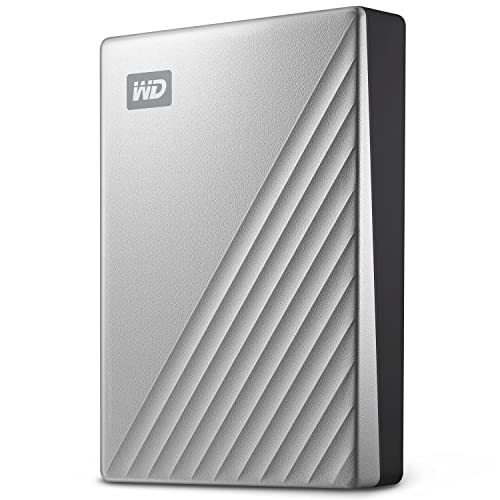
WD My Passport Ultra for Mac 2TB
- Best for: Daily carry where a Mac-formatted drive, USB-C, and hardware encryption all matter.
- Capacity: 2TB
- Interface: USB-C and USB 3.1 compatible
- Form factor: 2.5 inches
- Drive type: Mechanical hard disk
Daily carry where a Mac-formatted drive, USB-C, and hardware encryption all matter.
Two terabytes fills quickly if it must hold both a full Time Machine history and a large photo library, so check how much data is already on the MacBook Pro before settling on this capacity.
The Ultra for Mac suits the owner who carries a drive every day and wants it to look and feel like it belongs next to an aluminium laptop. Its refined metal cover sets it apart from plain plastic enclosures, and the listing states that it arrives formatted for Mac with Time Machine compatibility, so setup is a matter of plugging it in and choosing it as the backup destination. Hardware encryption with password protection guards the contents if the drive is lost, and the USB-C connection matches recent MacBook Pro ports without an adapter hunt.
Watch out for: Two terabytes fills quickly if it must hold both a full Time Machine history and a large photo library, so check how much data is already on the MacBook Pro before settling on this capacity.
LaCie Rugged USB-C 4TB
- Best for: Creative work on location where the drive may be dropped, rained on, or buried in a bag.
- Capacity: 4TB
- Form factor: 2.5-inch portable hard drive
- Interface: USB-C, USB 3.0 compatible
- Transfer speed: Up to 130 MB/s
Creative work on location where the drive may be dropped, rained on, or buried in a bag.
The rugged shell protects against knocks, not against a spinning drive being moved while it writes, so let transfers finish before packing the drive away, and keep a second copy of anything irreplaceable.
LaCie built this drive for bags, boots, and back seats, and its bright orange bumper makes it easy to spot among cables and chargers. The listing describes drop, shock, dust, and rain resistance, which matters for photographers and videographers who offload memory cards on location rather than waiting until they are home. Four terabytes holds multi-day shoots and the backup of a well-filled MacBook Pro, while the USB-C connection plugs straight into recent models. It remains a mechanical hard drive, so it trades raw speed for capacity and toughness.
Watch out for: The rugged shell protects against knocks, not against a spinning drive being moved while it writes, so let transfers finish before packing the drive away, and keep a second copy of anything irreplaceable.
LaCie Mobile Drive 4TB
- Best for: A desk-side library drive that should look at home next to a MacBook Pro.
- Capacity: 4TB
- Interface: USB-C 3.2
- Drive type: Mechanical hard disk
- Form factor: 2.5-inch portable
A desk-side library drive that should look at home next to a MacBook Pro.
The listing also shows a 5,000 MB/s figure for the USB bus, which is not the speed of the drive itself; expect hard-drive speeds around the media figure above, and do not plan to edit large video files directly from it.
The Mobile Drive is the quiet, good-looking option for a desk beside a MacBook Pro, with a slim aluminium enclosure in Moon Silver that matches Apple hardware better than most plastic drives. It connects over USB-C and works with both Mac and PC, making it a natural home for a photo library or a media collection that moves between machines. Four terabytes is ample for a large library plus a Time Machine backup of a moderately filled laptop, and the drive draws its power through the USB cable, so no separate adapter clutters the desk.
Watch out for: The listing also shows a 5,000 MB/s figure for the USB bus, which is not the speed of the drive itself; expect hard-drive speeds around the media figure above, and do not plan to edit large video files directly from it.
Seagate Backup Plus Slim for Mac 1TB
- Best for: A first Time Machine drive for a MacBook Pro with a modest amount of data.
- Capacity: 1TB portable hard disk
- Interface: USB 3.0
- Compatibility: Time Machine compatible
- Format: Formatted for Mac
A first Time Machine drive for a MacBook Pro with a modest amount of data.
The listing gives two different speed figures, 120 MB/s and 100 MB/s, so plan around the lower one; also note the USB 3.0 connection uses a USB-A style cable, so a recent MacBook Pro needs a USB-C adapter that the listing does not promise.
This is the smallest and simplest drive in the guide, and that is its appeal for a first-time backup buyer. The listing states Time Machine compatibility and a Mac format out of the box, so a MacBook Pro owner with a modest library can plug it in and start a backup within minutes. Its slim metal design slips into a laptop sleeve without adding noticeable bulk, and the included software covers scheduled backups for owners who would otherwise forget to run them. One terabyte suits a laptop with a smaller internal drive and a library that is still growing slowly.
Watch out for: The listing gives two different speed figures, 120 MB/s and 100 MB/s, so plan around the lower one; also note the USB 3.0 connection uses a USB-A style cable, so a recent MacBook Pro needs a USB-C adapter that the listing does not promise.
Which One Fits Your Situation
Backing Up a Full MacBook Pro at Home
Choose the WD My Passport for Mac 4TB. Its large capacity holds a complete Time Machine backup with room for months of file history, and it arrives ready for Macs, so the backup routine starts the evening it arrives. Keep it plugged in at the desk and let Time Machine run on its own schedule rather than treating backup as a weekly chore.
Carrying a Drive Every Day
Choose the WD My Passport Ultra for Mac 2TB. It is slim, Mac-formatted, and connects over USB-C, while hardware encryption protects the contents if it slips out of a bag while you travel. Two terabytes is enough for daily documents, a photo library, and a backup of a moderately filled laptop.
Working Outdoors or on Location
Choose the LaCie Rugged USB-C 4TB. Its drop, shock, dust, and rain resistance suit shoots and trips where a plain plastic drive would be at risk, and four terabytes swallows card dumps from multi-day work. Copy files to a second drive when back at base, because no single drive should ever be the only copy.
Keeping a Media Library Beside the Laptop
Choose the LaCie Mobile Drive 4TB. Its slim aluminium body sits neatly on a desk, USB-C keeps the setup to a single cable, and four terabytes holds a large photo or media collection with room to grow. Use it as the library drive and keep Time Machine on a separate drive if the budget of ports and desk space allows.
Safety Notes
External hard drives run on low-voltage USB power and carry no mains voltage themselves, but they still deserve basic care. Do not unplug a drive while files are copying or a backup is running, because an interrupted write can corrupt the data being transferred. Keep drives away from water, strong magnets, and hot surfaces such as radiators or a car dashboard in direct sun, and let a drive that has been in the cold warm up before use. Store the drive on a stable surface while it spins, and keep at least one additional copy of files that cannot be replaced.
Common Mistakes
- Buying a drive that only just matches the MacBook Pro internal storage, then discovering Time Machine has no room for older file versions.
- Assuming a USB bus figure on the listing is the speed files will actually copy at, when a mechanical drive moves data far more slowly.
- Reformatting a Mac-formatted drive for another system before checking whether Time Machine was the plan all along.
- Using a USB-A drive with a recent MacBook Pro and no adapter in the bag, so the backup never happens on the road.
- Keeping the only copy of irreplaceable photos on a single portable drive that travels everywhere the laptop goes.
Frequently Asked Questions
Do I need a USB-C drive for a recent MacBook Pro?
Yes, in practice. Recent MacBook Pro models have USB-C ports only, so a native USB-C drive plugs in directly, while a USB-A drive needs an adapter. Drives that ship with both cable types cover older and newer machines, so check the listing for the cable in the box before ordering.
Can I use one of these drives with Time Machine?
Yes, provided the drive is formatted for Mac or reformatted in Disk Utility first. The WD My Passport for Mac, the WD My Passport Ultra for Mac, and the Seagate Backup Plus Slim for Mac are all described as Time Machine compatible in their listings, which removes the formatting step for most buyers.
How much capacity should I choose for Time Machine?
Pick a drive with at least twice the amount of data stored on the MacBook Pro. Time Machine keeps older versions of changed files alongside the full backup, so a drive that only matches the laptop storage fills up quickly and starts deleting the oldest history sooner than expected.
Are these drives fast enough for video editing?
Not as a working drive for large projects. Mechanical hard drives copy large files at roughly one hundred megabytes per second and handle small files more slowly, which suits backups and archives. Keep active editing projects on the internal drive and use the external drive for storage, finished work, and backups.
Related guides
More from Amazon
Programs that pair well with the guide above. Offers and eligibility are set by Amazon and may change.
Free shipping on eligible items, Prime Video and more. Eligible new members can start with a free trial.
Start a Prime free trialAd-free music streaming. Eligible new subscribers can start with a free trial.
Try Music Unlimited freeA Prime membership for ages 18-24 with a trial period. Eligibility is set by Amazon.
See Prime for Young AdultsAudiobooks and podcasts to listen to on the go. Eligible new members can start with a free trial.
Try Audible freeAs an Amazon Associate we earn from qualifying purchases.