Our Short List of 3

- Best for: close seating and the most immersive curve in the group.
- 27-inch QHD (2560×1440)
- 165Hz refresh rate
- 1000R curved VA panel
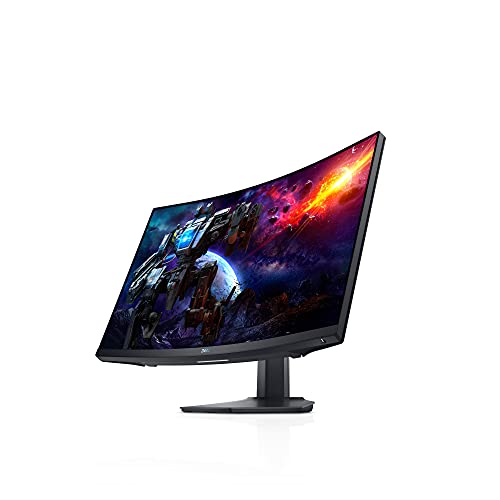
- Best for: a balanced curved monitor for work and play.
- 27-inch QHD (2560×1440)
- 165Hz refresh rate
- 1500R curved VA panel
- 99% sRGB

- Best for: a height-adjustable curved display with a strong warranty.
- 27-inch QHD (2560×1440)
- 144Hz refresh rate
- 1ms MPRT
- 1500R curved VA panel
All 4 Picks at a Glance
| Product | Specs | Action |
|---|---|---|
| Samsung Odyssey G5 27″ |
| Check price on Amazon |
| Dell S2722DGM 27″ |
| Check price on Amazon |
| AOC CQ27G2 27″ |
| Check price on Amazon |
 Gigabyte G27FC A 27″ |
| Check price on Amazon |
A curved monitor pulls the edges of the screen toward you, so the whole display sits at a more even distance from your eyes. The effect is subtle on a flat desk and obvious in a game or a film: the picture feels wider, the corners stay in focus, and the screen wraps your field of view instead of sitting flat in front of it. Curvature is measured in R — a 1000R curve is tighter than a 1500R curve — and the right amount depends on how close you sit.
This guide covers curved monitors as a form factor, led by 16:9 curved displays for gaming and work. The four picks below all share the same 27-inch size. Every pick below is a 27-inch curved VA panel chosen from its listing name and specifications on Amazon, at 144Hz or 165Hz. Curved ultrawides are a different decision and belong to a different article, so they stay out of this group.
Our Top Picks
Top 3 picks at a glance
Quick Picks
As an Amazon Associate we earn from qualifying purchases
| Product | Best for | Key spec from title |
|---|---|---|
| Samsung Odyssey G5 27″ | The tightest curve in the group | 27″ QHD, 1000R, 165Hz |
| Dell S2722DGM 27″ | A balanced curved workhorse | 27″ QHD, 1500R, 165Hz |
| AOC CQ27G2 27″ | A height-adjustable curved display | 27″ QHD, 1500R, 144Hz |
| Gigabyte G27FC A 27″ | Curved gaming on a smaller budget | 27″ FHD, 1500R, 165Hz |
How to Choose
Match the curve to your sitting distance
The R number describes the radius of the curve in millimetres, so a 1000R monitor curves more tightly than a 1500R one. A tighter curve suits a close seating position, where it pulls the screen edges into your peripheral vision, while a gentler curve suits a desk where you sit further back. If you sit at arm’s length, the difference between 1000R and 1500R is noticeable but not dramatic — both wrap the picture, and the tighter curve simply wraps it more. Measure your seating distance before you choose, since the curve that suits arm’s length differs from the curve that suits a metre back. Sit at arm’s length.
Decide between QHD and FHD
Resolution decides how sharp the picture looks at 27 inches. QHD at 2560×1440 gives visibly crisper text and game detail than FHD at 1920×1080 on the same size panel, and it shows more of a spreadsheet or a timeline. FHD costs less and runs easier on modest graphics hardware, so it suits players whose graphics card struggles with higher resolutions. For mixed work and play, QHD is the better default at this size. QHD shows more of a spreadsheet or a timeline, which matters when the monitor doubles as a work display. At 27 inches, QHD is the better default for mixed work and play.
Look at the refresh rate and response time
A 144Hz or 165Hz refresh rate makes motion smoother than a 60Hz office panel, and the difference shows in games and in fast scrolling. The 1ms MPRT response figures on these listings describe motion blur reduction rather than the panel’s native response, so treat them as a guide rather than a guarantee. FreeSync Premium support keeps the picture tear-free with compatible graphics cards, which matters more than a small refresh-rate gap between two otherwise equal monitors. A higher refresh rate also makes fast scrolling smoother, which you notice even outside games. A 144Hz panel is enough for most players, while 165Hz suits competitive shooters.
Check the stand and the ports
A curved monitor needs a stand that holds its weight and angle without wobbling, and height adjustment matters more here than on a flat panel because the curve changes the viewing geometry. Look for height and tilt adjustment on the listing, and check the ports for the connections your machine uses. A monitor that cannot adjust to your eye level will force you to stack books under it, which defeats the purpose of a good stand. A wobbling stand ruins a curved monitor, since the curve magnifies any tilt. A stand that cannot adjust forces you to stack books under the monitor.
The 4 Best Options
Samsung Odyssey G5 27″
- Best for: close seating and the most immersive curve in the group.
- 27-inch QHD (2560×1440)
- 165Hz refresh rate
- 1000R curved VA panel
close seating and the most immersive curve in the group.
do not confuse this curved G5 with the flat IPS G5 variants, which are different monitors.
The Odyssey G5 is the tightest curve in this group, with a 1000R radius that wraps the 27-inch QHD panel around your field of view. Its 165Hz refresh rate and VA panel suit fast games and immersive play, and the deep curve makes the screen feel larger than its size suggests. It is the pick for players who sit close and want the most enveloping picture of the four, with the QHD resolution to keep text and detail sharp. Its QHD resolution and 165Hz refresh rate cover both work and fast games.
Dell S2722DGM 27″
- Best for: a balanced curved monitor for work and play.
- 27-inch QHD (2560×1440)
- 165Hz refresh rate
- 1500R curved VA panel
- 99% sRGB
a balanced curved monitor for work and play.
the 1500R curve is gentler than the Samsung’s 1000R, so it wraps the picture less at close range.
Dell’s S2722DGM is the balanced pick, with a gentler 1500R curve, QHD resolution, and a 165Hz refresh rate on a VA panel. Its 99 percent sRGB coverage suits mixed work and play, and FreeSync Premium keeps games smooth without tearing. It is the monitor to choose when the curve should enhance the picture without dominating it, and when the same screen must handle spreadsheets in the morning and games in the evening. The stand adjusts to your eye level, which matters more on a curved panel.
AOC CQ27G2 27″
- Best for: a height-adjustable curved display with a strong warranty.
- 27-inch QHD (2560×1440)
- 144Hz refresh rate
- 1ms MPRT
- 1500R curved VA panel
a height-adjustable curved display with a strong warranty.
the refresh rate is 144Hz per AOC, not the 165Hz one source claims, and do not confuse it with the 165Hz CQ27G2SE or CQ27G2S models.
The AOC CQ27G2 adds the best stand in this group, with height adjustment that lets the curved panel sit exactly at eye level. Its 144Hz refresh rate is a step below the 165Hz picks, but its 1ms MPRT response and FreeSync Premium keep motion clean, and the three-year zero-dead-pixel warranty is the strongest guarantee here. It is the pick for anyone who values ergonomics and warranty coverage over the last few hertz of refresh rate. The zero-dead-pixel warranty runs for three years, which is longer than most monitors in this group.
Gigabyte G27FC A 27″
- Best for: curved gaming on a smaller budget or with modest graphics hardware.
- 27-inch FHD (1920×1080)
- 165Hz refresh rate
- 1ms MPRT
- 1500R curved VA panel
curved gaming on a smaller budget or with modest graphics hardware.
FHD at 27 inches is visibly less sharp than QHD, so confirm the resolution trade-off suits your eyes.
The Gigabyte G27FC A is the budget pick of the group, trading QHD resolution for FHD at the same 27-inch size and 165Hz refresh rate. Its 91 percent DCI-P3 coverage gives it richer colour than most budget panels, and the height and tilt stand adjusts to the desk. It suits players whose graphics card cannot drive QHD smoothly, or anyone who wants a curved gaming screen without paying for the sharper resolution. The FHD resolution keeps the price down and suits older graphics cards.
Which One Fits Your Situation
You sit close and want the most immersive picture
Pick the Samsung Odyssey G5 27″. Its 1000R curve is the tightest here, and at close range it pulls the screen edges into your peripheral vision better than the 1500R panels. The QHD resolution keeps the picture sharp, and the 165Hz refresh rate covers fast games. At close range the 1000R curve wraps the picture around you better than any flat panel. The deep curve makes the screen feel larger than its size suggests.
You need one monitor for work and play
Pick the Dell S2722DGM 27″. Its 99 percent sRGB coverage and balanced 1500R curve suit office work as well as games, and FreeSync Premium handles the gaming side without tearing. It is the most versatile of the four. Its stand adjusts to your eye level, which matters more on a curved panel than on a flat one. The same screen must handle spreadsheets in the morning and games in the evening.
You care about ergonomics and warranty
Pick the AOC CQ27G2 27″. The height-adjustable stand and three-year zero-dead-pixel warranty are the best in this group, and the 144Hz refresh rate is still smooth for most games. Just remember the refresh rate is 144Hz, not 165Hz. The three-year zero-dead-pixel warranty covers the panel longer than most monitors in this group. The height-adjustable stand lets the curved panel sit exactly at eye level.
Your graphics card cannot drive QHD
Pick the Gigabyte G27FC A 27″. Its FHD resolution runs smoothly on modest hardware, and its 91 percent DCI-P3 coverage and 165Hz refresh rate still deliver a vivid curved gaming picture. The trade-off is sharpness: text and detail are softer than on the QHD picks. The 165Hz refresh rate still delivers smooth motion on modest hardware. It suits players whose graphics card cannot drive QHD smoothly.
Common Mistakes
- Buying a curved monitor and sitting too far back to notice the curve — the wrap only works at close range, so sit at arm’s length.
- Choosing FHD at 27 inches without checking how sharp the text looks — text softens noticeably at this size.
- Confusing the curved Samsung G5 with the flat IPS G5 variants — the flat models are different monitors entirely.
- Ordering the AOC CQ27G2SE or CQ27G2S by mistake when you wanted the 144Hz CQ27G2 — check the model number on the listing, since the model number decides.
- Ignoring the stand and ending up with a curved panel at the wrong height — check the stand adjusts first.
Frequently Asked Questions
Is a curved monitor better than a flat one for gaming?
A curved monitor wraps the picture around your field of view, which makes games feel more immersive and keeps the screen edges at a more even distance from your eyes. The benefit grows with screen size and with how close you sit, and the curve matters most when the monitor is your main display rather than a side screen. The curve matters most when the monitor is your main display.
What does 1000R or 1500R mean on a curved monitor?
The R number is the radius of the curve in millimetres, so a 1000R monitor curves more tightly than a 1500R one. A tighter curve suits closer seating, while a gentler curve suits a desk where you sit further back. Neither is better in general — the right curve depends on your viewing distance. Closer seating suits a tighter curve. A gentler curve suits further back.
Is 144Hz enough for a curved gaming monitor?
Yes for most players. The step from 60Hz to 144Hz is dramatic, while the step from 144Hz to 165Hz is subtle. Unless you play competitive shooters at a high level, a 144Hz curved panel with FreeSync delivers smooth motion, and the money saved can go to a better panel or a better stand.
Do curved monitors work well for office work?
They do, especially for wide spreadsheets and timelines where the curve keeps the edges readable. A 1500R curve is gentler and suits office work well, while a tight 1000R curve can feel too aggressive for some people at a desk. If the monitor serves both work and play, the balanced 1500R picks in this guide are the safer choice.
Related guides
More from Amazon
Programs that pair well with the guide above. Offers and eligibility are set by Amazon and may change.
Free shipping on eligible items, Prime Video and more. Eligible new members can start with a free trial.
Start a Prime free trialAd-free music streaming. Eligible new subscribers can start with a free trial.
Try Music Unlimited freeA Prime membership for ages 18-24 with a trial period. Eligibility is set by Amazon.
See Prime for Young AdultsAudiobooks and podcasts to listen to on the go. Eligible new members can start with a free trial.
Try Audible freeAs an Amazon Associate we earn from qualifying purchases.