Our Short List of 3

- Best for: Palm-grip players who want a familiar ergonomic shape and simple controls.
- Sensor: 6,400 DPI optical sensor
- Buttons: 5 programmable buttons
- Switches: Razer mechanical mouse switches
- Grip: Rubber side grips

- Best for: Players who want wireless movement and the lightest listed weight in this group.
- Connectivity: 2.4GHz wireless
- Weight: 61g
- Battery life: 100 hours, lithium polymer battery included
- Sensor: Up to 16,000 DPI
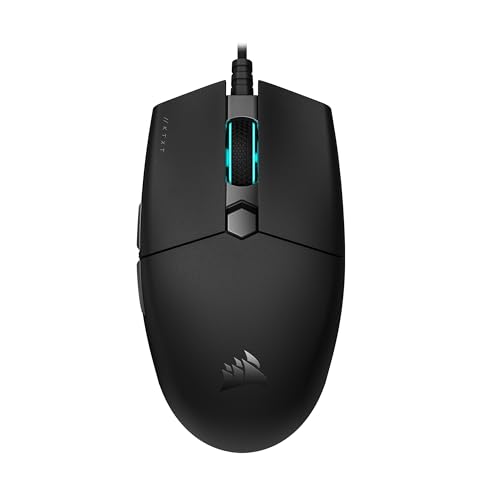
- Best for: Fingertip and claw players with smaller hands who prioritise fast flicks.
- Sensor: Custom PixArt optical sensor, up to 18,000 DPI
- Weight: 73g
- Shape: Compact symmetric shape
- Buttons: 6 programmable buttons with Quickstrike spring-loaded design
All 3 Picks at a Glance
| Product | Specs | Action |
|---|---|---|
| Razer DeathAdder Essential |
| Check price on Amazon |
| HyperX Pulsefire Haste |
| Check price on Amazon |
| Corsair Katar Pro XT |
| Check price on Amazon |
Picking an entry-level gaming mouse is really a decision about which flagship features you can live without. At this spec level you still get optical sensors with true one-to-one tracking, mechanical switches and proper gaming shapes, but makers trim somewhere: a heavier shell, a plain rubber cable, a single lighting zone, or software that does less. Knowing where the trims sit on each model matters more than chasing the biggest sensitivity number on the box.
This guide is for first-time PC builders finishing a setup, laptop players who want one dependable mouse for every game, and competitive players who need a backup that tracks honestly. The four mice below were chosen from their Amazon listing names and stated specifications: sensor type and range, listed weight, switch type, button count and connection method.
Top 3 picks at a glance
Quick Picks
As an Amazon Associate we earn from qualifying purchases.
| Product | Best for | Key spec from title |
|---|---|---|
| Razer DeathAdder Essential | Palm-grip players who want a proven ergonomic shape | 6,400 DPI optical sensor |
| SteelSeries Rival 3 | Claw and fingertip players who want crisp split triggers | 8,500 CPI TrueMove Core optical sensor |
| HyperX Pulsefire Haste | Players who want wireless freedom in a honeycomb shell | 61g with 2.4GHz wireless |
| Corsair Katar Pro XT | Small-handed fingertip players who aim with fast flicks | 18,000 DPI PixArt optical sensor |
How to Choose
Sensor class and tracking honesty
Look past the headline sensitivity figure and read the full sensor line on the listing. A named optical sensor, such as the TrueMove Core in the Rival 3 or the custom PixArt unit in the Katar Pro XT, signals a gaming-grade part with stated tracking speed and acceleration figures. Listings that hide behind a giant DPI number with no sensor name, no IPS figure and no mention of hardware acceleration are where corner-cutting usually starts, because printing a vague spec sheet asks nothing of the maker.
Weight and shell construction
Listed weight tells you how a mouse will feel during long tracking movements and repeated lifts. The Pulsefire Haste reaches 61g through a honeycomb shell, while the DeathAdder Essential keeps a solid ergonomic shell and lands far heavier, which palm-grip players often prefer for control. Check whether the stated weight includes the cable on wired models, and treat shell style as a genuine trade: perforations shed grams but let dust reach the internals, while solid shells stay cleaner and feel sturdier in the hand.
Switch type and button layout
Mechanical switches remain the standard at this level, and the better listings state a click lifespan, such as the 60 million click switches in the Rival 3, or a named design, such as Corsair’s spring-loaded Quickstrike buttons with zero gap before actuation. Count the programmable buttons and check their placement against your games: five or six well-placed inputs cover most shooters and action titles, while a crowded thumb cluster on a small shell invites accidental presses during fast, sweeping turns.
Connectivity and cable quality
Wired models remove batteries and pairing from the equation, but cable construction decides whether the wire fights you. A flexible paracord-style cable, like the one on the Katar Pro XT, drags far less than a stiff rubber cord such as the one listed for the Rival 3. The wireless entry here, the Pulsefire Haste, uses a 2.4GHz connection and a stated 100 hours of battery life, so check what the listing says about charging cables and receiver storage before assuming it suits a travel bag.
The 4 Best Options
Razer DeathAdder Essential
- Best for: Palm-grip players who want a familiar ergonomic shape and simple controls.
- Sensor: 6,400 DPI optical sensor
- Buttons: 5 programmable buttons
- Switches: Razer mechanical mouse switches
- Grip: Rubber side grips
Palm-grip players who want a familiar ergonomic shape and simple controls.
The wired-only design and solid shell make it the heaviest style of mouse in this group, so check the listed dimensions against your hand size.
The DeathAdder Essential suits right-handed palm and relaxed claw players who want a tall, supportive ergonomic shell from a long-running shape line. Its 6,400 DPI optical sensor covers the sensitivity range most players actually use, and the dedicated DPI buttons allow on-the-fly adjustment for switching between hip-fire movement and scoped shots. Rubber side grips help the hand stay planted during lifts, and the five programmable buttons keep the layout simple enough for players who dislike crowded thumb clusters.
SteelSeries Rival 3
The Rival 3 fits claw and fingertip players who want a lighter wired mouse with a carefully specified sensor. Its TrueMove Core optical sensor delivers true one-to-one tracking up to 8,500 CPI, with stated figures of 300 IPS and 35G acceleration, which is the kind of detail that separates a gaming sensor from a generic office part. Split trigger buttons sit over mechanical switches listed for 60 million clicks, and the three-zone Prism RGB lighting gives it more visual flexibility than most entry-level rivals.
Specs
- Sensor: SteelSeries TrueMove Core optical, 100–8,500 CPI in 100 CPI increments
- Tracking: 300 IPS, 35G acceleration, no hardware acceleration
- Polling rate: 1,000Hz / 1 ms
- Switches: Mechanical switches listed for 60 million clicks
- Buttons: 6 programmable buttons, split trigger design
- Weight: 77g without cable
- Lighting: Brilliant Prism RGB
- Shape: Ergonomic right-handed, claw or fingertip grip
Best for: Claw and fingertip players who read spec sheets closely and want stated tracking figures.
Watch out for: The rubber cable is stiffer than a paracord-style cord, so confirm your desk layout gives it room or plan on a bungee.
ASIN: B08176SM7C
HyperX Pulsefire Haste
- Best for: Players who want wireless movement and the lightest listed weight in this group.
- Connectivity: 2.4GHz wireless
- Weight: 61g
- Battery life: 100 hours, lithium polymer battery included
- Sensor: Up to 16,000 DPI
Players who want wireless movement and the lightest listed weight in this group.
The open honeycomb shell exposes the internals to dust and crumbs, so check the listing photos and plan to keep the desk surface clean.
The Pulsefire Haste is the wireless option in this group, built for players who want a clean desk and a very light mouse for fast, low-sensitivity aiming. The honeycomb hex shell brings the listed weight down to 61g, while the 2.4GHz connection keeps input responsive without a cable crossing the pad. A stated battery life of 100 hours means charging becomes an occasional task rather than a weekly one, and six programmable buttons cover the standard shooter layout with inputs to spare for push-to-talk or a melee key.
Corsair Katar Pro XT
- Best for: Fingertip and claw players with smaller hands who prioritise fast flicks.
- Sensor: Custom PixArt optical sensor, up to 18,000 DPI
- Weight: 73g
- Shape: Compact symmetric shape
- Buttons: 6 programmable buttons with Quickstrike spring-loaded design
Fingertip and claw players with smaller hands who prioritise fast flicks.
The compact shell offers limited palm support, so larger hands should compare the listed length with their current mouse before ordering.
The Katar Pro XT targets small to medium hands and fingertip or claw grips with a compact symmetric shell that weighs 73g. Its custom PixArt optical sensor reaches 18,000 DPI and adjusts in fine steps through Corsair’s software, giving precise control over sensitivity curves. Quickstrike buttons use a spring-loaded design with zero gap between the button and the switch, which shortens the path from intention to click, and the lightweight paracord cable keeps drag low during wide flicks across the pad.
Which One Fits Your Situation
You play palm grip and rest your whole hand on the mouse
Choose the DeathAdder Essential. Its tall right-handed ergonomic shell and rubber side grips are shaped for full-hand contact over long sessions, and the simpler five-button layout keeps everything reachable without stretching. The 6,400 DPI ceiling is plenty when your whole arm drives large, deliberate movements across the pad rather than tiny fingertip corrections.
You split time between shooters and desk work
The Rival 3 handles this mix well. Its 77g shell and claw-friendly shape suit quick target switching, while the six programmable buttons and onboard-friendly spec profile carry over to everyday tasks. The Prism RGB can be toned down through software, and the stated 60 million click switches suit a mouse that works as hard on weekdays as it does in matches.
You want a cable-free desk for a gaming laptop
Take the Pulsefire Haste. The 2.4GHz receiver plugs in once, the 100 hour stated battery life stretches between charges, and the 61g honeycomb shell travels light in a laptop bag. It also doubles as a strong pick for players who sweep a large pad, since there is no cord to snag at the edge of a long flick.
You have smaller hands and aim with your fingertips
The Katar Pro XT was shaped for exactly this. At 115.8mm long with a symmetric shell, it stays controllable when only your fingers steer, and the paracord cable plus 73g weight keep inertia low. Fine DPI adjustment in small steps helps fingertip players, who typically run higher sensitivity and notice coarse jumps more than palm players do.
Common Mistakes
- Choosing by the largest DPI figure alone, when sensor naming, tracking speed and acceleration figures reveal far more about real aiming quality.
- Ignoring listed weight and shell size, then discovering a compact fingertip mouse cramps a palm grip, or a tall ergonomic shell feels clumsy for claw play.
- Overlooking cable construction on wired models, where a stiff rubber cord can drag more than the mouse’s weight ever will.
- Assuming every wireless mouse includes Bluetooth, when many gaming models, including the one here, connect only through their 2.4GHz receiver.
- Skipping the software check: button remapping, DPI stages and lighting control all depend on whether the maker’s app runs on your platform.
Frequently Asked Questions
Is a 6,400 DPI sensor enough for competitive shooters?
Yes, for nearly every player. Most competitive sensitivity settings translate to effective ranges far below 6,400 DPI, because players pair modest in-game sensitivity with large mouse movements. Sensor quality, tracking consistency and shape fit influence your aim far more than a headline figure you will never select in a settings menu.
Does a honeycomb shell feel weaker than a solid one?
A honeycomb shell trades some rigidity for a much lower listed weight, and the Pulsefire Haste still uses a structured hex design to keep the body stiff under grip pressure. The practical downside is exposure: dust and debris can enter the openings, so the design suits tidy desks better than snack-heavy battlestations.
Wired or wireless at this spec level?
Wired models remove charging and pairing entirely, and modern paracord cables reduce drag to a minor concern. A 2.4GHz wireless model like the Pulsefire Haste removes the cord completely and lists 100 hours of battery life, which suits laptop setups and clean desks. Polling rate and sensor class matter more than the connection label itself.
How do I spot a mouse that cuts too many corners?
Check the listing for unnamed sensors, missing tracking speed figures, unstated switch lifespans and vague button counts. Strong entry-level listings name the sensor, state IPS and acceleration, give a click lifespan and publish an exact weight. When several of those details are absent, the maker trimmed the spec sheet because the hardware behind it was trimmed first.
Related guides
More from Amazon
Programs that pair well with the guide above. Offers and eligibility are set by Amazon and may change.
Free shipping on eligible items, Prime Video and more. Eligible new members can start with a free trial.
Start a Prime free trialAd-free music streaming. Eligible new subscribers can start with a free trial.
Try Music Unlimited freeA Prime membership for ages 18-24 with a trial period. Eligibility is set by Amazon.
See Prime for Young AdultsAudiobooks and podcasts to listen to on the go. Eligible new members can start with a free trial.
Try Audible freeAs an Amazon Associate we earn from qualifying purchases.