
Our Short List of 3
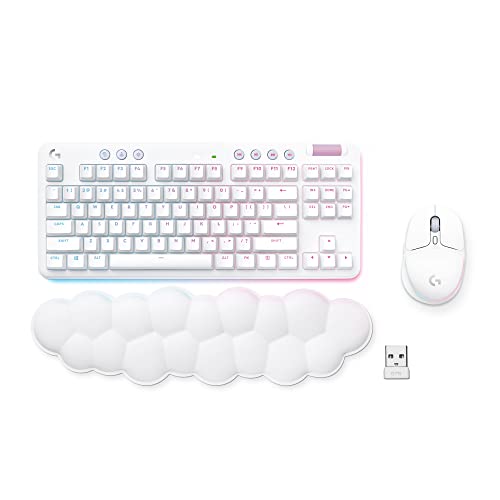
- Best for: Players with smaller hands who game for hours and want a matched, softer-looking setup.
- Keyboard: G715 tenkeyless mechanical, GX Red linear switches
- Keyboard connection: LIGHTSPEED wireless, Bluetooth, or wired
- Keyboard battery: up to 25 gaming hours with full lighting
- Per-key LIGHTSYNC RGB; cloud-shaped palm rest included
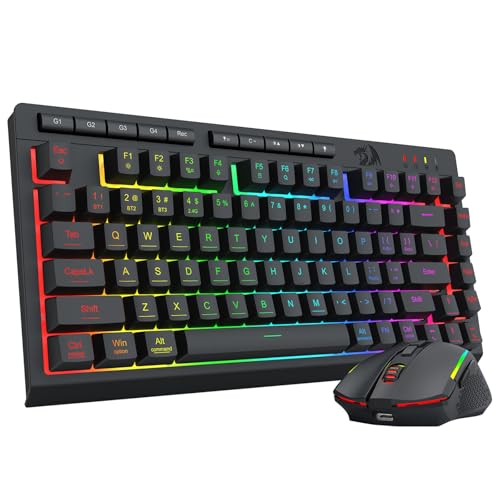
- Best for: Compact Mac desks and anyone switching one set between a Mac and other devices.
- Keyboard: 75% layout, membrane keys, RGB backlit
- Tri-mode connection: Bluetooth, 2.4 GHz wireless, USB-C wired
- Macro keys plus hotkeys and media keys; spill-resistant design
- Mouse: up to 12,800 DPI

- Best for: Mac players in shared rooms who want a quiet, colorful wireless set.
- Connection: 2.4GHz wireless through one shared USB receiver
- Receiver stores at the bottom of the mouse
- Mechanical-feel keys with RGB backlighting
- Rechargeable keyboard and mouse; cable is for charging only
All 4 Picks at a Glance
| Product | Specs | Action |
|---|---|---|
| Logitech G715 + G705 Combo |
| Check price on Amazon |
| Redragon S155-PRO Combo |
| Check price on Amazon |
| MageGee V560 Combo |
| Check price on Amazon |
 CHONCHOW G220 Combo |
| Check price on Amazon |
Gaming on a Mac narrows the combo market fast, and the real decision is not whether a set plugs in. Almost any USB or Bluetooth pairing connects, but far fewer still behave like gaming gear once macOS is in charge: the key legends or OS toggle need to suit a Mac, the customization software cannot be Windows-only, and the receiver has to fit ports your machine actually has. A combo can claim Mac support and still leave you with dead macro tools and a dongle you cannot use.
This guide is for MacBook, iMac and Mac mini players who want one matched set that games well and still types comfortably the next morning. It covers competitive players, compact-desk setups and first-time buyers alike. Every pick is a true keyboard-and-mouse combo whose Amazon listing states Mac or macOS support, and each spec below comes from that product’s own Amazon page.
Top 3 picks at a glance
Quick Picks
As an Amazon Associate we earn from qualifying purchases
| Product | Best for | Key spec from title |
|---|---|---|
| Keychron K2 HE + M3 Mouse Bundle | Rapid-trigger play on a Mac | Hall Effect switches; M3 mouse up to 12,000 DPI |
| Logitech G715 + G705 Combo | Smaller hands and long sessions | LIGHTSPEED and Bluetooth; GX Red linear switches |
| Redragon S155-PRO Combo | Compact desks and device hopping | Tri-mode connection; mouse up to 12,800 DPI |
| MageGee V560 Combo | Quiet rooms and shared spaces | 2.4GHz wireless; RGB mechanical-feel keys |
| CHONCHOW G220 Combo | A first set on a tight budget | 2,500 mAh keyboard battery; 3,600 DPI mouse |
How to Choose
Check What Mac Support Actually Covers
A listing that says a combo works with Mac can mean anything from full macOS legends and an OS toggle to basic typing with Windows shortcuts. Look for the details that decide daily use: Mac key legends or a hardware Mac/Windows switch, and software that runs on macOS. Keychron’s Launcher is a web app, so it works in a Mac browser, and Logitech’s G HUB has a macOS version. Many budget brands offer no Mac software at all, which is fine for plug-and-play play but limits macros and lighting control.
Match the Connection to Your Mac’s Ports
Most MacBooks ship with USB-C ports only, so a combo that connects solely through a USB-A 2.4GHz receiver needs an adapter or hub before it works at all. Bluetooth combos pair directly and keep ports free, which suits laptops and tidy desks. A shared receiver is the middle path: one dongle runs both devices, and on the Keychron bundle that link carries a 1000 Hz polling rate for gaming. Wired fallback modes also matter if you play competitively or hate charging mid-session.
Know Which Switch Type You Are Really Getting
The five sets here span three different key technologies, and the names are easy to confuse. Hall Effect magnetic switches, in the Keychron, allow adjustable actuation and rapid trigger for fast repeated inputs. True mechanical switches, in the Logitech, give a defined key feel and replaceable parts. Membrane boards described as mechanical feel, which covers the Redragon, MageGee and CHONCHOW, type softer and quieter but cannot match that response. None of these is automatically best; the right pick depends on your games and your noise tolerance.
Judge the Mouse by Sensor, Weight and Battery
Headline DPI is the least useful number on a combo listing, because nobody plays anywhere near a 12,000 DPI ceiling. What changes your aim is the sensor model, the mouse’s weight and shape, and how many buttons you can program. Battery claims need context too: Logitech rates its hours with full lighting on, while other brands quote figures with lights off, so compare like with like. A lighter mouse such as the 79 g Keychron M3 suits fast flicks, while a contoured 85 g shape favors comfort.
The 5 Best Options
Keychron K2 HE + M3 Mouse Bundle
Mac gamers who play ranked shooters rarely get a combo designed for them, and this bundle is the exception. The K2 HE keyboard uses Gateron double-rail Hall Effect magnetic switches with rapid trigger, so strafing and counter-strafing inputs register and reset with key travel instead of a fixed point. Actuation, macros and mouse settings are handled in the Keychron Launcher web app, which runs in a browser on macOS rather than demanding Windows software. The matching M3 mouse is light, ambidextrous in shape, and stores five on-board profiles you can carry between machines.
Specs
- Keyboard: 75% layout with Gateron double-rail Hall Effect magnetic switches
- Rapid trigger and adjustable actuation via the Keychron Launcher web app
- Connection: 2.4 GHz at 1000 Hz polling, Bluetooth 5.2, or USB wired
- One 2-in-1 receiver pairs both the keyboard and the mouse
- Mouse: PixArt 3311 sensor, up to 12,000 DPI
- Mouse weight: 79 g, with five on-board memory profiles
- RGB backlighting; listed for Mac, Windows and Linux
Best for: Competitive Mac players who want rapid trigger and full software control.
Watch out for: Keychron also sells the K2 HE keyboard alone under a similar title, so confirm the listing shows the M3 mouse and 2-in-1 receiver in the box before ordering.
ASIN: B0FL7B71BZ
Logitech G715 + G705 Combo
- Best for: Players with smaller hands who game for hours and want a matched, softer-looking setup.
- Keyboard: G715 tenkeyless mechanical, GX Red linear switches
- Keyboard connection: LIGHTSPEED wireless, Bluetooth, or wired
- Keyboard battery: up to 25 gaming hours with full lighting
- Per-key LIGHTSYNC RGB; cloud-shaped palm rest included
Players with smaller hands who game for hours and want a matched, softer-looking setup.
The battery figures assume full lighting, and the bundle is sold in the White Mist colorway, so check the listing’s color options if your desk theme matters.
Logitech’s Aurora Collection pairing is the comfort pick, built around smaller hands and long, relaxed sessions rather than tournament specs. The G715 is a tenkeyless mechanical board with GX Red linear switches, per-key LIGHTSYNC RGB and a cloud-shaped palm rest in the box. Its G705 partner is a compact, contoured mouse with a thumb rest that weighs just 85 g. Both devices speak LIGHTSPEED and Bluetooth, can share a single receiver, and are customized through G HUB, which supports macOS for lighting, macros and button assignments.
Redragon S155-PRO Combo
- Best for: Compact Mac desks and anyone switching one set between a Mac and other devices.
- Keyboard: 75% layout, membrane keys, RGB backlit
- Tri-mode connection: Bluetooth, 2.4 GHz wireless, USB-C wired
- Macro keys plus hotkeys and media keys; spill-resistant design
- Mouse: up to 12,800 DPI
Compact Mac desks and anyone switching one set between a Mac and other devices.
The keys are membrane, not mechanical, and you should confirm on Redragon’s site that the software download covers macOS before counting on programmed macros.
Desk space decides a lot of Mac setups, especially Mac mini and laptop stations, and this 75% Redragon set is built for tight footprints. The keyboard is a quiet membrane board with RGB backlighting, macro keys and media hotkeys, and it connects three ways: Bluetooth for a cable-free desk, 2.4 GHz for play, or USB-C wired when the battery runs low. The matching mouse reaches 12,800 DPI, which is more ceiling than anyone needs, and the whole combo weighs little enough to move between rooms. Redragon lists the set for both Windows and Mac.
MageGee V560 Combo
- Best for: Mac players in shared rooms who want a quiet, colorful wireless set.
- Connection: 2.4GHz wireless through one shared USB receiver
- Receiver stores at the bottom of the mouse
- Mechanical-feel keys with RGB backlighting
- Rechargeable keyboard and mouse; cable is for charging only
Mac players in shared rooms who want a quiet, colorful wireless set.
There is no Bluetooth mode, so a USB-C-only MacBook needs an adapter for the receiver, and the listing’s battery field mentions AA, so confirm what powers the mouse in the box.
Shared bedrooms, dorms and late-night sessions all punish loud keyboards, and the V560 leans into quiet. Its mechanical-feel keys are tuned to stay soft and muted, the backlighting is full RGB, and the blue, white and purple colorway gives a Mac desk some personality that most black gaming sets lack. Both devices are rechargeable and run from a single 2.4GHz receiver that stores underneath the mouse, so setup is one plug and done. MageGee markets the set directly at Mac and laptop gamers, and it suits casual and mid-core play rather than ranked ladders.
CHONCHOW G220 Combo
- Best for: Budget-conscious Mac owners buying their first gaming combo.
- Connection: 2.4GHz wireless, one shared USB receiver, up to 10 m range
- Keyboard battery: 2,500 mAh per the listing title; mouse battery 500 mAh
- Mouse: up to 3,600 DPI with seven buttons
- LED backlighting with FN-key mode and brightness controls
Budget-conscious Mac owners buying their first gaming combo.
One answer elsewhere on the same listing quotes a 2,000 mAh keyboard battery, so treat the capacity as approximate, and expect Windows-first legends on the keys.
A first gaming set for a Mac does not need tournament hardware, and the G220 covers the basics with room to spare. The full-size keyboard brings LED backlighting with FN-key brightness and mode controls, anti-ghosting for busy inputs, and a 2,500 mAh battery that the brand says runs about a week per charge with the lights managed. The mouse offers seven buttons and up to 3,600 DPI, which is plenty for casual shooters and MOBAs. Both devices share one receiver and charge over USB-C, and CHONCHOW’s listing states the combo works with Mac.
Which One Fits Your Situation
You Play Ranked Shooters on a MacBook
Take the Keychron bundle. Rapid trigger and adjustable actuation are features competitive players actually feel in duels, the 2.4 GHz mode polls at 1000 Hz, and the Launcher runs in your browser, so nothing about the setup depends on Windows. The 79 g mouse also suits the low-sensitivity, big-swipe style most ranked players use.
Your Desk Is Small and the Set Serves Two Machines
Choose the Redragon S155-PRO. The 75% board leaves room for a wide mouse arc, Bluetooth pairing makes hopping between a Mac and a second device painless, and the USB-C wired mode keeps you playing while it charges. It is the easiest set here to treat as an everyday desk tool that also games.
You Have Smaller Hands and Play for Hours
The Logitech combo fits this brief best. The G705 was shaped for smaller hands, with a sculpted thumb rest and an 85 g body that stays easy to control late in a session, while the G715’s included palm rest supports your wrists. LIGHTSYNC lighting across both pieces keeps the setup looking unified.
You Are Buying a First Set and Watching Spending
Start with the CHONCHOW G220 if the budget is firm, since it covers backlighting, a week-scale battery and a seven-button mouse in one box. If your roommate’s sleep matters more than the last bit of savings, step sideways to the MageGee V560, whose quieter keys are kinder in shared spaces.
Common Mistakes
- Assuming a Mac-compatible label means the brand’s software, macros and lighting controls all work on macOS too.
- Buying a dongle-only combo for a USB-C-only MacBook without budgeting for an adapter or hub.
- Reading mechanical feel as mechanical switches, then being surprised by a softer membrane key press.
- Comparing combos by headline DPI instead of sensor model, mouse weight, shape and programmable buttons.
- Treating battery-hour claims as equal when some brands rate runtime with lighting on and others with it off.
Frequently Asked Questions
Do gaming keyboard and mouse combos really work on Mac?
Yes, provided the listing states Mac or macOS support, as all five sets here do. Basic typing and mouse input work over Bluetooth or a receiver on any modern Mac. The parts that vary are the extras: Mac key legends, an OS toggle, and whether the brand’s customization software runs on macOS or only on Windows.
Is Bluetooth or 2.4 GHz better for gaming on a Mac?
For play, 2.4 GHz through a receiver is the safer choice because it polls faster and feels more consistent; the Keychron bundle reaches 1000 Hz that way. Bluetooth is more convenient on a laptop, needs no adapter on USB-C MacBooks, and is perfectly fine for casual games, strategy titles and everyday desktop use between sessions.
Will Windows key legends slow me down on macOS?
Only briefly. The keys themselves work, but Command and Option sit where Windows and Alt labels sit, which can trip muscle memory in shortcuts. Sets with printed Mac legends or an OS mode switch, like the Keychron and Logitech here, remove that friction. Remapping modifier keys in macOS settings also fixes most of it for free.
Can I program macros and lighting on a Mac?
It depends on the brand’s tools. Keychron’s Launcher is a web app, so actuation, macros and DPI changes work in a Mac browser, and Logitech’s G HUB has a macOS version. Budget sets such as the MageGee and CHONCHOW rely on onboard controls instead, so expect backlight keys and DPI buttons rather than saved software profiles.
Related guides
More from Amazon
Programs that pair well with the guide above. Offers and eligibility are set by Amazon and may change.
Free shipping on eligible items, Prime Video and more. Eligible new members can start with a free trial.
Start a Prime free trialAd-free music streaming. Eligible new subscribers can start with a free trial.
Try Music Unlimited freeA Prime membership for ages 18-24 with a trial period. Eligibility is set by Amazon.
See Prime for Young AdultsAudiobooks and podcasts to listen to on the go. Eligible new members can start with a free trial.
Try Audible freeAs an Amazon Associate we earn from qualifying purchases.









