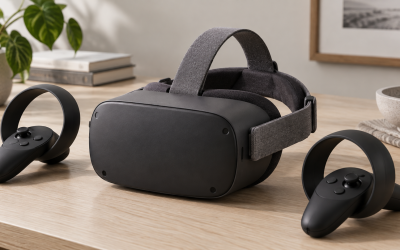
Two of the least understood but most important VR specs are IPD adjustment and lens type. Get them wrong and even a high-resolution headset looks blurry and causes eye strain; get them right and cheaper hardware can look wonderful. This explainer demystifies interpupillary distance and the common lens designs, so new buyers know what to check before spending money and how to set up a headset for a crisp, comfortable image.
What IPD means and why it matters
IPD, or interpupillary distance, is simply the gap between the centers of your two pupils, measured in millimeters. VR lenses have a sweet spot, and your eyes need to line up with it. If the lens spacing does not match your IPD, the image goes soft, depth feels off, and long sessions bring headaches. Adult IPD typically ranges from about 58 to 72 mm, with most people near the middle.
| IPD adjustment type | How it works | Best for |
|---|---|---|
| Continuous slider | Smoothly moves lenses to any point in range | Anyone, especially edge-of-range eyes |
| Stepped presets | Two or three fixed positions | Users near common IPD values |
| Software-only | Shifts image digitally, lenses fixed | Budget headsets, less ideal for outliers |
If your IPD sits near the extremes, a headset with a continuous physical slider is worth prioritizing, because presets and software adjustment cannot fully compensate.
Lens types you will encounter
Fresnel lenses
Fresnel lenses use concentric ridges to stay thin and light. They were the standard for years and remain common on value headsets. They work well but can produce glare or god rays around bright objects on dark backgrounds, and clarity falls off toward the edges, so you turn your head rather than glancing sideways.
Pancake lenses
Pancake lenses fold the light path through multiple elements, allowing a much slimmer, lighter headset with sharper, more even clarity from center to edge and far less glare. The trade-off is that they are less efficient with light, so the displays must work a little harder. Pancake optics are increasingly the mark of a premium modern headset.
Getting your setup right
After unboxing, measure or estimate your IPD, set the headset’s adjustment to match, then fine-tune by nudging it until text looks sharpest. The headset should sit so your eyes align with the lens centers, sometimes called the eye box. A poor fit, not a poor panel, is the most common reason new users think VR looks fuzzy.
Signs your setup is wrong, and how to fix them
Many new users blame the headset when the real culprit is a misconfigured fit, so it helps to recognize the symptoms. Persistent blur that no focusing seems to cure, eye strain or headaches after short sessions, and a feeling that only a small central patch looks sharp are classic signs your IPD is off or the headset is sitting in the wrong position. The fix is methodical: set the IPD adjustment to your measured value, then nudge it slightly in each direction while looking at fine text until it snaps into its sharpest, most comfortable state. Next, adjust the straps so the headset sits level with your eyes centered in the lens sweet spot, neither too high nor too low. Face cushion thickness also shifts your eyes closer to or farther from the lenses, changing both sharpness and effective field of view, so a thinner or thicker pad can transform the image. Spend five minutes on this the first time and revisit it whenever someone else uses the headset. Getting the fit right routinely does more for perceived clarity than any single spec on the box.
FAQ
How do I measure my IPD at home?
Stand in front of a mirror with a millimeter ruler against your brow, close one eye, and align zero with one pupil’s center, then read the number at the other pupil. Repeat to confirm; most adults land between 58 and 72 mm.
Are pancake lenses always better than Fresnel?
They are generally clearer edge to edge with less glare, which is why premium headsets favor them. Fresnel lenses still perform well and keep costs down, so they remain a sensible choice on value models.
Bottom line
IPD and lens type quietly decide whether VR looks razor sharp or frustratingly soft. Match the headset’s IPD range to your eyes, prefer a continuous slider if you are near the edges of the 58 to 72 mm range, and understand that pancake lenses offer cleaner clarity than Fresnel at a higher price. Set these up correctly and even modest hardware can look stunning.