If you are buying your first headset, the biggest fork in the road is standalone versus PCVR. Standalone headsets are self-contained computers you strap to your face, while PCVR relies on a gaming PC doing the heavy lifting. Both play great games, but they suit very different budgets, spaces, and expectations. This guide compares them honestly so a newcomer can pick the right entry point without overspending or ending up frustrated.
As an Amazon Associate we earn from qualifying purchases at no extra cost to you.


Our Top Picks


Top 3 picks at a glance
The core difference
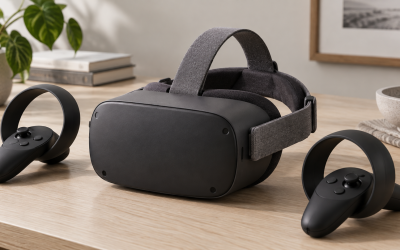
A standalone headset runs games on its own built-in mobile chip, similar to what powers a phone or tablet. You put it on and play with no cables and no computer. PCVR headsets, by contrast, are display and tracking devices that stream visuals from a separate gaming PC, either over a cable or wirelessly. The PC’s graphics card can be far more powerful than any mobile chip, so PCVR delivers sharper, more detailed worlds, at the cost of needing that expensive computer.
Head-to-head for beginners
| Factor | Standalone VR | PCVR |
|---|---|---|
| Upfront cost | Headset only, roughly $250 to $550 | Headset plus a capable PC, often $1,000+ total |
| Setup | Minutes, no wires | More involved, drivers and streaming |
| Graphics ceiling | Good, mobile-class | Excellent, limited by your GPU |
| Portability | Take it anywhere | Tied to the PC’s location |
| Game library | Large built-in store | Standalone library plus full PC catalog |
Why most beginners start standalone
For a first headset, standalone is usually the smart move. The all-in price is a fraction of a PCVR setup, there are no cables to trip over, and you can be playing minutes after opening the box. The built-in libraries are big and beginner-friendly, and the wireless freedom makes room-scale games genuinely fun. Crucially, many standalone headsets can also connect to a PC later, so you are not locked out of PCVR down the line.
When PCVR makes sense first
If you already own a gaming PC with a modern mid-range or better graphics card, roughly the class used for smooth 1440p gaming, PCVR unlocks visually stunning sim and adventure titles that standalone hardware cannot match. Flight and racing sim fans in particular gravitate to PCVR for the extra clarity in cockpit gauges and distant scenery. It is the enthusiast path, and it rewards people who value fidelity over convenience.
The hybrid reality
Here is the reassuring part: the two categories overlap. A capable standalone headset can double as a PCVR display when tethered or streamed over a strong Wi-Fi network. That means a beginner can buy standalone today, enjoy it wire-free, and add PCVR later if they build or buy a gaming PC. You rarely have to commit to one world forever.
Total cost of ownership over time
Beginners often compare only the sticker prices, but the fuller picture is total cost over the first couple of years. A standalone headset is largely a one-time purchase, with optional extras like a comfort strap, a larger battery, or prescription lens inserts adding modest amounts later. PCVR carries the ongoing reality of a gaming PC that you may want to upgrade as games grow more demanding, plus accessories like a quality link cable or a dedicated router for wireless streaming. On the other hand, if you already game on PC for other reasons, much of that cost is not attributable to VR at all. Game libraries also factor in: standalone stores are self-contained and convenient, while PCVR opens the door to a vast catalog that frequently goes on deep discount. For a newcomer trying to keep the entry cost low and the setup simple, standalone almost always wins the value calculation. For someone who already owns capable hardware and wants the best visuals, PCVR can be surprisingly economical because the expensive part is already paid for.
FAQ
Can a standalone headset play PC VR games?
Many can, by connecting to a gaming PC over a link cable or wireless streaming. You get the standalone library on its own plus access to PC titles when tethered, which makes standalone a flexible starting point.
Do I need a powerful PC for PCVR?
Yes. PCVR leans on your graphics card, and a modern mid-range or better GPU is the practical minimum for smooth, comfortable play. Underpowered PCs cause stutter that can trigger motion sickness.
Bottom line
For most first-time buyers, a standalone headset is the better entry point: lower total cost, no wires, quick setup, and the option to add PCVR later. Choose PCVR from the start only if you already own a capable gaming PC and crave the highest visual fidelity, especially for sims. Either way, you are not painting yourself into a corner, because the best standalone headsets bridge both worlds.